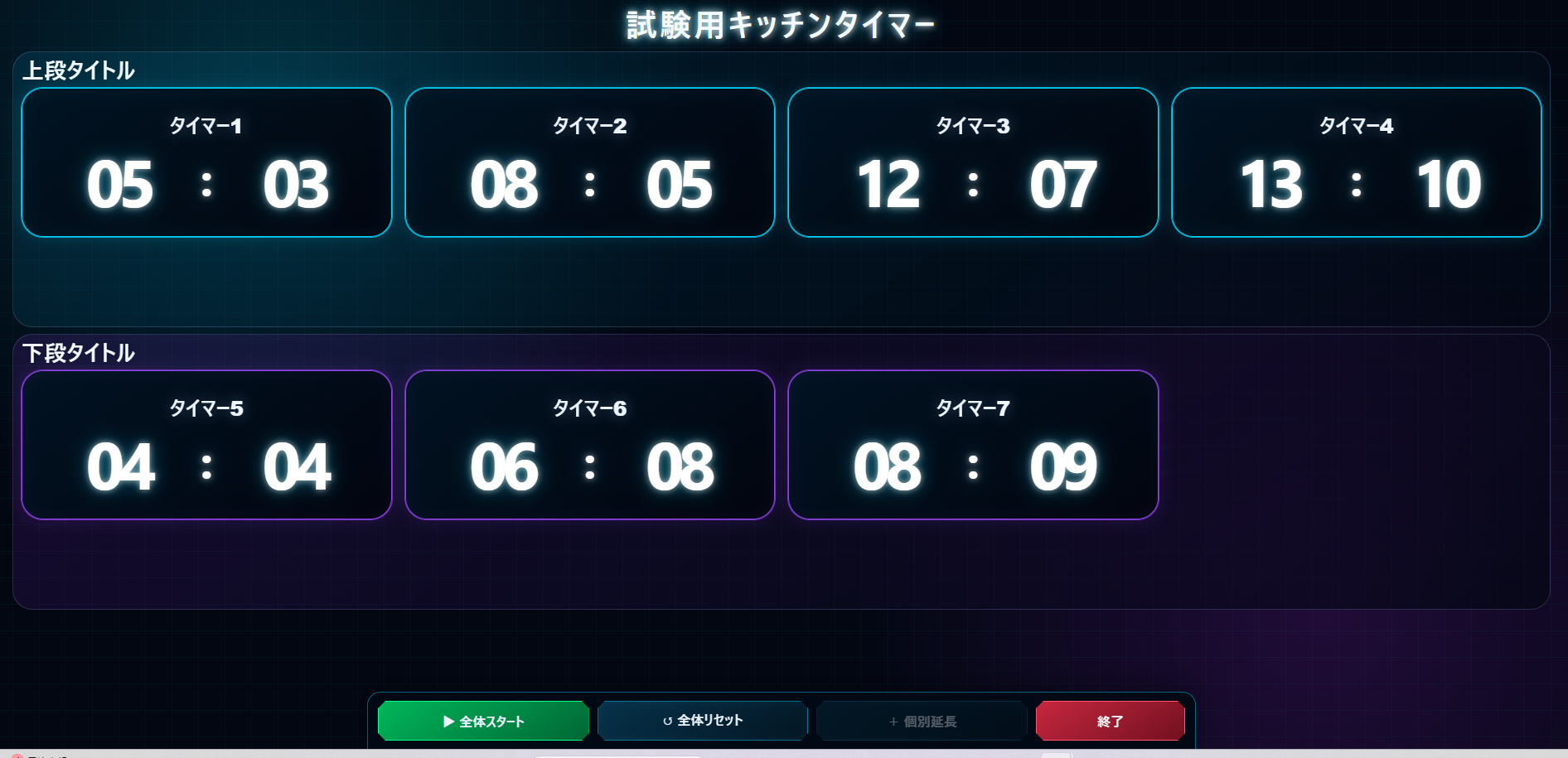
- このシリーズについて
- 今回追加する機能
- AIとの分担制作
- 第9回 Ver.0.9の完成ソースコード
- 設定内容と実行状態を分けて保存する
- 状態が変わるたびに自動保存する
- 残り時間ではなく「終了予定時刻」を基準にする
- 現在日時と最終終了予定日時を右上へ表示
- 復元データが見つかったら選択画面を表示
- 試験終了後の保存猶予時間を設定できるようにした
- 保存期限を過ぎたデータは自動で破棄する
- 設定を完全に消したいときは「設定を初期化」
- 保存データへバージョン番号を持たせる
- 同じタイマーを複数タブで開かない
- ChromeとEdgeで復元テスト
- 実際のトラブル時はどうする?
- 今回新しく使ったJavaScriptの仕組み
- 第9回でできるようになったこと
- 完成版を確認する
- 次回はVer.1.0へ
このシリーズについて
第8回では、タイマーの外観を7種類のテーマから切り替えられるようにしました。見た目はかなり完成形に近づきましたが、実際の試験で使うことを考えると、まだ一つ大きな不安が残っています。
もし試験中にブラウザが落ちたら……タイマーはどうなるのでしょうか?
今回は、ブラウザを閉じたりPCを再起動したりしても、同じPC・同じブラウザなら試験の続きを復元できるようにします。あわせて、設定内容の自動保存、現在時刻と最終終了予定時刻の表示、保存猶予時間、設定の初期化も追加します。
第9回の完成版は Ver.0.9 としました。第9回=Ver.0.9、第10回=Ver.1.0というように、記事の回数とバージョンを対応させて管理していきます。
今回追加する機能
- 設定画面の内容を
localStorageへ自動保存する - 試験開始後の実行状態を、状態が変化するたびに保存する
- ブラウザを開き直したときに「復元する/破棄して新しく始める」を選べるようにする
- 右上へ現在日時と、現在存在する全タイマーの最終終了予定日時を表示する
- 個別延長の追加・減算・削除時に最終終了予定時刻を再計算する
- 試験終了後の保存猶予時間を0~120分で設定できるようにする。初期値は15分
- 通常のリセットや実行データの破棄では設定内容を残す
- 完全に作り直したい場合だけ「設定を初期化」で設定内容も初期状態へ戻す
- 保存データへVer.0.9のバージョン情報を持たせる
今回は新しい見た目を作る回ではなく、実運用で困らないための「裏側」をかなり強化する回です。
AIとの分担制作
今回も、必要な機能、保存するタイミング、復元時の動作、保存期限などの仕様は私が考え、HTML・CSS・JavaScriptの実装はAIのノンに担当してもらいました。出力されたものを実際にChromeとEdgeで動かし、ブラウザ終了やPC再起動まで含めて確認しています。
第9回 Ver.0.9の完成ソースコード
まず、今回完成したソースコードを掲載します。長くなったため、コードは「詳細」ブロックの中へ折りたたんでいます。必要なファイルだけ開いて確認してください。
style.css は第8回から変更していません。今回は第8回の style.css と assets フォルダをそのまま使用し、index.html と script.js を更新しています。
index.html のソースコードを表示
<!DOCTYPE html>
<html lang="ja">
<head>
  <meta charset="UTF-8">
  <meta name="viewport" content="width=device-width, initial-scale=1.0">
  <title>試験用キッチンタイマー Ver.0.9</title>
  <link rel="stylesheet" href="style.css">
  <style>
    .version-badge {
      display:inline-block; margin-top:8px; padding:3px 9px; border:1px solid rgba(155,198,255,.35);
      border-radius:999px; color:#bcd3f4; font-size:.78rem; font-weight:700; background:rgba(5,12,23,.32);
    }
    .save-grace-setting input {
      max-width: 180px;
    }
    .save-grace-help {
      margin: 6px 0 0;
      opacity: .78;
      font-size: .88rem;
      line-height: 1.6;
    }
    .setup-storage-note {
      margin:10px 0 0; color:#9fb2ce; font-size:.82rem; line-height:1.55;
    }
    .board-header-row {
      display:grid; grid-template-columns:minmax(0,1fr) auto; gap:18px; align-items:center;
    }
    .board-header-title { text-align:left; }
    .board-clock-panel {
      min-width:min(430px,42vw); padding:8px 12px; border:1px solid rgba(151,190,245,.28); border-radius:14px;
      background:rgba(5,12,23,.46); text-align:left; box-shadow:inset 0 0 18px rgba(100,150,230,.05);
    }
    .board-clock-line {
      display:grid; grid-template-columns:7.6em minmax(0,1fr); gap:8px; align-items:baseline; margin:0;
      color:#dbe8fb; font-size:clamp(.72rem,1vw,.95rem); line-height:1.45;
    }
    .board-clock-line + .board-clock-line { margin-top:2px; }
    .board-clock-label { color:#9fb2ce; font-weight:700; }
    .board-clock-value { color:#fff; font-family:Consolas,"Roboto Mono","Courier New",monospace; font-weight:700; white-space:nowrap; }
    .board-version { margin:4px 0 0; color:#8ea5c6; font-size:.7rem; text-align:right; }
    .restore-dialog {
      width:min(620px,calc(100% - 28px)); border:1px solid rgba(148,187,245,.5); border-radius:20px;
      background:linear-gradient(145deg,#15233a,#070d18); color:#f7f9ff; box-shadow:0 20px 60px rgba(0,0,0,.62);
    }
    .restore-dialog::backdrop { background:rgba(0,0,0,.72); backdrop-filter:blur(3px); }
    .restore-content { display:grid; gap:14px; padding:6px; }
    .restore-content h2 { margin:0; font-size:1.45rem; }
    .restore-content p { margin:0; line-height:1.7; color:#dbe8fb; }
    .restore-meta { padding:10px 12px; border:1px solid rgba(151,190,245,.24); border-radius:12px; background:rgba(5,12,23,.4); font-size:.88rem; }
    .restore-actions { display:grid; grid-template-columns:1fr 1fr; gap:10px; margin-top:4px; }
    .discard-button { border-color:rgba(255,144,144,.58); background:rgba(92,28,28,.72); }
    @media (max-width:900px) {
      .board-header-row { grid-template-columns:1fr; gap:8px; }
      .board-header-title { text-align:center; }
      .board-clock-panel { width:100%; min-width:0; }
      .board-version { text-align:left; }
    }
    @media (max-width:560px) {
      .board-clock-line { grid-template-columns:1fr; gap:0; }
      .restore-actions { grid-template-columns:1fr; }
    }
  </style>
</head>
<body>
  <main class="app-shell">
    <section id="setup-screen" class="screen setup-screen" aria-labelledby="setup-title">
      <header class="page-header">
        <h1 id="setup-title">試験用キッチンタイマー</h1>
        <p>上段・下段のタイマーを設定してください</p>
        <span class="version-badge">Ver.0.9</span>
      </header>

      <form id="setup-form" class="setup-form" novalidate>
        <section class="setup-group board-title-setup" aria-labelledby="board-title-setup-heading">
          <h2 id="board-title-setup-heading" class="setup-subheading">画面タイトル</h2>
          <div class="field-block">
            <label for="board-title-input">一番上に表示するタイトル</label>
            <input id="board-title-input" name="boardTitle" type="text" value="試験用キッチンタイマー" maxlength="40">
          </div>
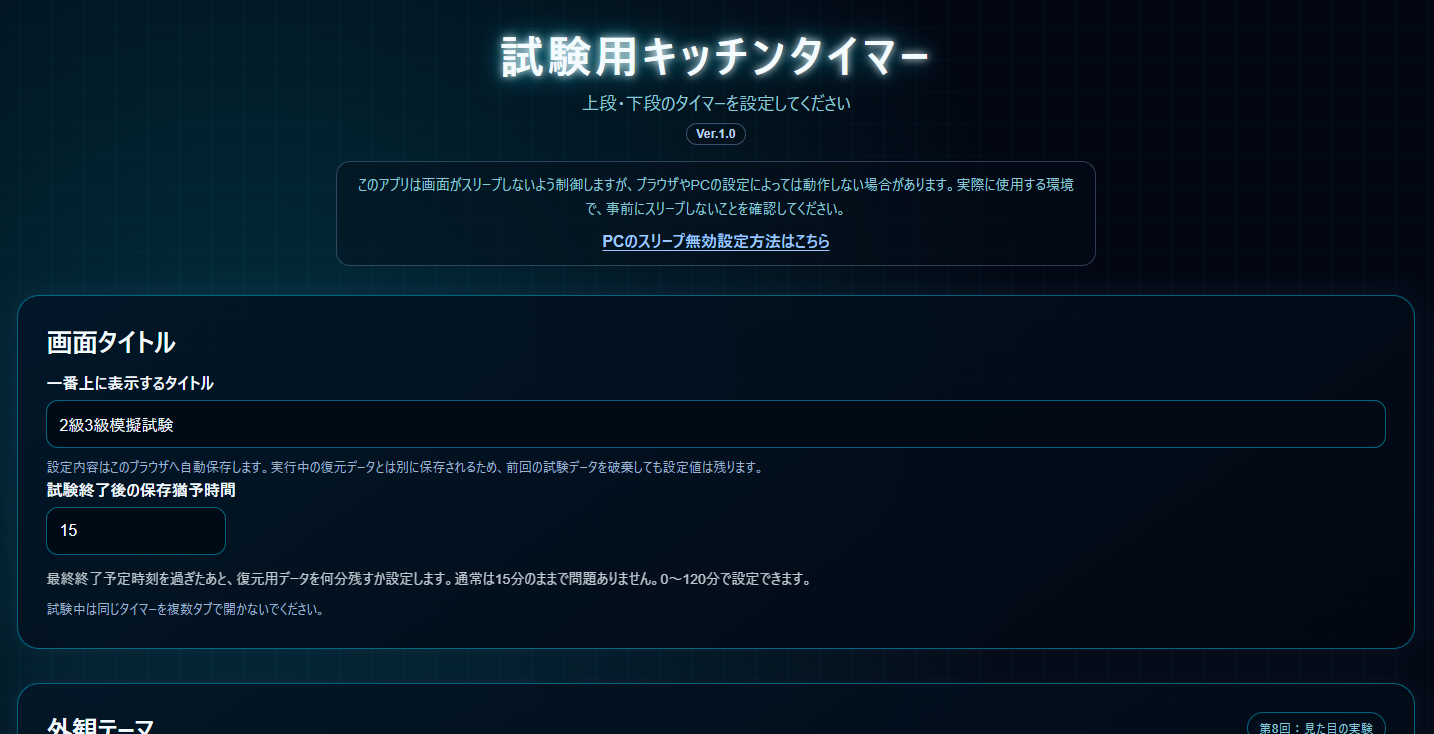
          <p class="setup-storage-note">設定内容はこのブラウザへ自動保存します。実行中の復元データとは別に保存されるため、前回の試験データを破棄しても設定値は残ります。</p>

          <div class="field-block save-grace-setting">
            <label for="save-grace-minutes">試験終了後の保存猶予時間</label>
            <input id="save-grace-minutes" name="saveGraceMinutes" type="number" min="0" max="120" step="1" value="15" inputmode="numeric">
            <p class="save-grace-help">最終終了予定時刻を過ぎたあと、復元用データを何分残すか設定します。通常は15分のままで問題ありません。0~120分で設定できます。</p>
          </div>

          <p class="setup-storage-note">試験中は同じタイマーを複数タブで開かないでください。</p>
        </section>

        <section class="setup-group theme-setup" aria-labelledby="theme-setup-heading">
          <div class="theme-setup-heading-row">
            <div>
              <h2 id="theme-setup-heading" class="setup-subheading">外観テーマ</h2>
              <p class="theme-help">テーマを選ぶと、設定画面を含む画面全体がその場で切り替わります。</p>
            </div>
            <p class="theme-experiment-note">第8回:見た目の実験</p>
          </div>
          <fieldset class="theme-fieldset">
            <legend class="visually-hidden">外観テーマを選択</legend>
            <label class="theme-option theme-option-blue"><input type="radio" name="app-theme" value="blue" checked><span class="theme-swatch" aria-hidden="true"></span><span class="theme-option-text"><strong>ブルー・ガラス</strong><small>現在の標準テーマ</small></span></label>
            <label class="theme-option theme-option-industrial"><input type="radio" name="app-theme" value="industrial"><span class="theme-swatch" aria-hidden="true"></span><span class="theme-option-text"><strong>ブラック・インダストリアル</strong><small>機械パネル風</small></span></label>
            <label class="theme-option theme-option-minimal"><input type="radio" name="app-theme" value="minimal"><span class="theme-swatch" aria-hidden="true"></span><span class="theme-option-text"><strong>ミニマル</strong><small>落ち着いた実用重視</small></span></label>
            <label class="theme-option theme-option-cyber"><input type="radio" name="app-theme" value="cyber"><span class="theme-swatch" aria-hidden="true"></span><span class="theme-option-text"><strong>サイバーパンク</strong><small>ネオンHUD風</small></span></label>
            <label class="theme-option theme-option-steam-css"><input type="radio" name="app-theme" value="steam-css"><span class="theme-swatch" aria-hidden="true"></span><span class="theme-option-text"><strong>スチームパンク A</strong><small>純CSSのみ</small></span></label>
            <label class="theme-option theme-option-steam-svg"><input type="radio" name="app-theme" value="steam-svg"><span class="theme-swatch" aria-hidden="true"></span><span class="theme-option-text"><strong>スチームパンク B</strong><small>CSS+SVG装飾</small></span></label>
            <label class="theme-option theme-option-steam-image"><input type="radio" name="app-theme" value="steam-image"><span class="theme-swatch" aria-hidden="true"></span><span class="theme-option-text"><strong>スチームパンク C</strong><small>CSS+画像装飾</small></span></label>
          </fieldset>
        </section>

        <section class="setup-group" aria-labelledby="upper-setup-heading">
          <div class="setup-group-header">
            <div class="field-block title-field-block"><label for="upper-title">上段タイトル</label><input id="upper-title" name="upperTitle" type="text" value="上段タイトル" maxlength="30"></div>
            <div class="field-block count-field-block">
              <label for="upper-count">タイマー数</label>
              <select id="upper-count" name="upperCount"><option value="1">1個</option><option value="2">2個</option><option value="3">3個</option><option value="4" selected>4個</option></select>
              <p class="count-note">上段に、一番タイマー数の多い段を設定してください。</p>
            </div>
          </div>
          <fieldset class="time-mode-fieldset"><legend>時間の表示方法</legend><label class="radio-option"><input type="radio" name="upper-time-mode" value="cumulative" checked> 累積時間</label><label class="radio-option"><input type="radio" name="upper-time-mode" value="individual"> 個別時間</label></fieldset>
          <h2 id="upper-setup-heading" class="visually-hidden">上段タイマー設定</h2>
          <div id="upper-timer-settings" class="timer-settings-list"></div>
        </section>

        <section class="setup-group" aria-labelledby="lower-setup-heading">
          <div class="setup-group-header">
            <div class="field-block title-field-block"><label for="lower-title">下段タイトル</label><input id="lower-title" name="lowerTitle" type="text" value="下段タイトル" maxlength="30"></div>
            <div class="field-block count-field-block">
              <label for="lower-count">タイマー数</label>
              <select id="lower-count" name="lowerCount"><option value="0">0個</option><option value="1">1個</option><option value="2">2個</option><option value="3" selected>3個</option><option value="4">4個</option></select>
              <p class="count-note">下段は、上段のタイマー数以下から選択できます。</p>
            </div>
          </div>
          <fieldset class="time-mode-fieldset"><legend>時間の表示方法</legend><label class="radio-option"><input type="radio" name="lower-time-mode" value="cumulative" checked> 累積時間</label><label class="radio-option"><input type="radio" name="lower-time-mode" value="individual"> 個別時間</label></fieldset>
          <h2 id="lower-setup-heading" class="visually-hidden">下段タイマー設定</h2>
          <div id="lower-timer-settings" class="timer-settings-list"></div>
        </section>

        <p id="setup-error" class="setup-error" aria-live="polite"></p>
        <div class="setup-actions"><button class="secondary-button" id="reset-settings-button" type="button">設定を初期化</button><button class="primary-button create-board-button" type="submit">タイマーボードを作成</button></div>
      </form>
    </section>

    <section id="board-screen" class="screen board-screen" aria-labelledby="board-title" hidden>
      <header class="page-header board-header">
        <div class="board-header-row">
          <div class="board-header-title"><h1 id="board-title">試験用キッチンタイマー</h1></div>
          <div class="board-clock-panel" aria-label="時刻情報">
            <p class="board-clock-line"><span class="board-clock-label">現在時刻</span><time id="current-datetime" class="board-clock-value">----</time></p>
            <p class="board-clock-line"><span class="board-clock-label">終了予定時刻</span><time id="final-end-datetime" class="board-clock-value">---</time></p>
            <p class="board-version">Ver.0.9</p>
          </div>
        </div>
      </header>

      <section id="upper-timer-section" class="timer-section timer-section-upper" aria-labelledby="upper-heading">
        <div id="upper-group-flip" class="group-flip-card"><div class="group-face group-face-front"><div class="section-heading"><h2 id="upper-heading">上段タイトル</h2></div><div id="upper-timer-grid" class="timer-grid"></div></div><div class="group-face group-face-back" aria-live="polite"><p id="upper-finished-title" class="group-finished-title">上段タイトル</p><p class="group-finished-text">終了</p></div></div>
      </section>

      <section id="lower-timer-section" class="timer-section timer-section-lower" aria-labelledby="lower-heading">
        <div id="lower-group-flip" class="group-flip-card"><div class="group-face group-face-front"><div class="section-heading"><h2 id="lower-heading">下段タイトル</h2></div><div id="lower-timer-grid" class="timer-grid"></div></div><div class="group-face group-face-back" aria-live="polite"><p id="lower-finished-title" class="group-finished-title">下段タイトル</p><p class="group-finished-text">終了</p></div></div>
      </section>

      <section id="extension-timer-section" class="timer-section timer-section-extension" aria-labelledby="extension-heading" hidden><div class="section-heading"><h2 id="extension-heading">個別延長</h2></div><div id="extension-timer-grid" class="timer-grid"></div></section>

      <div id="board-finish-overlay" class="board-finish-overlay" aria-live="polite" aria-hidden="true"><div class="board-finish-message"><p id="board-finished-title" class="board-finished-title">試験用キッチンタイマー</p><p class="board-finished-text">終了</p></div></div>

      <div id="floating-controls" class="floating-controls is-visible" aria-label="操作パネル"><button id="start-all-button" class="primary-button control-button" type="button">▶ 全体スタート</button><button id="reset-all-button" class="secondary-button control-button" type="button">↺ 全体リセット</button><button id="add-extension-button" class="secondary-button control-button" type="button" disabled>+ 個別延長</button><button id="finish-button" class="secondary-button control-button finish-button" type="button">終了</button></div>
    </section>
  </main>

  <dialog id="extension-dialog" class="extension-dialog">
    <form id="extension-form" class="extension-form" method="dialog" novalidate>
      <h2 id="extension-dialog-title">個別延長タイマーを作成</h2>
      <div id="extension-name-field" class="field-block"><label for="extension-name">表示名</label><input id="extension-name" type="text" maxlength="30" placeholder="受験者名・座席番号など"></div>
      <div id="extension-base-field" class="field-block"><label for="extension-base-group">基準にする段</label><select id="extension-base-group"></select></div>
      <div id="extension-current-total" class="extension-current-total" hidden></div>
      <fieldset id="extension-adjust-fieldset" class="extension-adjust-fieldset" hidden><legend>時間の調整</legend><label class="radio-option"><input type="radio" name="extension-adjust-mode" value="increase" checked> 増やす</label><label class="radio-option"><input type="radio" name="extension-adjust-mode" value="decrease"> 減らす</label></fieldset>
      <div class="extension-duration-row"><div class="field-block compact-field-block"><label for="extension-minutes">追加する分</label><input id="extension-minutes" type="number" min="0" step="1" value="0" inputmode="numeric"></div><div class="field-block compact-field-block"><label for="extension-seconds">追加する秒</label><input id="extension-seconds" type="number" min="0" max="59" step="1" value="0" inputmode="numeric"></div></div>
      <p id="extension-error" class="setup-error" aria-live="polite"></p>
      <div class="dialog-actions"><button id="extension-cancel-button" class="secondary-button" type="button">キャンセル</button><button id="extension-submit-button" class="primary-button" type="submit">作成</button></div>
    </form>
  </dialog>

  <dialog id="restore-dialog" class="restore-dialog">
    <div class="restore-content">
      <h2>前回の試験データが残っています</h2>
      <p>同じPC・同じブラウザに、まだ有効な実行データが見つかりました。続きから復元するか、実行データだけを破棄して新しく始めるか選んでください。</p>
      <div id="restore-meta" class="restore-meta"></div>
      <div class="restore-actions"><button id="restore-run-button" class="primary-button" type="button">復元する</button><button id="discard-run-button" class="secondary-button discard-button" type="button">破棄して新しく始める</button></div>
    </div>
  </dialog>

  <template id="setting-row-template">
    <div class="timer-setting-row"><div class="field-block name-field-block"><label class="timer-name-label"></label><input class="timer-name-input" type="text" maxlength="30"></div><div class="duration-fields"><div class="field-block compact-field-block"><label>分</label><input class="minutes-input" type="number" min="0" step="1" inputmode="numeric"></div><div class="field-block compact-field-block"><label>秒</label><input class="seconds-input" type="number" min="0" max="59" step="1" inputmode="numeric"></div></div></div>
  </template>

  <template id="timer-panel-template">
    <article class="timer-panel"><div class="timer-panel-inner"><div class="timer-face timer-face-front"><p class="timer-title"></p><div class="time-display" aria-label="残り時間"><span class="minutes-display">00</span><span class="time-colon" aria-hidden="true">:</span><span class="seconds-display">00</span></div><div class="extension-info" hidden><p class="extension-history"></p><p class="extension-total"></p></div><div class="extension-panel-actions interaction-controls" hidden><button class="secondary-button extension-add-button" type="button">+ 追加</button><button class="secondary-button extension-delete-button" type="button">削除</button></div></div><div class="timer-face timer-face-back" aria-live="polite"><div class="finished-message"><p class="finished-title"></p><p class="finished-text">終了</p></div><div class="extension-panel-actions interaction-controls finished-actions" hidden><button class="secondary-button extension-add-button" type="button">+ 追加</button><button class="secondary-button extension-delete-button" type="button">削除</button></div></div></div></article>
  </template>

  <script src="script.js"></script>
</body>
</html>
style.css について
第9回では style.css を変更していません。第8回完成版の style.css をそのまま使用します。今回追加した現在時刻表示、復元ダイアログ、Ver.0.9表示などに必要な追加スタイルは index.html 内へ記述しています。
script.js のソースコードを表示
const APP_VERSION = "0.9";
const DATA_VERSION = "0.9";
const DEFAULT_MINUTES = 5;
const DEFAULT_SECONDS = 0;
const UPDATE_INTERVAL = 200;
const CLOCK_INTERVAL = 1000;
const WARNING_THRESHOLD_MS = 60 * 1000;
const CONTROL_HIDE_DELAY = 3000;
const MAX_EXTENSION_TIMERS = 4;
const BOARD_FINISH_FADE_MS = 1500;
const BOARD_FINISH_DELAY_MS = 1000;
const DEFAULT_SAVE_GRACE_MINUTES = 15;
const MAX_SAVE_GRACE_MINUTES = 120;
const SETTINGS_STORAGE_KEY = "nonbiri-kitchen-timer-settings";
const RUN_STORAGE_KEY = "nonbiri-kitchen-timer-run";

const setupScreen = document.getElementById("setup-screen");
const boardScreen = document.getElementById("board-screen");
const setupForm = document.getElementById("setup-form");
const setupError = document.getElementById("setup-error");
const boardTitleInput = document.getElementById("board-title-input");
const upperTitleInput = document.getElementById("upper-title");
const lowerTitleInput = document.getElementById("lower-title");
const upperCountSelect = document.getElementById("upper-count");
const lowerCountSelect = document.getElementById("lower-count");
const upperSettingsContainer = document.getElementById("upper-timer-settings");
const lowerSettingsContainer = document.getElementById("lower-timer-settings");
const settingRowTemplate = document.getElementById("setting-row-template");
const upperHeading = document.getElementById("upper-heading");
const upperGroupFlip = document.getElementById("upper-group-flip");
const lowerGroupFlip = document.getElementById("lower-group-flip");
const upperFinishedTitle = document.getElementById("upper-finished-title");
const lowerFinishedTitle = document.getElementById("lower-finished-title");
const lowerHeading = document.getElementById("lower-heading");
const boardTitle = document.getElementById("board-title");
const lowerTimerSection = document.getElementById("lower-timer-section");
const extensionTimerSection = document.getElementById("extension-timer-section");
const upperTimerGrid = document.getElementById("upper-timer-grid");
const lowerTimerGrid = document.getElementById("lower-timer-grid");
const extensionTimerGrid = document.getElementById("extension-timer-grid");
const timerPanelTemplate = document.getElementById("timer-panel-template");
const startAllButton = document.getElementById("start-all-button");
const resetAllButton = document.getElementById("reset-all-button");
const addExtensionButton = document.getElementById("add-extension-button");
const finishButton = document.getElementById("finish-button");
const floatingControls = document.getElementById("floating-controls");
const extensionDialog = document.getElementById("extension-dialog");
const extensionForm = document.getElementById("extension-form");
const extensionDialogTitle = document.getElementById("extension-dialog-title");
const extensionNameField = document.getElementById("extension-name-field");
const extensionBaseField = document.getElementById("extension-base-field");
const extensionNameInput = document.getElementById("extension-name");
const extensionBaseGroup = document.getElementById("extension-base-group");
const extensionMinutesInput = document.getElementById("extension-minutes");
const extensionSecondsInput = document.getElementById("extension-seconds");
const extensionError = document.getElementById("extension-error");
const extensionCurrentTotal = document.getElementById("extension-current-total");
const extensionAdjustFieldset = document.getElementById("extension-adjust-fieldset");
const extensionSubmitButton = document.getElementById("extension-submit-button");
const extensionCancelButton = document.getElementById("extension-cancel-button");
const boardFinishOverlay = document.getElementById("board-finish-overlay");
const boardFinishedTitle = document.getElementById("board-finished-title");
const themeRadios = [...setupForm.querySelectorAll('input[name="app-theme"]')];
const currentDatetime = document.getElementById("current-datetime");
const finalEndDatetime = document.getElementById("final-end-datetime");
const restoreDialog = document.getElementById("restore-dialog");
const restoreMeta = document.getElementById("restore-meta");
const restoreRunButton = document.getElementById("restore-run-button");
const discardRunButton = document.getElementById("discard-run-button");
const saveGraceMinutesInput = document.getElementById("save-grace-minutes");
const resetSettingsButton = document.getElementById("reset-settings-button");

const settingsState = {
  theme: "blue",
  boardTitle: "試験用キッチンタイマー",
  saveGraceMinutes: DEFAULT_SAVE_GRACE_MINUTES,
  upper: { title: "上段タイトル", count: 4, timeMode: "cumulative", timers: createDefaultTimerSettings(4, 1) },
  lower: { title: "下段タイトル", count: 3, timeMode: "cumulative", timers: createDefaultTimerSettings(3, 5) }
};

let timers = [];
let extensionTimers = [];
let boardStarted = false;
let controlHideTimerId = null;
let extensionDialogMode = "create";
let editingExtensionTimer = null;
let groupFinishedState = { upper: false, lower: false };
let boardFinishShown = false;
let boardFinishTimerId = null;
let clockTimerId = null;
let pendingRestoreData = null;
let suppressPersistence = false;
let setupSaveTimerId = null;

function createDefaultTimerSettings(count, startNumber) {
  return Array.from({ length: count }, (_, index) => ({
    name: `タイマー${startNumber + index}`,
    minutes: DEFAULT_MINUTES,
    seconds: DEFAULT_SECONDS
  }));
}

function padNumber(value) { return String(value).padStart(2, "0"); }

function formatTime(milliseconds) {
  const totalSeconds = Math.max(0, Math.ceil(milliseconds / 1000));
  return { minutes: padNumber(Math.floor(totalSeconds / 60)), seconds: padNumber(totalSeconds % 60) };
}

function formatDuration(milliseconds) {
  const totalSeconds = Math.max(0, Math.round(milliseconds / 1000));
  return `${Math.floor(totalSeconds / 60)}分${padNumber(totalSeconds % 60)}秒`;
}

function formatSignedDuration(milliseconds, includePlus = false) {
  const absolute = formatDuration(Math.abs(milliseconds));
  if (milliseconds < 0) return `- ${absolute}`;
  if (includePlus) return `+ ${absolute}`;
  return absolute;
}

function formatDateTime(timestamp) {
  if (!Number.isFinite(timestamp) || timestamp <= 0) return "---";
  const date = new Date(timestamp);
  return `${date.getFullYear()}/${date.getMonth() + 1}/${date.getDate()} ${padNumber(date.getHours())}:${padNumber(date.getMinutes())}:${padNumber(date.getSeconds())}`;
}

function normalizeSaveGraceMinutes(value) {
  const parsed = Number(value);
  if (!Number.isInteger(parsed)) return DEFAULT_SAVE_GRACE_MINUTES;
  return Math.min(MAX_SAVE_GRACE_MINUTES, Math.max(0, parsed));
}

function getSaveGraceMilliseconds() {
  return normalizeSaveGraceMinutes(settingsState.saveGraceMinutes) * 60 * 1000;
}

function getGroupDisplayTitle(groupKey) {
  return groupKey === "upper"
    ? (settingsState.upper.title.trim() || "上段")
    : (settingsState.lower.title.trim() || "下段");
}

function buildExtensionDisplayName(baseGroup, enteredName) {
  return `${getGroupDisplayTitle(baseGroup)}|${enteredName}`;
}

function safeSetStorage(key, value) {
  try {
    localStorage.setItem(key, JSON.stringify(value));
    return true;
  } catch (error) {
    console.warn("localStorageへの保存に失敗しました。", error);
    return false;
  }
}

function safeGetStorage(key) {
  try {
    const raw = localStorage.getItem(key);
    return raw ? JSON.parse(raw) : null;
  } catch (error) {
    console.warn("localStorageの読み込みに失敗しました。", error);
    return null;
  }
}

function safeRemoveStorage(key) {
  try { localStorage.removeItem(key); } catch (error) { console.warn("localStorageの削除に失敗しました。", error); }
}

function cloneSettingsForStorage() {
  return JSON.parse(JSON.stringify(settingsState));
}

function saveSettingsState() {
  if (suppressPersistence) return;
  saveCurrentSetupInputs(false);
  safeSetStorage(SETTINGS_STORAGE_KEY, {
    appVersion: APP_VERSION,
    dataVersion: DATA_VERSION,
    savedAt: Date.now(),
    settings: cloneSettingsForStorage()
  });
}

function scheduleSettingsSave() {
  window.clearTimeout(setupSaveTimerId);
  setupSaveTimerId = window.setTimeout(saveSettingsState, 150);
}

function getLatestEndTime() {
  if (!boardStarted) return 0;
  const allTimers = [...timers, ...extensionTimers];
  const endTimes = allTimers.map((timer) => Number(timer.endTime) || 0).filter((value) => value > 0);
  return endTimes.length ? Math.max(...endTimes) : 0;
}

function serializeTimer(timer) {
  return {
    name: timer.name,
    totalMilliseconds: timer.totalMilliseconds,
    group: timer.group,
    isExtension: timer.isExtension,
    extensionTotalMilliseconds: timer.extensionTotalMilliseconds,
    extensionHistoryMilliseconds: [...timer.extensionHistoryMilliseconds],
    baseGroup: timer.baseGroup,
    remainingMilliseconds: timer.remainingMilliseconds,
    endTime: timer.endTime,
    isRunning: timer.isRunning,
    isFinished: timer.isFinished
  };
}

function saveRunState() {
  if (suppressPersistence || !boardStarted) return;
  const latestEndTime = getLatestEndTime();
  if (!latestEndTime) return;
  const now = Date.now();
  safeSetStorage(RUN_STORAGE_KEY, {
    appVersion: APP_VERSION,
    dataVersion: DATA_VERSION,
    savedAt: now,
    expiresAt: latestEndTime + getSaveGraceMilliseconds(),
    settings: cloneSettingsForStorage(),
    boardStarted: true,
    normalTimers: timers.map(serializeTimer),
    extensionTimers: extensionTimers.map(serializeTimer),
    groupFinishedState: { ...groupFinishedState },
    boardFinishShown
  });
}

function clearRunState() { safeRemoveStorage(RUN_STORAGE_KEY); }

function updateClockPanel() {
  currentDatetime.textContent = formatDateTime(Date.now());
  finalEndDatetime.textContent = boardStarted ? formatDateTime(getLatestEndTime()) : "---";
}

function startClockPanel() {
  window.clearInterval(clockTimerId);
  updateClockPanel();
  clockTimerId = window.setInterval(updateClockPanel, CLOCK_INTERVAL);
}

function updateLowerCountOptions() {
  const upperCount = Number(upperCountSelect.value);
  [...lowerCountSelect.options].forEach((option) => { option.disabled = Number(option.value) > upperCount; });
  if (Number(lowerCountSelect.value) > upperCount) {
    saveCurrentSetupInputs(false);
    lowerCountSelect.value = String(upperCount);
    normalizeTimerSettings("lower", upperCount);
    renderSettingRows("lower", lowerSettingsContainer);
    lowerSettingsContainer.hidden = upperCount === 0;
  }
}

function getInputInteger(input, minimum, maximum = null) {
  const value = Number(input.value);
  if (!Number.isInteger(value) || value < minimum) return null;
  if (maximum !== null && value > maximum) return null;
  return value;
}

function normalizeTimerSettings(groupKey, count) {
  const group = settingsState[groupKey];
  const startNumber = groupKey === "upper" ? 1 : settingsState.upper.count + 1;
  while (group.timers.length < count) {
    const index = group.timers.length;
    group.timers.push({ name: `タイマー${startNumber + index}`, minutes: DEFAULT_MINUTES, seconds: DEFAULT_SECONDS });
  }
  group.count = count;
}

function readVisibleSettingRows(groupKey, container) {
  [...container.querySelectorAll(".timer-setting-row")].forEach((row, index) => {
    if (!settingsState[groupKey].timers[index]) settingsState[groupKey].timers[index] = {};
    const timerSetting = settingsState[groupKey].timers[index];
    timerSetting.name = row.querySelector(".timer-name-input").value;
    timerSetting.minutes = row.querySelector(".minutes-input").value;
    timerSetting.seconds = row.querySelector(".seconds-input").value;
  });
}

function applyTheme(themeName) {
  const allowedThemes = ["blue", "industrial", "minimal", "cyber", "steam-css", "steam-svg", "steam-image"];
  const theme = allowedThemes.includes(themeName) ? themeName : "blue";
  settingsState.theme = theme;
  document.body.dataset.theme = theme;
}

function saveCurrentSetupInputs(shouldPersist = true) {
  settingsState.theme = setupForm.querySelector('input[name="app-theme"]:checked')?.value || "blue";
  applyTheme(settingsState.theme);
  settingsState.boardTitle = boardTitleInput.value;
  settingsState.saveGraceMinutes = normalizeSaveGraceMinutes(saveGraceMinutesInput.value);
  settingsState.upper.title = upperTitleInput.value;
  settingsState.lower.title = lowerTitleInput.value;
  settingsState.upper.count = Number(upperCountSelect.value);
  settingsState.lower.count = Number(lowerCountSelect.value);
  settingsState.upper.timeMode = setupForm.querySelector('input[name="upper-time-mode"]:checked')?.value || "cumulative";
  settingsState.lower.timeMode = setupForm.querySelector('input[name="lower-time-mode"]:checked')?.value || "cumulative";
  readVisibleSettingRows("upper", upperSettingsContainer);
  readVisibleSettingRows("lower", lowerSettingsContainer);
  if (shouldPersist) scheduleSettingsSave();
}

function resetSettingsToDefaults() {
  const confirmed = window.confirm(
    "設定内容を初期化します。\n" +
    "画面タイトル、段タイトル、タイマー数、タイマー名、時間、時間方式、テーマ、保存猶予時間が初期値へ戻ります。\n" +
    "実行中の試験データも破棄します。よろしいですか?"
  );
  if (!confirmed) return;

  suppressPersistence = true;
  try {
    [...timers, ...extensionTimers].forEach((timer) => timer.stopAndDispose());
    timers = [];
    extensionTimers = [];
    extensionTimerGrid.replaceChildren();
    extensionTimerSection.hidden = true;
    boardStarted = false;
    resetFinishPresentation();

    settingsState.theme = "blue";
    settingsState.boardTitle = "試験用キッチンタイマー";
    settingsState.saveGraceMinutes = DEFAULT_SAVE_GRACE_MINUTES;
    settingsState.upper = {
      title: "上段タイトル",
      count: 4,
      timeMode: "cumulative",
      timers: createDefaultTimerSettings(4, 1)
    };
    settingsState.lower = {
      title: "下段タイトル",
      count: 3,
      timeMode: "cumulative",
      timers: createDefaultTimerSettings(3, 5)
    };

    safeRemoveStorage(RUN_STORAGE_KEY);
    safeRemoveStorage(SETTINGS_STORAGE_KEY);
    applySettingsToForm();
    setupError.textContent = "";
    updateClockPanel();
    showSetupScreen();
  } finally {
    suppressPersistence = false;
  }

  saveSettingsState();
}

function applySettingsToForm() {
  applyTheme(settingsState.theme);
  boardTitleInput.value = settingsState.boardTitle ?? "試験用キッチンタイマー";
  settingsState.saveGraceMinutes = normalizeSaveGraceMinutes(settingsState.saveGraceMinutes);
  saveGraceMinutesInput.value = String(settingsState.saveGraceMinutes);
  upperTitleInput.value = settingsState.upper.title ?? "上段タイトル";
  lowerTitleInput.value = settingsState.lower.title ?? "下段タイトル";
  upperCountSelect.value = String(Math.min(4, Math.max(1, Number(settingsState.upper.count) || 4)));
  settingsState.upper.count = Number(upperCountSelect.value);
  lowerCountSelect.value = String(Math.min(settingsState.upper.count, Math.max(0, Number(settingsState.lower.count) || 0)));
  settingsState.lower.count = Number(lowerCountSelect.value);
  setupForm.querySelector(`input[name="upper-time-mode"][value="${settingsState.upper.timeMode || "cumulative"}"]`)?.click();
  setupForm.querySelector(`input[name="lower-time-mode"][value="${settingsState.lower.timeMode || "cumulative"}"]`)?.click();
  const themeRadio = setupForm.querySelector(`input[name="app-theme"][value="${settingsState.theme}"]`);
  if (themeRadio) themeRadio.checked = true;
  normalizeTimerSettings("upper", settingsState.upper.count);
  normalizeTimerSettings("lower", settingsState.lower.count);
  renderSettingRows("upper", upperSettingsContainer);
  renderSettingRows("lower", lowerSettingsContainer);
  updateLowerCountOptions();
  lowerSettingsContainer.hidden = settingsState.lower.count === 0;
}

function loadStoredSettings() {
  const stored = safeGetStorage(SETTINGS_STORAGE_KEY);
  if (!stored?.settings) return false;
  const candidate = stored.settings;
  if (!candidate.upper || !candidate.lower) return false;
  Object.assign(settingsState, candidate);
  settingsState.upper = { ...settingsState.upper, ...candidate.upper };
  settingsState.lower = { ...settingsState.lower, ...candidate.lower };
  return true;
}

function renderSettingRows(groupKey, container) {
  const group = settingsState[groupKey];
  container.replaceChildren();
  group.timers.slice(0, group.count).forEach((timerSetting, index) => {
    const row = settingRowTemplate.content.firstElementChild.cloneNode(true);
    row.querySelector(".timer-name-label").textContent = `タイマー${index + 1}の名前`;
    row.querySelector(".timer-name-input").value = timerSetting.name ?? "";
    row.querySelector(".minutes-input").value = timerSetting.minutes ?? DEFAULT_MINUTES;
    row.querySelector(".seconds-input").value = timerSetting.seconds ?? DEFAULT_SECONDS;
    container.appendChild(row);
  });
}

function handleCountChange(groupKey, selectElement, container) {
  saveCurrentSetupInputs(false);
  const count = Number(selectElement.value);
  normalizeTimerSettings(groupKey, count);
  renderSettingRows(groupKey, container);
  if (groupKey === "lower") container.hidden = count === 0;
  saveSettingsState();
}

class TimerPanel {
  constructor({
    name,
    totalMilliseconds,
    group,
    isExtension = false,
    extensionTotalMilliseconds = 0,
    extensionHistoryMilliseconds = [],
    baseGroup = null
  }, panelElement) {
    this.name = name;
    this.totalMilliseconds = totalMilliseconds;
    this.group = group;
    this.isExtension = isExtension;
    this.extensionTotalMilliseconds = extensionTotalMilliseconds;
    this.extensionHistoryMilliseconds = [...extensionHistoryMilliseconds];
    this.baseGroup = baseGroup;
    this.panel = panelElement;
    this.remainingMilliseconds = totalMilliseconds;
    this.endTime = 0;
    this.intervalId = null;
    this.isRunning = false;
    this.isFinished = false;
    this.titleElement = panelElement.querySelector(".timer-title");
    this.minutesDisplay = panelElement.querySelector(".minutes-display");
    this.secondsDisplay = panelElement.querySelector(".seconds-display");
    this.timeDisplay = panelElement.querySelector(".time-display");
    this.finishedTitle = panelElement.querySelector(".finished-title");
    this.extensionInfoElement = panelElement.querySelector(".extension-info");
    this.extensionHistoryElement = panelElement.querySelector(".extension-history");
    this.extensionTotalElement = panelElement.querySelector(".extension-total");
    this.titleElement.textContent = this.name;
    this.finishedTitle.textContent = this.name;
    this.setupExtensionUi();
    this.updateDisplay(this.remainingMilliseconds);
  }

  setupExtensionUi() {
    if (!this.isExtension) return;
    this.panel.classList.add("extension-timer-panel", this.baseGroup === "upper" ? "extension-base-upper" : "extension-base-lower");
    this.extensionInfoElement.hidden = false;
    this.updateExtensionInfoText();
    this.panel.querySelectorAll(".extension-panel-actions").forEach((actions) => actions.hidden = false);
    this.panel.querySelectorAll(".extension-add-button").forEach((button) => button.addEventListener("click", () => openExtensionDialogForUpdate(this)));
    this.panel.querySelectorAll(".extension-delete-button").forEach((button) => button.addEventListener("click", () => deleteExtensionTimer(this)));
  }

  updateExtensionInfoText() {
    if (this.extensionHistoryElement) {
      const historyText = this.extensionHistoryMilliseconds.map((milliseconds, index) => formatSignedDuration(milliseconds, index > 0)).join(" ");
      this.extensionHistoryElement.textContent = `延長時間:${historyText}`;
    }
    if (this.extensionTotalElement) this.extensionTotalElement.textContent = `延長時間合計:${formatDuration(this.extensionTotalMilliseconds)}`;
  }

  canStart() { return !this.isRunning && !this.isFinished; }

  beginInterval() {
    window.clearInterval(this.intervalId);
    this.intervalId = window.setInterval(() => this.updateFromClock(), UPDATE_INTERVAL);
  }

  start() {
    if (!this.canStart()) return;
    this.endTime = Date.now() + this.remainingMilliseconds;
    this.isRunning = true;
    this.panel.classList.add("is-running");
    this.updateFromClock();
    this.beginInterval();
  }

  startFromEndTime(endTime) {
    this.endTime = Number(endTime) || 0;
    this.remainingMilliseconds = Math.max(0, this.endTime - Date.now());
    this.isFinished = false;
    this.isRunning = this.remainingMilliseconds > 0;
    this.panel.classList.remove("is-finished");
    this.panel.classList.toggle("is-running", this.isRunning);
    this.updateDisplay(this.remainingMilliseconds);
    window.clearInterval(this.intervalId);
    if (this.isRunning) this.beginInterval();
    else this.finish();
  }

  adjustExtension(milliseconds, mode = "increase") {
    const delta = mode === "decrease" ? -milliseconds : milliseconds;
    this.extensionHistoryMilliseconds.push(delta);
    this.extensionTotalMilliseconds += delta;
    this.updateExtensionInfoText();
    const baseEndTime = getBaseGroupEndTime(this.baseGroup);
    const newEndTime = baseEndTime + this.extensionTotalMilliseconds;
    this.startFromEndTime(newEndTime);
    saveRunState();
    updateClockPanel();
  }

  updateFromClock() {
    if (!this.isRunning) return;
    this.remainingMilliseconds = Math.max(0, this.endTime - Date.now());
    this.updateDisplay(this.remainingMilliseconds);
    if (this.remainingMilliseconds <= 0) this.finish();
  }

  updateDisplay(milliseconds) {
    const formatted = formatTime(milliseconds);
    this.minutesDisplay.textContent = formatted.minutes;
    this.secondsDisplay.textContent = formatted.seconds;
    const warning = milliseconds > 0 && milliseconds < WARNING_THRESHOLD_MS;
    this.timeDisplay.classList.toggle("is-warning", warning);
  }

  finish() {
    const wasFinished = this.isFinished;
    window.clearInterval(this.intervalId);
    this.intervalId = null;
    this.isRunning = false;
    this.isFinished = true;
    this.remainingMilliseconds = 0;
    this.updateDisplay(0);
    this.panel.classList.remove("is-running");
    this.panel.classList.add("is-finished");
    updateControlStates();
    if (!wasFinished && !this.isExtension) handleNormalTimerFinished(this);
    if (!suppressPersistence) saveRunState();
    updateClockPanel();
  }

  reset() {
    window.clearInterval(this.intervalId);
    this.intervalId = null;
    this.remainingMilliseconds = this.totalMilliseconds;
    this.endTime = 0;
    this.isRunning = false;
    this.isFinished = false;
    this.panel.classList.remove("is-running", "is-finished");
    this.updateDisplay(this.remainingMilliseconds);
  }

  stopAndDispose() {
    window.clearInterval(this.intervalId);
    this.intervalId = null;
    this.isRunning = false;
  }
}

function validateGroup(groupKey, container) {
  const rows = [...container.querySelectorAll(".timer-setting-row")];
  const parsedTimers = [];
  for (let index = 0; index < rows.length; index += 1) {
    const row = rows[index];
    const minutes = getInputInteger(row.querySelector(".minutes-input"), 0);
    const seconds = getInputInteger(row.querySelector(".seconds-input"), 0, 59);
    const label = groupKey === "upper" ? "上段" : "下段";
    if (minutes === null) return { error: `${label}タイマー${index + 1}の分は、0以上の整数で入力してください。` };
    if (seconds === null) return { error: `${label}タイマー${index + 1}の秒は、0~59の整数で入力してください。` };
    if (minutes === 0 && seconds === 0) return { error: `${label}タイマー${index + 1}は、0分0秒では作成できません。` };
    const fallbackNumber = groupKey === "upper" ? index + 1 : settingsState.upper.count + index + 1;
    const name = row.querySelector(".timer-name-input").value.trim() || `タイマー${fallbackNumber}`;
    parsedTimers.push({ name, minutes, seconds, durationMilliseconds: (minutes * 60 + seconds) * 1000 });
  }
  return { timers: parsedTimers };
}

function makeDisplayTimers(groupKey, parsedTimers) {
  if (settingsState[groupKey].timeMode === "individual") {
    return parsedTimers.map((timer) => ({ name: timer.name, totalMilliseconds: timer.durationMilliseconds, group: groupKey }));
  }
  let cumulativeMilliseconds = 0;
  return parsedTimers.map((timer) => {
    cumulativeMilliseconds += timer.durationMilliseconds;
    return { name: timer.name, totalMilliseconds: cumulativeMilliseconds, group: groupKey };
  });
}

function createTimerPanel(timerData) {
  const panel = timerPanelTemplate.content.firstElementChild.cloneNode(true);
  const timer = new TimerPanel(timerData, panel);
  return { panel, timer };
}

function resetFinishPresentation() {
  groupFinishedState = { upper: false, lower: false };
  upperGroupFlip.classList.remove("is-group-finished");
  lowerGroupFlip.classList.remove("is-group-finished");
  window.clearTimeout(boardFinishTimerId);
  boardFinishTimerId = null;
  boardFinishShown = false;
  boardFinishOverlay.classList.remove("is-visible");
  boardFinishOverlay.setAttribute("aria-hidden", "true");
}

function renderBoard(upperTimers, lowerTimers) {
  [...timers, ...extensionTimers].forEach((timer) => timer.stopAndDispose());
  timers = [];
  extensionTimers = [];
  boardStarted = false;
  upperTimerGrid.replaceChildren();
  lowerTimerGrid.replaceChildren();
  extensionTimerGrid.replaceChildren();
  extensionTimerSection.hidden = true;
  resetFinishPresentation();
  const referenceColumnCount = Math.max(1, upperTimers.length);
  upperTimerGrid.style.setProperty("--timer-count", String(referenceColumnCount));
  lowerTimerGrid.style.setProperty("--timer-count", String(referenceColumnCount));
  extensionTimerGrid.style.setProperty("--timer-count", String(referenceColumnCount));
  upperTimers.forEach((timerData) => { const { panel, timer } = createTimerPanel(timerData); upperTimerGrid.appendChild(panel); timers.push(timer); });
  lowerTimers.forEach((timerData) => { const { panel, timer } = createTimerPanel(timerData); lowerTimerGrid.appendChild(panel); timers.push(timer); });
  boardTitle.textContent = settingsState.boardTitle.trim() || "試験用キッチンタイマー";
  boardFinishedTitle.textContent = settingsState.boardTitle.trim() || "試験用キッチンタイマー";
  upperHeading.textContent = settingsState.upper.title.trim() || "上段タイトル";
  lowerHeading.textContent = settingsState.lower.title.trim() || "下段タイトル";
  upperFinishedTitle.textContent = settingsState.upper.title.trim() || "上段タイトル";
  lowerFinishedTitle.textContent = settingsState.lower.title.trim() || "下段タイトル";
  lowerTimerSection.hidden = lowerTimers.length === 0;
  updateControlStates();
  updateClockPanel();
  requestAnimationFrame(updateBoardDensity);
}

function getGroupTimers(groupKey) { return timers.filter((timer) => timer.group === groupKey); }

function getBaseGroupEndTime(groupKey) {
  const groupTimers = getGroupTimers(groupKey);
  if (!groupTimers.length) return Date.now();
  return Math.max(...groupTimers.map((timer) => timer.endTime || (Date.now() + timer.remainingMilliseconds)));
}

function areAllNormalTimersFinished() {
  return timers.length > 0 && timers.every((timer) => timer.isFinished);
}

function finishGroup(groupKey) {
  const groupTimers = getGroupTimers(groupKey);
  if (!groupTimers.length || !groupTimers.every((timer) => timer.isFinished)) return;
  if (groupFinishedState[groupKey]) return;
  groupFinishedState[groupKey] = true;
  (groupKey === "upper" ? upperGroupFlip : lowerGroupFlip).classList.add("is-group-finished");
  if (areAllNormalTimersFinished() && !boardFinishShown && boardFinishTimerId === null) {
    boardFinishTimerId = window.setTimeout(() => {
      boardFinishTimerId = null;
      boardFinishShown = true;
      boardFinishOverlay.classList.add("is-visible");
      boardFinishOverlay.setAttribute("aria-hidden", "false");
      saveRunState();
    }, BOARD_FINISH_DELAY_MS);
  }
}

function handleNormalTimerFinished(timer) { finishGroup(timer.group); }

function updateControlStates() {
  startAllButton.disabled = boardStarted || !timers.some((timer) => timer.canStart());
  addExtensionButton.disabled = !boardStarted || extensionTimers.length >= MAX_EXTENSION_TIMERS;
}

function startAllTimers() {
  if (boardStarted) return;
  const startTime = Date.now();
  timers.forEach((timer) => {
    timer.endTime = startTime + timer.remainingMilliseconds;
    timer.isRunning = true;
    timer.panel.classList.add("is-running");
    timer.updateFromClock();
    timer.beginInterval();
  });
  boardStarted = true;
  updateControlStates();
  saveSettingsState();
  saveRunState();
  updateClockPanel();
}

function resetAllTimers() {
  const confirmed = window.confirm("すべてのタイマーをリセットします。個別延長タイマーも削除されます。よろしいですか?");
  if (!confirmed) return;
  timers.forEach((timer) => timer.reset());
  extensionTimers.forEach((timer) => timer.stopAndDispose());
  extensionTimers = [];
  extensionTimerGrid.replaceChildren();
  extensionTimerSection.hidden = true;
  boardStarted = false;
  resetFinishPresentation();
  clearRunState();
  updateControlStates();
  updateClockPanel();
  requestAnimationFrame(updateBoardDensity);
}

function populateBaseGroupOptions() {
  extensionBaseGroup.replaceChildren();
  extensionBaseGroup.add(new Option(settingsState.upper.title.trim() || "上段", "upper"));
  if (settingsState.lower.count > 0) extensionBaseGroup.add(new Option(settingsState.lower.title.trim() || "下段", "lower"));
}

function resetExtensionDialogInputs() {
  extensionMinutesInput.value = "0";
  extensionSecondsInput.value = "0";
  extensionError.textContent = "";
  const increaseRadio = extensionForm.querySelector('input[name="extension-adjust-mode"][value="increase"]');
  if (increaseRadio) increaseRadio.checked = true;
}

function openExtensionDialogForCreate() {
  if (!boardStarted || extensionTimers.length >= MAX_EXTENSION_TIMERS) return;
  extensionDialogMode = "create";
  editingExtensionTimer = null;
  extensionDialogTitle.textContent = "個別延長タイマーを作成";
  extensionSubmitButton.textContent = "作成";
  extensionNameField.hidden = false;
  extensionBaseField.hidden = false;
  extensionCurrentTotal.hidden = true;
  extensionAdjustFieldset.hidden = true;
  extensionNameInput.value = "";
  populateBaseGroupOptions();
  resetExtensionDialogInputs();
  extensionDialog.showModal();
  extensionNameInput.focus();
}

function openExtensionDialogForUpdate(timer) {
  extensionDialogMode = "update";
  editingExtensionTimer = timer;
  extensionDialogTitle.textContent = `${timer.name} の延長時間を調整`;
  extensionSubmitButton.textContent = "更新";
  extensionNameField.hidden = true;
  extensionBaseField.hidden = true;
  extensionCurrentTotal.hidden = false;
  extensionAdjustFieldset.hidden = false;
  extensionCurrentTotal.textContent = `現在の延長合計:${formatDuration(timer.extensionTotalMilliseconds)} / 残り時間:${formatDuration(timer.remainingMilliseconds)}`;
  resetExtensionDialogInputs();
  extensionDialog.showModal();
  extensionMinutesInput.focus();
}

function closeExtensionDialog() {
  if (extensionDialog.open) extensionDialog.close();
  editingExtensionTimer = null;
}

function appendExtensionTimer(timerData, endTime = null, restoreState = null) {
  const { panel, timer } = createTimerPanel(timerData);
  extensionTimerGrid.appendChild(panel);
  extensionTimers.push(timer);
  extensionTimerGrid.style.setProperty("--timer-count", String(Math.max(1, settingsState.upper.count)));
  extensionTimerSection.hidden = false;
  if (restoreState) {
    timer.endTime = Number(restoreState.endTime) || 0;
    timer.remainingMilliseconds = restoreState.isFinished ? 0 : Math.max(0, timer.endTime - Date.now());
    if (restoreState.isFinished || timer.remainingMilliseconds <= 0) timer.finish();
    else timer.startFromEndTime(timer.endTime);
  } else if (endTime !== null) {
    timer.startFromEndTime(endTime);
  }
  return timer;
}

function createExtensionTimer(enteredName, baseGroup, extensionMilliseconds) {
  const baseEndTime = getBaseGroupEndTime(baseGroup);
  const endTime = baseEndTime + extensionMilliseconds;
  const remainingMilliseconds = Math.max(0, endTime - Date.now());
  const displayName = buildExtensionDisplayName(baseGroup, enteredName);
  appendExtensionTimer({
    name: displayName,
    totalMilliseconds: remainingMilliseconds,
    group: "extension",
    isExtension: true,
    extensionTotalMilliseconds: extensionMilliseconds,
    extensionHistoryMilliseconds: [extensionMilliseconds],
    baseGroup
  }, endTime);
  updateControlStates();
  showInteractionControls();
  saveRunState();
  updateClockPanel();
  requestAnimationFrame(updateBoardDensity);
}

function deleteExtensionTimer(timer) {
  const confirmed = window.confirm(`${timer.name} の延長タイマーを削除しますか?`);
  if (!confirmed) return;
  timer.stopAndDispose();
  timer.panel.remove();
  extensionTimers = extensionTimers.filter((item) => item !== timer);
  extensionTimerGrid.style.setProperty("--timer-count", String(Math.max(1, settingsState.upper.count)));
  extensionTimerSection.hidden = extensionTimers.length === 0;
  updateControlStates();
  saveRunState();
  updateClockPanel();
  requestAnimationFrame(updateBoardDensity);
}

function handleExtensionSubmit(event) {
  event.preventDefault();
  const minutes = getInputInteger(extensionMinutesInput, 0);
  const seconds = getInputInteger(extensionSecondsInput, 0, 59);
  if (minutes === null) { extensionError.textContent = "分は0以上の整数で入力してください。"; return; }
  if (seconds === null) { extensionError.textContent = "秒は0~59の整数で入力してください。"; return; }
  if (minutes === 0 && seconds === 0) { extensionError.textContent = "延長時間を入力してください。"; return; }
  const extensionMilliseconds = (minutes * 60 + seconds) * 1000;
  if (extensionDialogMode === "create") {
    if (extensionTimers.length >= MAX_EXTENSION_TIMERS) { extensionError.textContent = "個別延長タイマーは最大4個までです。"; return; }
    const enteredName = extensionNameInput.value.trim() || `個別延長${extensionTimers.length + 1}`;
    createExtensionTimer(enteredName, extensionBaseGroup.value, extensionMilliseconds);
  } else if (editingExtensionTimer) {
    const adjustMode = extensionForm.querySelector('input[name="extension-adjust-mode"]:checked')?.value || "increase";
    if (adjustMode === "decrease") {
      const remainingMilliseconds = Math.max(0, editingExtensionTimer.remainingMilliseconds);
      if (remainingMilliseconds <= 0) { extensionError.textContent = "終了したタイマーから時間を減らすことはできません。"; return; }
      if (extensionMilliseconds >= remainingMilliseconds) { extensionError.textContent = `残り時間(${formatDuration(remainingMilliseconds)})以上は減らせません。`; return; }
      if (extensionMilliseconds > editingExtensionTimer.extensionTotalMilliseconds) { extensionError.textContent = `現在の延長合計(${formatDuration(editingExtensionTimer.extensionTotalMilliseconds)})を超えて減らすことはできません。`; return; }
    }
    editingExtensionTimer.adjustExtension(extensionMilliseconds, adjustMode);
  }
  closeExtensionDialog();
}

function showInteractionControls() {
  if (boardScreen.hidden) return;
  floatingControls.classList.add("is-visible");
  document.body.classList.add("show-interaction-controls");
  window.clearTimeout(controlHideTimerId);
  controlHideTimerId = window.setTimeout(hideInteractionControls, CONTROL_HIDE_DELAY);
}

function hideInteractionControls() {
  floatingControls.classList.remove("is-visible");
  document.body.classList.remove("show-interaction-controls");
}

function updateBoardDensity() {
  if (boardScreen.hidden) return;
  const isDesktop = window.matchMedia("(min-width: 901px)").matches;
  document.body.classList.remove("board-compact", "board-extra-compact");
  if (!isDesktop) return;
  const viewportHeight = window.innerHeight;
  if (viewportHeight < 950 || !extensionTimerSection.hidden) document.body.classList.add("board-compact");
  if (viewportHeight < 760) document.body.classList.add("board-extra-compact");
}

function showBoardScreen() {
  setupScreen.hidden = true;
  boardScreen.hidden = false;
  window.scrollTo({ top: 0, behavior: "auto" });
  showInteractionControls();
  updateClockPanel();
  requestAnimationFrame(updateBoardDensity);
}

function showSetupScreen() {
  boardScreen.hidden = true;
  setupScreen.hidden = false;
  window.clearTimeout(controlHideTimerId);
  document.body.classList.remove("show-interaction-controls", "board-compact", "board-extra-compact");
  window.scrollTo({ top: 0, behavior: "auto" });
}

function restoreNormalTimerState(timer, state) {
  timer.endTime = Number(state.endTime) || 0;
  timer.totalMilliseconds = Number(state.totalMilliseconds) || timer.totalMilliseconds;
  if (state.isFinished || (timer.endTime > 0 && timer.endTime <= Date.now())) {
    timer.isFinished = true;
    timer.isRunning = false;
    timer.remainingMilliseconds = 0;
    timer.updateDisplay(0);
    timer.panel.classList.remove("is-running");
    timer.panel.classList.add("is-finished");
    return;
  }
  timer.remainingMilliseconds = Math.max(0, timer.endTime - Date.now());
  timer.isRunning = timer.remainingMilliseconds > 0;
  timer.isFinished = false;
  timer.panel.classList.toggle("is-running", timer.isRunning);
  timer.updateDisplay(timer.remainingMilliseconds);
  if (timer.isRunning) timer.beginInterval();
}

function evaluateRestoredFinishPresentation() {
  ["upper", "lower"].forEach((groupKey) => {
    const groupTimers = getGroupTimers(groupKey);
    if (groupTimers.length && groupTimers.every((timer) => timer.isFinished)) {
      groupFinishedState[groupKey] = true;
      (groupKey === "upper" ? upperGroupFlip : lowerGroupFlip).classList.add("is-group-finished");
    }
  });
  if (areAllNormalTimersFinished()) {
    boardFinishShown = true;
    boardFinishOverlay.classList.add("is-visible");
    boardFinishOverlay.setAttribute("aria-hidden", "false");
  }
}

function restoreRunState(data) {
  suppressPersistence = true;
  try {
    if (data.settings) {
      Object.assign(settingsState, data.settings);
      settingsState.upper = { ...settingsState.upper, ...data.settings.upper };
      settingsState.lower = { ...settingsState.lower, ...data.settings.lower };
      applySettingsToForm();
    }
    const upperStates = (data.normalTimers || []).filter((timer) => timer.group === "upper");
    const lowerStates = (data.normalTimers || []).filter((timer) => timer.group === "lower");
    renderBoard(
      upperStates.map((timer) => ({ name: timer.name, totalMilliseconds: timer.totalMilliseconds, group: "upper" })),
      lowerStates.map((timer) => ({ name: timer.name, totalMilliseconds: timer.totalMilliseconds, group: "lower" }))
    );
    boardStarted = true;
    timers.forEach((timer, index) => restoreNormalTimerState(timer, data.normalTimers[index]));
    extensionTimers.forEach((timer) => timer.stopAndDispose());
    extensionTimers = [];
    extensionTimerGrid.replaceChildren();
    extensionTimerSection.hidden = true;
    (data.extensionTimers || []).forEach((state) => {
      appendExtensionTimer({
        name: state.name,
        totalMilliseconds: Math.max(0, (Number(state.endTime) || Date.now()) - Date.now()),
        group: "extension",
        isExtension: true,
        extensionTotalMilliseconds: Number(state.extensionTotalMilliseconds) || 0,
        extensionHistoryMilliseconds: Array.isArray(state.extensionHistoryMilliseconds) ? state.extensionHistoryMilliseconds : [],
        baseGroup: state.baseGroup
      }, null, state);
    });
    evaluateRestoredFinishPresentation();
    updateControlStates();
    showBoardScreen();
  } finally {
    suppressPersistence = false;
  }
  saveSettingsState();
  saveRunState();
  updateClockPanel();
}

function inspectStoredRunState() {
  const data = safeGetStorage(RUN_STORAGE_KEY);
  if (!data) return;
  if (data.dataVersion !== DATA_VERSION || data.appVersion !== APP_VERSION) {
    clearRunState();
    return;
  }
  const now = Date.now();
  if (!Number.isFinite(data.expiresAt) || now > data.expiresAt) {
    clearRunState();
    return;
  }
  pendingRestoreData = data;
  const latestEnd = Math.max(0, ...(data.normalTimers || []).map((timer) => Number(timer.endTime) || 0), ...(data.extensionTimers || []).map((timer) => Number(timer.endTime) || 0));
  restoreMeta.innerHTML = `保存日時:${formatDateTime(data.savedAt)}<br>最終終了予定:${formatDateTime(latestEnd)}<br>保存期限:${formatDateTime(data.expiresAt)}`;
  restoreDialog.showModal();
}

setupForm.addEventListener("submit", (event) => {
  event.preventDefault();
  saveCurrentSetupInputs(false);
  const upperResult = validateGroup("upper", upperSettingsContainer);
  if (upperResult.error) { setupError.textContent = upperResult.error; return; }
  const lowerResult = validateGroup("lower", lowerSettingsContainer);
  if (lowerResult.error) { setupError.textContent = lowerResult.error; return; }
  settingsState.upper.timers = upperResult.timers.map(({ name, minutes, seconds }) => ({ name, minutes, seconds }));
  settingsState.lower.timers = lowerResult.timers.map(({ name, minutes, seconds }) => ({ name, minutes, seconds }));
  setupError.textContent = "";
  saveSettingsState();
  renderBoard(makeDisplayTimers("upper", upperResult.timers), makeDisplayTimers("lower", lowerResult.timers));
  showBoardScreen();
});

themeRadios.forEach((radio) => radio.addEventListener("change", () => { if (radio.checked) { applyTheme(radio.value); saveCurrentSetupInputs(); } }));
upperCountSelect.addEventListener("change", () => { handleCountChange("upper", upperCountSelect, upperSettingsContainer); updateLowerCountOptions(); saveSettingsState(); });
lowerCountSelect.addEventListener("change", () => handleCountChange("lower", lowerCountSelect, lowerSettingsContainer));
resetSettingsButton.addEventListener("click", resetSettingsToDefaults);
setupForm.addEventListener("input", scheduleSettingsSave);
setupForm.addEventListener("change", scheduleSettingsSave);
startAllButton.addEventListener("click", startAllTimers);
resetAllButton.addEventListener("click", resetAllTimers);
addExtensionButton.addEventListener("click", openExtensionDialogForCreate);
extensionForm.addEventListener("submit", handleExtensionSubmit);
extensionCancelButton.addEventListener("click", closeExtensionDialog);
finishButton.addEventListener("click", () => {
  const confirmed = window.confirm("設定画面へ戻ります。タイマーは終了します。よろしいですか?");
  if (!confirmed) return;
  [...timers, ...extensionTimers].forEach((timer) => timer.stopAndDispose());
  boardStarted = false;
  clearRunState();
  saveSettingsState();
  updateClockPanel();
  showSetupScreen();
});
restoreRunButton.addEventListener("click", () => {
  if (!pendingRestoreData) return;
  const data = pendingRestoreData;
  pendingRestoreData = null;
  restoreDialog.close();
  restoreRunState(data);
});
discardRunButton.addEventListener("click", () => {
  clearRunState();
  pendingRestoreData = null;
  restoreDialog.close();
  showSetupScreen();
});
["mousemove", "mousedown", "keydown", "touchstart"].forEach((eventName) => window.addEventListener(eventName, showInteractionControls, { passive: true }));
window.addEventListener("resize", () => { showInteractionControls(); updateBoardDensity(); });

loadStoredSettings();
applySettingsToForm();
startClockPanel();
inspectStoredRunState();
第9回 Ver.0.9 の完成版ソースコードは、こちらからまとめてダウンロードできます。
設定内容と実行状態を分けて保存する
今回の保存では、「設定内容」と「実行中の試験データ」を別々に扱うようにしました。ここを分けたことで、かなり使いやすくなりました。
設定内容として保存するもの
- 画面タイトル
- 上段・下段のタイトル
- タイマー数
- タイマー名
- 分・秒
- 累積時間/個別時間
- 外観テーマ
- 試験終了後の保存猶予時間
実行状態として保存するもの
- 試験が開始済みかどうか
- 各タイマーの終了予定時刻
- 実行中・終了済みなどの状態
- 個別延長タイマー
- 延長履歴と延長時間合計
- 段終了・全体終了の状態
- 保存日時と保存期限
この2種類を分けたことで、「前回の試験データは捨てたいけれど、設定はもう一度使いたい」という運用ができます。
「破棄して新しく始める」を選んでも、入力済みの設定内容は残ります。同じ試験を繰り返す場合、毎回タイトルや時間を入力し直す必要がありません。
状態が変わるたびに自動保存する
保存は、ブラウザを閉じる瞬間だけに行う方式にはしませんでした。スタート時、個別延長の追加・変更・削除、タイマー終了など、試験の状態が変わったタイミングでその都度保存します。
設定画面も同じで、タイトルや時間などを変更すると自動的に設定内容を保存します。
こうしておけば、ブラウザが突然落ちた場合でも「閉じる処理が正常に実行されたか」に依存しにくくなります。
残り時間ではなく「終了予定時刻」を基準にする
今回の復元で重要なのが、単純に「残り30分」と保存するだけではなく、各タイマーの終了予定時刻を保存している点です。
タイマー表示は、保存していた終了予定時刻と、復元した瞬間のPC現在時刻との差から計算します。そのため、ブラウザを閉じていた時間も試験時間として進みます。
例えば、残り30分のところでブラウザを閉じ、5分後に開き直した場合、復元後は残り約25分になります。ブラウザが閉じている間だけタイマーが止まることはありません。
外部のタイムサーバーは使わず、今回も利用しているPCの時刻を基準にしています。
現在日時と最終終了予定日時を右上へ表示
本番画面の右上には、現在日時と終了予定日時を2段で表示するようにしました。
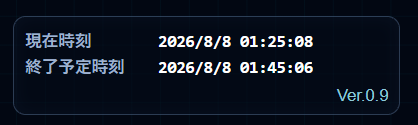
- 上段:現在時刻
- 下段:終了予定時刻
- その下:Ver.0.9
終了予定時刻には、通常タイマーだけではなく、現在存在する個別延長タイマーも含めた「最も遅い終了予定時刻」を表示します。
個別延長を追加した場合は後ろへ延び、減算や削除で最終終了予定が早くなった場合も再計算されます。開始前は「—」表示です。
日付も表示するため、PCの現在日時そのものを確認する用途にも使えます。
復元データが見つかったら選択画面を表示
ページを開いたとき、まだ有効な実行データが残っている場合は、自動的に試験を再開せず、確認画面を表示します。
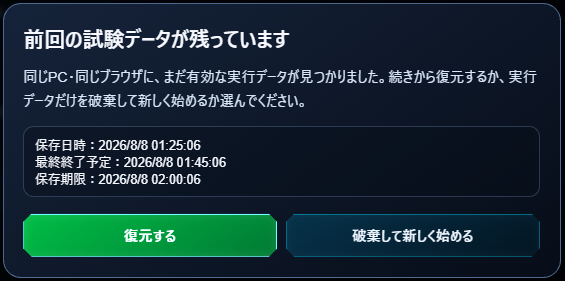
確認画面には、保存日時、最終終了予定、保存期限を表示します。かなり親切です(笑)。
- 復元する:保存していた試験状態を読み込み、現在時刻から残り時間を再計算して続行
- 破棄して新しく始める:実行データだけを削除して設定画面へ戻る
「破棄して新しく始める」を選んでも、設定画面へ入力した内容は残るようにしました。
試験終了後の保存猶予時間を設定できるようにした
当初は、最終終了予定時刻から15分後まで保存する固定仕様で考えていました。
ところが保存期限のテストをしている途中で、「これ、テストのたびに15分待つの?」という問題が発生しました(笑)。
そこで設定画面へ「試験終了後の保存猶予時間」を追加しました。
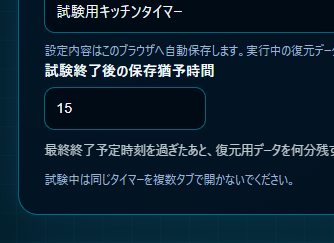
- 初期値:15分
- 設定可能範囲:0~120分
- 保存期限:現在存在する全タイマーの最終終了予定時刻+設定した猶予時間
通常運用では15分のままでよく、テストするときだけ1分に変更すれば、保存期限切れをすぐに確認できます。
個別延長によって最終終了予定時刻が延びた場合、保存期限も新しい最終終了予定時刻を基準に再計算されます。
保存期限を過ぎたデータは自動で破棄する
復元データをいつまでも残しておくと、翌日に前日の試験データが出てくる可能性があります。そこで、保存期限を過ぎた実行データは復元候補にせず自動で破棄します。
期限切れで破棄されるのは実行データです。設定内容は別に保存しているため、次の試験でも前回の設定を利用できます。
テストでは保存猶予時間を短くして、期限を過ぎたあとに復元データが破棄されることを確認しました。
設定を完全に消したいときは「設定を初期化」
設定が残るのは便利ですが、Wordの試験からExcelの試験へ切り替える場合など、まったく別の設定を作りたいこともあります。
そこで設定画面へ「設定を初期化」ボタンも追加しました。
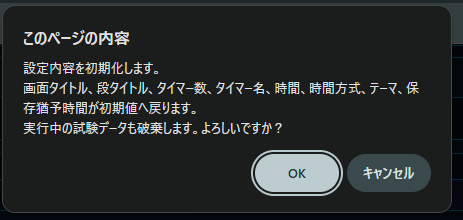
通常のリセット、実行データの破棄、保存期限切れでは設定を残し、「設定を初期化」を実行したときだけ、タイトル、タイマー数、時間、テーマ、保存猶予時間などを初期値へ戻します。
「設定を初期化」では実行中データも破棄します。誤操作を避けるため、実行前に確認ダイアログを表示します。
保存データへバージョン番号を持たせる
第9回からアプリのバージョンをVer.0.9として、保存データの中にもバージョン情報を持たせました。
今後ソースコードを変更して保存形式が変わった場合、古い形式のデータを無理に読み込んで動作がおかしくなるのを避けるためです。
今回は記事の回数とバージョンを対応させています。第9回はVer.0.9、第10回で正式版になればVer.1.0という、とても覚えやすい方式です。厳密というより管理しやすさ重視です(笑)。
同じタイマーを複数タブで開かない
今回の保存は同じサイト・同じブラウザの localStorage を利用します。そのため、同じタイマーを複数タブで開いて両方から操作すると、同じ保存場所へ書き込むことになります。
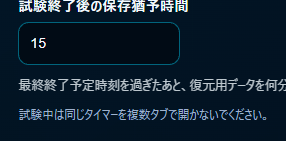
複雑な多重起動防止機能までは作らず、設定画面へ次の注意書きを表示しました。
試験中は同じタイマーを複数タブで開かないでください。
そもそも試験中に同じ時計を何個も開く必要はありません(笑)。
ChromeとEdgeで復元テスト
機能を作っただけでは不安なので、実際にChromeとEdgeで保存・復元を確認しました。
Chrome
- タブを閉じて開き直す:正常に復元
- ブラウザを終了して開き直す:正常に復元
- PCを再起動して開き直す:正常に復元
Microsoft Edge
- タブを閉じて開き直す:正常に復元
- ブラウザを終了して開き直す:正常に復元
- PCを再起動して開き直す:正常に復元
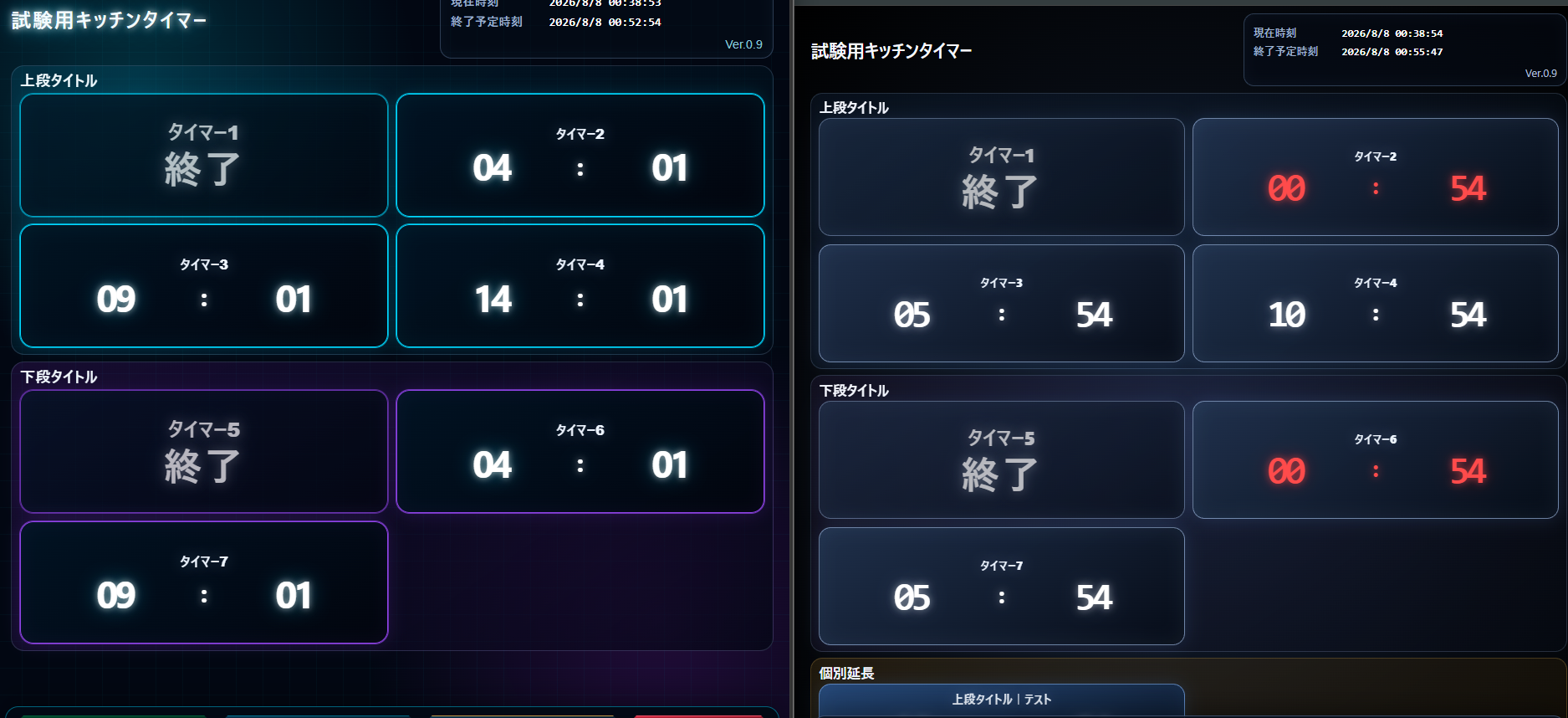
終了予定時刻を見ながら確認し、ブラウザを閉じていた時間も含めて残り時間が進んでいること、個別延長が残ること、終了済みタイマーが終了状態で戻ることも確認しました。
localStorage は同じPC・同じブラウザ内の保存です。別のPCへ切り替えた場合は、この復元データを引き継ぐことはできません。
実際のトラブル時はどうする?
この復元機能は、何があっても試験を救ってくれる万能バックアップではありません。実運用では、ブラウザが落ちたらまずブラウザを起動し直し、それでもだめならPCを再起動。それでも復旧しなければ別PCへ切り替える想定です。
別PCでは保存データを引き継げないため、その場合は開始時刻などをもとに再設定することになります。
つまり今回の保存・復元機能は、「短時間のブラウザ落ちやPC再起動から素早く戻るための保険」として考えています。
今回新しく使ったJavaScriptの仕組み
localStorage
localStorage は、ブラウザ側へ文字列データを保存できる仕組みです。今回は設定データと実行データをJSON形式へ変換して保存しています。
JSON.stringify() と JSON.parse()
JSON.stringify() でJavaScriptのオブジェクトを保存できる文字列へ変換し、読み込むときは JSON.parse() で元のデータ構造へ戻します。
Date.now()
Date.now() では現在時刻をミリ秒単位の数値として取得できます。今回の終了予定時刻、保存日時、保存期限の計算に使っています。
dialog要素
復元確認にはHTMLの <dialog> を使っています。「復元する」と「破棄して新しく始める」を選ぶためのモーダル画面として利用しました。
try…catch
localStorage の保存や読み込みで例外が発生してもアプリ全体が止まりにくいよう、保存処理を try...catch で囲んでいます。
第9回でできるようになったこと
- ブラウザを閉じても設定内容を保持できる
- 試験中の状態を自動保存できる
- 同じPC・同じブラウザならブラウザ終了後やPC再起動後も復元できる
- 復元するか実行データを破棄するか選べる
- 現在日時と最終終了予定日時を確認できる
- 保存猶予時間を用途に合わせて変更できる
- 期限切れの古い実行データを自動破棄できる
- 通常は設定を残し、必要なときだけ設定を完全初期化できる
- 保存形式へVer.0.9のバージョン情報を持たせられた
完成版を確認する
次回はVer.1.0へ
第9回で保存と復元まで入り、かなり実運用に近いタイマーになりました。
次回は、全画面表示やスリープ防止など、教室の大型ディスプレイで実際に使うための最後の仕上げを進める予定です。
ちょうど第10回なので、うまく完成すればVer.1.0。回数をそのままバージョンにしただけですが、どの記事の状態なのかすぐ分かるので意外と便利です(笑)。