- このシリーズについて
- このシリーズについて
- 今回追加する機能
- AIとの分担制作
- 第10回 Ver.1.0の完成ソースコード
- フルスクリーン表示を追加する
- Fullscreen APIで全画面表示と解除を切り替える
- 全画面表示中も操作パネルは自動で隠す
- Screen Wake Lock APIで画面スリープを防ぐ
- Wake Lockが解除されたら再取得する
- Wake Lockだけに頼らない理由
- Windows 11のスリープ設定方法を案内する
- スリープ設定案内をモーダルで表示する
- ChromeとEdgeでスリープ防止を確認
- 今回新しく使ったJavaScriptの仕組み
- Ver.1.0でできるようになったこと
- 完成版を確認する
- 試験用キッチンタイマー Ver.1.0完成
- この先のキッチンタイマーについて
このシリーズについて
試験用キッチンタイマー制作、第10回です。
第9回では、ブラウザを閉じたりPCを再起動したりしても試験の状態を戻せるように、設定内容と実行状態の保存・復元機能を追加しました。
ここまででタイマーとして必要な機能はかなり揃いましたが、実際に教室の大型ディスプレイへ表示して使うことを考えると、もう少しだけ仕上げておきたい部分があります。
今回は、画面いっぱいに表示するためのフルスクリーン機能と、試験中に画面がスリープしてしまうのを防ぐための対策を追加します。
今回の完成版は試験用キッチンタイマー Ver.1.0です。第1回から少しずつ機能を増やしてきた本編は、ここでいったん完成とします。
このシリーズについて
このシリーズでは、求職者支援訓練などの模擬試験で使うキッチンタイマーを、HTML・CSS・JavaScriptで少しずつ作っています。
最初から完成形を作るのではなく、「こういう機能も欲しい」「実際に使うならここも直したい」と思ったところを、その都度追加してきました。
第1回は1個だけのシンプルなキッチンタイマーでしたが、複数タイマー、可変設定、累積時間、個別延長、終了演出、テーマ切り替え、保存・復元まで増え、今回の第10回でVer.1.0へ到達します。
シリーズの途中から読んでも分かるように、今回必要な内容はこの記事内でも説明します。過去に詳しく説明した基本操作は簡略化しています。
今回追加する機能
第10回では、大きな機能を増やすというより、実際の教室で使うための最終仕上げを行います。
- 操作パネルへ「フルスクリーン」ボタンを追加
- Fullscreen APIを使って全画面表示と解除を切り替える
- Screen Wake Lock APIで画面スリープの防止を試みる
- タブを切り替えて戻ったときにWake Lockを再取得する
- Wake Lockが使えない環境でもタイマー自体は通常どおり動かす
- 設定画面へスリープに関する注意書きを追加
- Windows 11のスリープ無効設定をモーダルで確認できるようにする
- アプリの表示をVer.1.0へ更新
AIとの分担制作
今回も、これまでと同じようにAIのノンと役割を分けて制作しています。
どんな機能が必要か、実際の試験でどう使うか、どの動きなら使いやすいかは私が考え、HTML・CSS・JavaScriptのソースコード作成はノンが担当しています。
出力されたソースコードを実際に動かし、ChromeやMicrosoft Edgeで確認しながら、問題があれば相談して修正する流れです。
コードを一から書かなくても、必要な機能や使い方を考え、実際に動かして確認しながらAIと一緒に作ることができます。ソースコードが気になる場合は、完成したコードの一部分をAIへ貼り付けて「ここは何をしている?」と聞くと、教材としても使えます。
第10回 Ver.1.0の完成ソースコード
まずは、今回完成したVer.1.0のソースコードです。
前回までと同じく、HTML・CSS・JavaScriptの3ファイルで動作します。第8回で追加したスチームパンク用の画像・SVG素材は、そのまま使用しています。
完成ソースを先に掲載し、そのあとで第9回から追加した部分を順番に見ていきます。
index.html のソースコードを表示
<!DOCTYPE html>
<html lang="ja">
<head>
  <meta charset="UTF-8">
  <meta name="viewport" content="width=device-width, initial-scale=1.0">
  <title>試験用キッチンタイマー Ver.1.0</title>
  <link rel="stylesheet" href="style.css">
  <style>
    .version-badge {
      display:inline-block; margin-top:8px; padding:3px 9px; border:1px solid rgba(155,198,255,.35);
      border-radius:999px; color:#bcd3f4; font-size:.78rem; font-weight:700; background:rgba(5,12,23,.32);
    }
    .save-grace-setting input {
      max-width: 180px;
    }
    .save-grace-help {
      margin: 6px 0 0;
      opacity: .78;
      font-size: .88rem;
      line-height: 1.6;
    }
    .setup-storage-note {
      margin:10px 0 0; color:#9fb2ce; font-size:.82rem; line-height:1.55;
    }
    .board-header-row {
      display:grid; grid-template-columns:minmax(0,1fr) auto; gap:18px; align-items:center;
    }
    .board-header-title { text-align:left; }
    .board-clock-panel {
      min-width:min(430px,42vw); padding:8px 12px; border:1px solid rgba(151,190,245,.28); border-radius:14px;
      background:rgba(5,12,23,.46); text-align:left; box-shadow:inset 0 0 18px rgba(100,150,230,.05);
    }
    .board-clock-line {
      display:grid; grid-template-columns:7.6em minmax(0,1fr); gap:8px; align-items:baseline; margin:0;
      color:#dbe8fb; font-size:clamp(.72rem,1vw,.95rem); line-height:1.45;
    }
    .board-clock-line + .board-clock-line { margin-top:2px; }
    .board-clock-label { color:#9fb2ce; font-weight:700; }
    .board-clock-value { color:#fff; font-family:Consolas,"Roboto Mono","Courier New",monospace; font-weight:700; white-space:nowrap; }
    .board-version { margin:4px 0 0; color:#8ea5c6; font-size:.7rem; text-align:right; }
    .restore-dialog {
      width:min(620px,calc(100% - 28px)); border:1px solid rgba(148,187,245,.5); border-radius:20px;
      background:linear-gradient(145deg,#15233a,#070d18); color:#f7f9ff; box-shadow:0 20px 60px rgba(0,0,0,.62);
    }
    .restore-dialog::backdrop { background:rgba(0,0,0,.72); backdrop-filter:blur(3px); }
    .restore-content { display:grid; gap:14px; padding:6px; }
    .restore-content h2 { margin:0; font-size:1.45rem; }
    .restore-content p { margin:0; line-height:1.7; color:#dbe8fb; }
    .restore-meta { padding:10px 12px; border:1px solid rgba(151,190,245,.24); border-radius:12px; background:rgba(5,12,23,.4); font-size:.88rem; }
    .restore-actions { display:grid; grid-template-columns:1fr 1fr; gap:10px; margin-top:4px; }
    .discard-button { border-color:rgba(255,144,144,.58); background:rgba(92,28,28,.72); }
    @media (max-width:900px) {
      .board-header-row { grid-template-columns:1fr; gap:8px; }
      .board-header-title { text-align:center; }
      .board-clock-panel { width:100%; min-width:0; }
      .board-version { text-align:left; }
    }
    @media (max-width:560px) {
      .board-clock-line { grid-template-columns:1fr; gap:0; }
      .restore-actions { grid-template-columns:1fr; }
    }
  </style>
</head>
<body>
  <main class="app-shell">
    <section id="setup-screen" class="screen setup-screen" aria-labelledby="setup-title">
      <header class="page-header">
        <h1 id="setup-title">試験用キッチンタイマー</h1>
        <p>上段・下段のタイマーを設定してください</p>
        <span class="version-badge">Ver.1.0</span>
        <div class="sleep-notice">
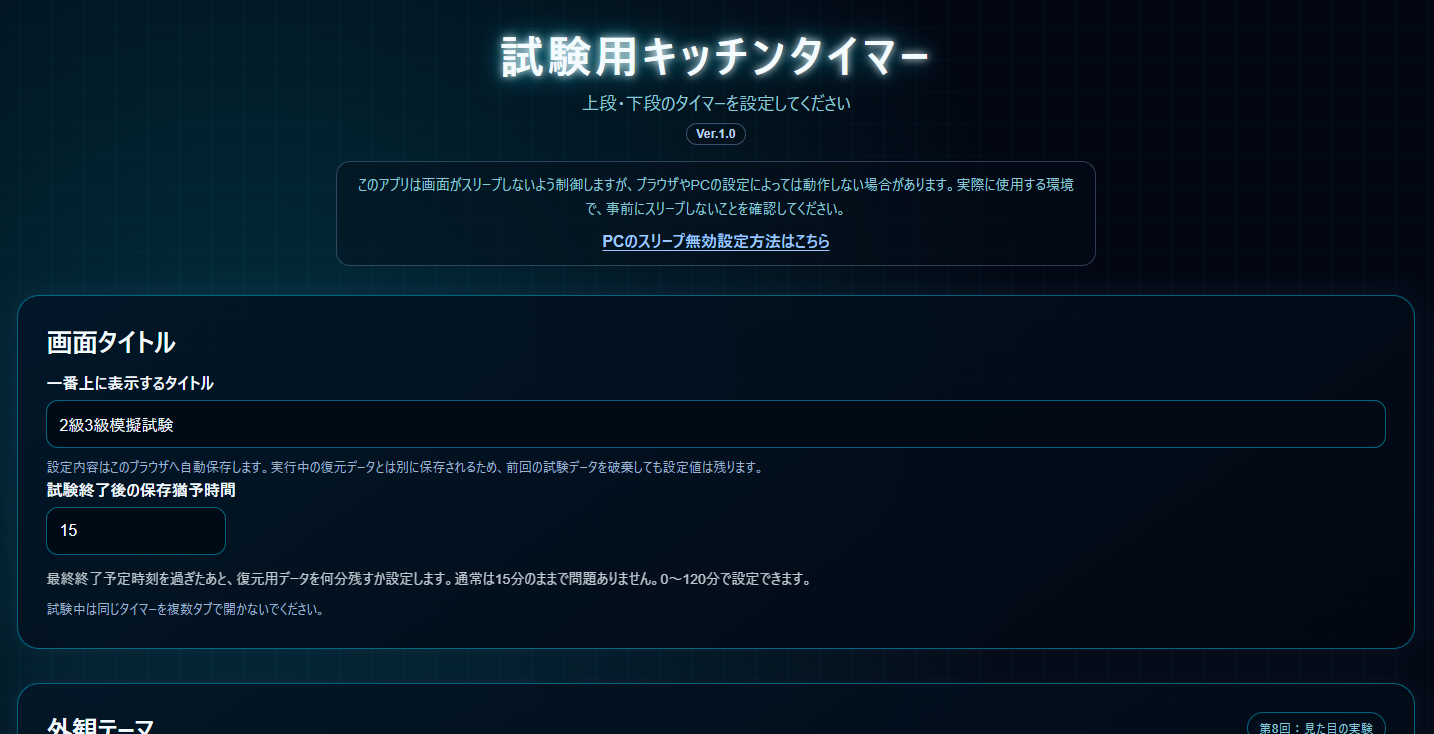
          <p>このアプリは画面がスリープしないよう制御しますが、ブラウザやPCの設定によっては動作しない場合があります。実際に使用する環境で、事前にスリープしないことを確認してください。</p>
          <button id="open-sleep-guide-button" class="text-link-button" type="button">PCのスリープ無効設定方法はこちら</button>
        </div>
      </header>

      <form id="setup-form" class="setup-form" novalidate>
        <section class="setup-group board-title-setup" aria-labelledby="board-title-setup-heading">
          <h2 id="board-title-setup-heading" class="setup-subheading">画面タイトル</h2>
          <div class="field-block">
            <label for="board-title-input">一番上に表示するタイトル</label>
            <input id="board-title-input" name="boardTitle" type="text" value="試験用キッチンタイマー" maxlength="40">
          </div>
          <p class="setup-storage-note">設定内容はこのブラウザへ自動保存します。実行中の復元データとは別に保存されるため、前回の試験データを破棄しても設定値は残ります。</p>

          <div class="field-block save-grace-setting">
            <label for="save-grace-minutes">試験終了後の保存猶予時間</label>
            <input id="save-grace-minutes" name="saveGraceMinutes" type="number" min="0" max="120" step="1" value="15" inputmode="numeric">
            <p class="save-grace-help">最終終了予定時刻を過ぎたあと、復元用データを何分残すか設定します。通常は15分のままで問題ありません。0~120分で設定できます。</p>
          </div>

          <p class="setup-storage-note">試験中は同じタイマーを複数タブで開かないでください。</p>
        </section>

        <section class="setup-group theme-setup" aria-labelledby="theme-setup-heading">
          <div class="theme-setup-heading-row">
            <div>
              <h2 id="theme-setup-heading" class="setup-subheading">外観テーマ</h2>
              <p class="theme-help">テーマを選ぶと、設定画面を含む画面全体がその場で切り替わります。</p>
            </div>
            <p class="theme-experiment-note">第8回:見た目の実験</p>
          </div>
          <fieldset class="theme-fieldset">
            <legend class="visually-hidden">外観テーマを選択</legend>
            <label class="theme-option theme-option-blue"><input type="radio" name="app-theme" value="blue" checked><span class="theme-swatch" aria-hidden="true"></span><span class="theme-option-text"><strong>ブルー・ガラス</strong><small>現在の標準テーマ</small></span></label>
            <label class="theme-option theme-option-industrial"><input type="radio" name="app-theme" value="industrial"><span class="theme-swatch" aria-hidden="true"></span><span class="theme-option-text"><strong>ブラック・インダストリアル</strong><small>機械パネル風</small></span></label>
            <label class="theme-option theme-option-minimal"><input type="radio" name="app-theme" value="minimal"><span class="theme-swatch" aria-hidden="true"></span><span class="theme-option-text"><strong>ミニマル</strong><small>落ち着いた実用重視</small></span></label>
            <label class="theme-option theme-option-cyber"><input type="radio" name="app-theme" value="cyber"><span class="theme-swatch" aria-hidden="true"></span><span class="theme-option-text"><strong>サイバーパンク</strong><small>ネオンHUD風</small></span></label>
            <label class="theme-option theme-option-steam-css"><input type="radio" name="app-theme" value="steam-css"><span class="theme-swatch" aria-hidden="true"></span><span class="theme-option-text"><strong>スチームパンク A</strong><small>純CSSのみ</small></span></label>
            <label class="theme-option theme-option-steam-svg"><input type="radio" name="app-theme" value="steam-svg"><span class="theme-swatch" aria-hidden="true"></span><span class="theme-option-text"><strong>スチームパンク B</strong><small>CSS+SVG装飾</small></span></label>
            <label class="theme-option theme-option-steam-image"><input type="radio" name="app-theme" value="steam-image"><span class="theme-swatch" aria-hidden="true"></span><span class="theme-option-text"><strong>スチームパンク C</strong><small>CSS+画像装飾</small></span></label>
          </fieldset>
        </section>

        <section class="setup-group" aria-labelledby="upper-setup-heading">
          <div class="setup-group-header">
            <div class="field-block title-field-block"><label for="upper-title">上段タイトル</label><input id="upper-title" name="upperTitle" type="text" value="上段タイトル" maxlength="30"></div>
            <div class="field-block count-field-block">
              <label for="upper-count">タイマー数</label>
              <select id="upper-count" name="upperCount"><option value="1">1個</option><option value="2">2個</option><option value="3">3個</option><option value="4" selected>4個</option></select>
              <p class="count-note">上段に、一番タイマー数の多い段を設定してください。</p>
            </div>
          </div>
          <fieldset class="time-mode-fieldset"><legend>時間の表示方法</legend><label class="radio-option"><input type="radio" name="upper-time-mode" value="cumulative" checked> 累積時間</label><label class="radio-option"><input type="radio" name="upper-time-mode" value="individual"> 個別時間</label></fieldset>
          <h2 id="upper-setup-heading" class="visually-hidden">上段タイマー設定</h2>
          <div id="upper-timer-settings" class="timer-settings-list"></div>
        </section>

        <section class="setup-group" aria-labelledby="lower-setup-heading">
          <div class="setup-group-header">
            <div class="field-block title-field-block"><label for="lower-title">下段タイトル</label><input id="lower-title" name="lowerTitle" type="text" value="下段タイトル" maxlength="30"></div>
            <div class="field-block count-field-block">
              <label for="lower-count">タイマー数</label>
              <select id="lower-count" name="lowerCount"><option value="0">0個</option><option value="1">1個</option><option value="2">2個</option><option value="3" selected>3個</option><option value="4">4個</option></select>
              <p class="count-note">下段は、上段のタイマー数以下から選択できます。</p>
            </div>
          </div>
          <fieldset class="time-mode-fieldset"><legend>時間の表示方法</legend><label class="radio-option"><input type="radio" name="lower-time-mode" value="cumulative" checked> 累積時間</label><label class="radio-option"><input type="radio" name="lower-time-mode" value="individual"> 個別時間</label></fieldset>
          <h2 id="lower-setup-heading" class="visually-hidden">下段タイマー設定</h2>
          <div id="lower-timer-settings" class="timer-settings-list"></div>
        </section>

        <p id="setup-error" class="setup-error" aria-live="polite"></p>
        <div class="setup-actions"><button class="secondary-button" id="reset-settings-button" type="button">設定を初期化</button><button class="primary-button create-board-button" type="submit">タイマーボードを作成</button></div>
      </form>
    </section>

    <section id="board-screen" class="screen board-screen" aria-labelledby="board-title" hidden>
      <header class="page-header board-header">
        <div class="board-header-row">
          <div class="board-header-title"><h1 id="board-title">試験用キッチンタイマー</h1></div>
          <div class="board-clock-panel" aria-label="時刻情報">
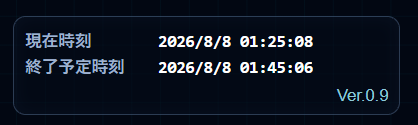
            <p class="board-clock-line"><span class="board-clock-label">現在時刻</span><time id="current-datetime" class="board-clock-value">----</time></p>
            <p class="board-clock-line"><span class="board-clock-label">終了予定時刻</span><time id="final-end-datetime" class="board-clock-value">---</time></p>
            <p class="board-version">Ver.1.0</p>
          </div>
        </div>
      </header>

      <section id="upper-timer-section" class="timer-section timer-section-upper" aria-labelledby="upper-heading">
        <div id="upper-group-flip" class="group-flip-card"><div class="group-face group-face-front"><div class="section-heading"><h2 id="upper-heading">上段タイトル</h2></div><div id="upper-timer-grid" class="timer-grid"></div></div><div class="group-face group-face-back" aria-live="polite"><p id="upper-finished-title" class="group-finished-title">上段タイトル</p><p class="group-finished-text">終了</p></div></div>
      </section>

      <section id="lower-timer-section" class="timer-section timer-section-lower" aria-labelledby="lower-heading">
        <div id="lower-group-flip" class="group-flip-card"><div class="group-face group-face-front"><div class="section-heading"><h2 id="lower-heading">下段タイトル</h2></div><div id="lower-timer-grid" class="timer-grid"></div></div><div class="group-face group-face-back" aria-live="polite"><p id="lower-finished-title" class="group-finished-title">下段タイトル</p><p class="group-finished-text">終了</p></div></div>
      </section>

      <section id="extension-timer-section" class="timer-section timer-section-extension" aria-labelledby="extension-heading" hidden><div class="section-heading"><h2 id="extension-heading">個別延長</h2></div><div id="extension-timer-grid" class="timer-grid"></div></section>

      <div id="board-finish-overlay" class="board-finish-overlay" aria-live="polite" aria-hidden="true"><div class="board-finish-message"><p id="board-finished-title" class="board-finished-title">試験用キッチンタイマー</p><p class="board-finished-text">終了</p></div></div>

      <div id="floating-controls" class="floating-controls is-visible" aria-label="操作パネル"><button id="fullscreen-button" class="secondary-button control-button fullscreen-button" type="button" aria-pressed="false">⛶ フルスクリーン</button><button id="start-all-button" class="primary-button control-button" type="button">▶ 全体スタート</button><button id="reset-all-button" class="secondary-button control-button" type="button">↺ 全体リセット</button><button id="add-extension-button" class="secondary-button control-button" type="button" disabled>+ 個別延長</button><button id="finish-button" class="secondary-button control-button finish-button" type="button">終了</button></div>
    </section>
  </main>

  <dialog id="extension-dialog" class="extension-dialog">
    <form id="extension-form" class="extension-form" method="dialog" novalidate>
      <h2 id="extension-dialog-title">個別延長タイマーを作成</h2>
      <div id="extension-name-field" class="field-block"><label for="extension-name">表示名</label><input id="extension-name" type="text" maxlength="30" placeholder="受験者名・座席番号など"></div>
      <div id="extension-base-field" class="field-block"><label for="extension-base-group">基準にする段</label><select id="extension-base-group"></select></div>
      <div id="extension-current-total" class="extension-current-total" hidden></div>
      <fieldset id="extension-adjust-fieldset" class="extension-adjust-fieldset" hidden><legend>時間の調整</legend><label class="radio-option"><input type="radio" name="extension-adjust-mode" value="increase" checked> 増やす</label><label class="radio-option"><input type="radio" name="extension-adjust-mode" value="decrease"> 減らす</label></fieldset>
      <div class="extension-duration-row"><div class="field-block compact-field-block"><label for="extension-minutes">追加する分</label><input id="extension-minutes" type="number" min="0" step="1" value="0" inputmode="numeric"></div><div class="field-block compact-field-block"><label for="extension-seconds">追加する秒</label><input id="extension-seconds" type="number" min="0" max="59" step="1" value="0" inputmode="numeric"></div></div>
      <p id="extension-error" class="setup-error" aria-live="polite"></p>
      <div class="dialog-actions"><button id="extension-cancel-button" class="secondary-button" type="button">キャンセル</button><button id="extension-submit-button" class="primary-button" type="submit">作成</button></div>
    </form>
  </dialog>

  <dialog id="restore-dialog" class="restore-dialog">
    <div class="restore-content">
      <h2>前回の試験データが残っています</h2>
      <p>同じPC・同じブラウザに、まだ有効な実行データが見つかりました。続きから復元するか、実行データだけを破棄して新しく始めるか選んでください。</p>
      <div id="restore-meta" class="restore-meta"></div>
      <div class="restore-actions"><button id="restore-run-button" class="primary-button" type="button">復元する</button><button id="discard-run-button" class="secondary-button discard-button" type="button">破棄して新しく始める</button></div>
    </div>
  </dialog>

  <dialog id="sleep-guide-dialog" class="sleep-guide-dialog" aria-labelledby="sleep-guide-title">
    <div class="sleep-guide-content">
      <h2 id="sleep-guide-title">Windows 11でスリープを無効にする方法</h2>
      <ol class="sleep-guide-steps"><li>「スタート」を開く</li><li>「設定」を開く</li><li>「システム」を選ぶ</li><li>「電源とバッテリー」を選ぶ</li><li>「画面とスリープ」を開く</li></ol>
      <p>「画面の電源オフ」と「PCのスリープ」を、試験で使う電源状態に合わせて「なし」へ変更してください。</p>
      <p class="sleep-guide-note">会社PCなどでは、管理者権限や組織の設定により変更できない場合があります。Wake Lockだけに頼らず、実際に使用するPCで事前に確認してください。</p>
      <div class="dialog-actions"><button id="close-sleep-guide-button" class="primary-button" type="button">閉じる</button></div>
    </div>
  </dialog>

  <template id="setting-row-template">
    <div class="timer-setting-row"><div class="field-block name-field-block"><label class="timer-name-label"></label><input class="timer-name-input" type="text" maxlength="30"></div><div class="duration-fields"><div class="field-block compact-field-block"><label>分</label><input class="minutes-input" type="number" min="0" step="1" inputmode="numeric"></div><div class="field-block compact-field-block"><label>秒</label><input class="seconds-input" type="number" min="0" max="59" step="1" inputmode="numeric"></div></div></div>
  </template>

  <template id="timer-panel-template">
    <article class="timer-panel"><div class="timer-panel-inner"><div class="timer-face timer-face-front"><p class="timer-title"></p><div class="time-display" aria-label="残り時間"><span class="minutes-display">00</span><span class="time-colon" aria-hidden="true">:</span><span class="seconds-display">00</span></div><div class="extension-info" hidden><p class="extension-history"></p><p class="extension-total"></p></div><div class="extension-panel-actions interaction-controls" hidden><button class="secondary-button extension-add-button" type="button">+ 追加</button><button class="secondary-button extension-delete-button" type="button">削除</button></div></div><div class="timer-face timer-face-back" aria-live="polite"><div class="finished-message"><p class="finished-title"></p><p class="finished-text">終了</p></div><div class="extension-panel-actions interaction-controls finished-actions" hidden><button class="secondary-button extension-add-button" type="button">+ 追加</button><button class="secondary-button extension-delete-button" type="button">削除</button></div></div></div></article>
  </template>

  <script src="script.js"></script>
</body>
</html>
style.css のソースコードを表示
* { box-sizing: border-box; }

:root {
  color-scheme: dark;
  font-family: "Segoe UI", "Yu Gothic UI", "Meiryo", sans-serif;
}

html, body { margin: 0; min-width: 320px; min-height: 100%; }
body {
  min-height: 100vh;
  background: radial-gradient(circle at center, #17243a 0%, #070b12 60%, #000 100%);
  color: #f7f9ff;
  overflow-x: hidden;
}
button, input, select { font: inherit; -webkit-tap-highlight-color: transparent; }
button { cursor: pointer; }
input, select {
  width: 100%; min-height: 48px; border: 1px solid rgba(139,183,245,.5); border-radius: 12px;
  background: rgba(8,17,31,.9); color: #f7f9ff; outline: none;
}
input { padding: 10px 12px; }
select { padding: 10px 38px 10px 12px; }
input:focus, select:focus { border-color:#8fbaff; box-shadow:0 0 0 3px rgba(93,147,255,.2); }

.app-shell { width:min(1920px,100%); min-height:100vh; margin:0 auto; padding:clamp(14px,2vw,32px); }
.screen[hidden], .timer-section[hidden], .timer-settings-list[hidden], [hidden] { display:none !important; }

.page-header { margin-bottom:clamp(18px,2vw,30px); text-align:center; }
.page-header h1, .page-header p, .section-heading h2 { margin:0; }
.page-header h1 { font-size:clamp(1.8rem,3vw,3.1rem); }
.page-header p { margin-top:7px; color:#aebfd8; font-size:clamp(.9rem,1.2vw,1.15rem); }
.sleep-notice { width:min(760px,100%); margin:16px auto 0; padding:12px 16px; border:1px solid rgba(151,190,245,.28); border-radius:14px; background:rgba(5,12,23,.42); }
.sleep-notice p { margin:0; font-size:.88rem; line-height:1.65; }
.text-link-button { margin-top:7px; padding:2px; border:0; background:transparent; color:#9fc7ff; font-weight:700; text-decoration:underline; text-underline-offset:3px; }
.text-link-button:hover, .text-link-button:focus-visible { color:#fff; outline:2px solid rgba(155,198,255,.45); outline-offset:3px; }
.board-header { margin-bottom:clamp(10px,1.2vw,18px); }

.setup-form { display:grid; gap:clamp(20px,2.4vw,34px); }
.setup-group { padding:clamp(16px,2vw,28px); border:1px solid rgba(151,190,245,.35); border-radius:22px; background:linear-gradient(145deg,rgba(23,39,63,.88),rgba(7,13,24,.93)); box-shadow:0 0 28px rgba(85,139,226,.12); }
.setup-group-header { display:grid; grid-template-columns:minmax(0,1fr) minmax(140px,200px); gap:18px; margin-bottom:18px; }
.field-block { display:grid; gap:7px; }
.field-block label { color:#dbe8fb; font-weight:700; }
.count-note { margin:2px 0 0; color:#9fb2ce; font-size:.78rem; line-height:1.35; }
.timer-settings-list { display:grid; gap:12px; }
.timer-setting-row { display:grid; grid-template-columns:minmax(0,1fr) auto; align-items:end; gap:16px; padding:14px; border:1px solid rgba(131,169,224,.22); border-radius:16px; background:rgba(5,12,23,.48); }
.duration-fields, .extension-duration-row { display:grid; grid-template-columns:repeat(2,minmax(90px,110px)); gap:10px; }
.setup-error { min-height:1.5em; margin:-2px 0 0; color:#ff9b9b; font-weight:700; text-align:center; }
.setup-actions { display:flex; justify-content:center; padding-bottom:20px; }
.setup-subheading { margin:0 0 14px; font-size:clamp(1.2rem,1.8vw,1.6rem); }
.board-title-setup { background:linear-gradient(145deg,rgba(22,36,58,.9),rgba(7,13,24,.94)); }

.primary-button, .secondary-button { min-height:48px; padding:10px 20px; border:1px solid #84b6ff; border-radius:14px; color:#eef5ff; font-weight:700; }
.primary-button { background:linear-gradient(145deg,#376cff,#1541b8); box-shadow:0 0 18px rgba(71,126,255,.35), inset 0 0 10px rgba(255,255,255,.1); }
.secondary-button { border-color:rgba(151,184,227,.58); background:rgba(21,34,54,.95); box-shadow:inset 0 0 10px rgba(122,169,236,.08); }
.primary-button:hover:not(:disabled), .primary-button:focus-visible:not(:disabled), .secondary-button:hover:not(:disabled), .secondary-button:focus-visible:not(:disabled) { filter:brightness(1.14); outline:3px solid rgba(155,198,255,.32); outline-offset:3px; }
button:disabled { cursor:not-allowed; opacity:.35; }
.create-board-button { width:min(440px,100%); min-height:56px; font-size:clamp(1.05rem,1.7vw,1.45rem); }

.timer-section { margin-bottom:clamp(12px,1.4vw,22px); padding:clamp(10px,1vw,18px); border:1px solid rgba(166,198,241,.18); border-radius:clamp(16px,1.5vw,24px); }
.timer-section-upper { background:linear-gradient(145deg,rgba(38,88,150,.14),rgba(7,13,24,.38)); }
.timer-section-lower { background:linear-gradient(145deg,rgba(92,57,137,.14),rgba(7,13,24,.38)); }
.timer-section-extension { background:linear-gradient(145deg,rgba(170,117,28,.18),rgba(30,21,6,.46)); border-color:rgba(239,188,87,.24); }

.extension-timer-panel.extension-base-upper .timer-face {
  background:linear-gradient(145deg,rgba(35,70,118,.96),rgba(8,18,34,.97));
  border-color:rgba(132,181,247,.62);
  box-shadow:0 0 24px rgba(71,137,225,.18), inset 0 0 24px rgba(111,170,245,.09);
}

.extension-timer-panel.extension-base-lower .timer-face {
  background:linear-gradient(145deg,rgba(78,50,112,.96),rgba(18,10,30,.97));
  border-color:rgba(178,135,226,.55);
  box-shadow:0 0 24px rgba(129,79,184,.18), inset 0 0 24px rgba(171,119,224,.09);
}
.section-heading { margin-bottom:8px; }
.section-heading h2 { font-size:clamp(1.35rem,2vw,2.2rem); line-height:1.1; overflow-wrap:anywhere; }
.timer-grid { display:grid; grid-template-columns:repeat(var(--timer-count,4),minmax(0,1fr)); gap:clamp(8px,1vw,16px); }
.timer-panel { min-width:0; perspective:1200px; transition:opacity .35s ease; }
.timer-panel-inner { display:grid; width:100%; min-height:clamp(180px,18vw,300px); transform-style:preserve-3d; transition:transform .7s ease-in-out; }
.timer-panel.is-finished { opacity:.7; }
.timer-panel.is-finished .timer-panel-inner { transform:rotateY(180deg); }
.timer-face { grid-area:1/1; display:grid; width:100%; padding:clamp(10px,1vw,18px); border:1px solid rgba(182,211,255,.55); border-radius:clamp(16px,1.5vw,26px); background:linear-gradient(145deg,rgba(32,50,78,.92),rgba(6,12,23,.96)); box-shadow:0 0 24px rgba(116,168,255,.16), inset 0 0 24px rgba(158,200,255,.08); text-align:center; backface-visibility:hidden; -webkit-backface-visibility:hidden; }
.timer-face-front { align-content:center; gap:clamp(8px,1vw,16px); }
.timer-face-back { align-content:center; justify-items:center; gap:14px; transform:rotateY(180deg); }
.timer-title { max-width:100%; margin:0; color:#eef5ff; font-size:clamp(1.15rem,2vw,2.25rem); font-weight:800; line-height:1.05; text-shadow:0 0 16px rgba(159,198,255,.36); overflow-wrap:anywhere; }
.time-display { display:grid; grid-template-columns:minmax(0,1fr) auto minmax(0,1fr); align-items:center; width:100%; }
.minutes-display, .seconds-display, .time-colon { color:#fff; font-family:Consolas,"Roboto Mono","Courier New",monospace; font-weight:700; line-height:.9; text-shadow:0 0 11px rgba(255,255,255,.52),0 0 26px rgba(153,194,255,.22); transition:color .2s ease,text-shadow .2s ease; }
.minutes-display, .seconds-display { min-width:0; font-size:clamp(3.2rem,6.7vw,7.3rem); letter-spacing:-.09em; }
.time-colon { padding:0 .02em .08em; font-size:clamp(2.4rem,4.3vw,4.8rem); }
.time-display.is-warning .minutes-display, .time-display.is-warning .seconds-display, .time-display.is-warning .time-colon { color:#ff4b4b; text-shadow:0 0 11px rgba(255,75,75,.68),0 0 28px rgba(255,0,0,.24); }
.finished-message { display:grid; justify-items:center; gap:8px; width:100%; }
.finished-title, .finished-text { max-width:100%; margin:0; color:#fff; font-weight:800; line-height:1.05; overflow-wrap:anywhere; text-shadow:0 0 14px rgba(255,255,255,.4),0 0 28px rgba(153,194,255,.24); }
.finished-title { font-size:clamp(1.5rem,2.4vw,2.8rem); }
.finished-text { font-size:clamp(2.8rem,4.7vw,5.2rem); letter-spacing:.08em; }
.extension-info { display:grid; gap:2px; }
.extension-history,
.extension-total { margin:0; color:#f6d88d; font-size:clamp(.68rem,.9vw,.88rem); font-weight:700; line-height:1.25; overflow-wrap:anywhere; }
.extension-total { color:#ffe6a8; }
.extension-panel-actions { display:flex; justify-content:center; gap:8px; }
.extension-panel-actions .secondary-button { min-height:36px; padding:6px 12px; font-size:.85rem; }
.interaction-controls { opacity:0; pointer-events:none; transition:opacity .18s ease; }
.show-interaction-controls .interaction-controls { opacity:1; pointer-events:auto; }

.floating-controls { position:fixed; left:50%; bottom:0; z-index:50; display:flex; gap:10px; width:min(1240px,calc(100% - 24px)); padding:10px 12px; border:1px solid rgba(154,191,245,.35); border-bottom:0; border-radius:16px 16px 0 0; background:rgba(5,11,22,.96); box-shadow:0 -8px 30px rgba(0,0,0,.34); transform:translate(-50%,calc(100% - 5px)); opacity:.05; transition:transform .28s ease,opacity .2s ease; }
.floating-controls.is-visible { transform:translate(-50%,0); opacity:1; }
.control-button { flex:1 1 0; min-width:0; min-height:48px; white-space:nowrap; }
.finish-button { flex:.65 1 0; }
.fullscreen-button { flex:1.15 1 0; }

.extension-dialog { width:min(560px,calc(100% - 28px)); border:1px solid rgba(148,187,245,.45); border-radius:20px; background:linear-gradient(145deg,#15233a,#070d18); color:#f7f9ff; box-shadow:0 20px 60px rgba(0,0,0,.58); }
.sleep-guide-dialog { width:min(650px,calc(100% - 28px)); border:1px solid rgba(148,187,245,.45); border-radius:20px; background:linear-gradient(145deg,#15233a,#070d18); color:#f7f9ff; box-shadow:0 20px 60px rgba(0,0,0,.58); }
.sleep-guide-dialog::backdrop { background:rgba(0,0,0,.68); backdrop-filter:blur(3px); }
.sleep-guide-content { display:grid; gap:14px; padding:6px; }
.sleep-guide-content h2, .sleep-guide-content p { margin:0; }
.sleep-guide-content p { color:#dbe8fb; line-height:1.7; }
.sleep-guide-steps { display:grid; gap:7px; margin:0; padding:14px 14px 14px 40px; border:1px solid rgba(151,190,245,.25); border-radius:14px; background:rgba(5,12,23,.42); }
.sleep-guide-note { font-size:.88rem; opacity:.82; }
.extension-dialog::backdrop { background:rgba(0,0,0,.68); backdrop-filter:blur(3px); }
.extension-form { display:grid; gap:16px; padding:4px; }
.extension-form h2 { margin:0 0 2px; font-size:1.45rem; }
.extension-current-total { padding:10px 12px; border:1px solid rgba(241,194,95,.3); border-radius:12px; background:rgba(142,91,12,.16); color:#f6d88d; font-weight:700; }
.dialog-actions { display:flex; justify-content:flex-end; gap:10px; margin-top:4px; }

.visually-hidden { position:absolute!important; width:1px!important; height:1px!important; padding:0!important; margin:-1px!important; overflow:hidden!important; clip:rect(0,0,0,0)!important; white-space:nowrap!important; border:0!important; }

/* PCで3段をできるだけ1画面に収める */
@media (min-width:901px) {
  .board-screen { padding-bottom:10px; }
  .board-screen .page-header h1 { font-size:clamp(1.5rem,2vw,2.4rem); }
  .board-screen .timer-panel-inner { min-height:clamp(165px,17vh,255px); }
  .board-screen .minutes-display, .board-screen .seconds-display { font-size:clamp(3rem,5.4vw,6.2rem); }
  .board-screen .time-colon { font-size:clamp(2.1rem,3.4vw,4rem); }
  body.board-compact .app-shell { padding-top:10px; padding-bottom:8px; }
  body.board-compact .board-header { margin-bottom:8px; }
  body.board-compact .timer-section { margin-bottom:8px; padding:8px 10px; }
  body.board-compact .section-heading { margin-bottom:5px; }
  body.board-compact .section-heading h2 { font-size:clamp(1.15rem,1.55vw,1.7rem); }
  body.board-compact .timer-panel-inner { min-height:clamp(135px,15.5vh,210px); }
  body.board-compact .timer-title { font-size:clamp(1rem,1.45vw,1.55rem); }
  body.board-compact .minutes-display, body.board-compact .seconds-display { font-size:clamp(2.6rem,4.7vw,5rem); }
  body.board-compact .time-colon { font-size:clamp(1.9rem,3vw,3.4rem); }
  body.board-extra-compact .board-header { margin-bottom:4px; }
  body.board-extra-compact .board-header h1 { font-size:1.35rem; }
  body.board-extra-compact .timer-section { margin-bottom:5px; padding:6px 8px; }
  body.board-extra-compact .timer-panel-inner { min-height:120px; }
  body.board-extra-compact .timer-title { font-size:.95rem; }
  body.board-extra-compact .minutes-display, body.board-extra-compact .seconds-display { font-size:clamp(2.2rem,4.2vw,4.3rem); }
  body.board-extra-compact .time-colon { font-size:2.4rem; }
  body.board-extra-compact .extension-history, body.board-extra-compact .extension-total { font-size:.64rem; }
}

@media (max-width:1100px) and (min-width:701px) {
  .timer-grid { grid-template-columns:repeat(2,minmax(0,1fr)); }
}

@media (max-width:900px) {
  .board-screen { padding-bottom:74px; }
  .timer-grid { grid-template-columns:repeat(2,minmax(0,1fr)); }
  .timer-panel-inner { min-height:250px; }
  .minutes-display, .seconds-display { font-size:clamp(4rem,12vw,7rem); }
  .floating-controls { width:calc(100% - 12px); gap:6px; padding:8px; }
  .control-button { font-size:.82rem; padding:8px 6px; }
}

@media (max-width:700px) {
  .setup-group-header, .timer-setting-row { grid-template-columns:1fr; }
  .duration-fields, .extension-duration-row { grid-template-columns:repeat(2,minmax(0,1fr)); }
}

@media (max-width:560px) {
  .app-shell { padding:10px; }
  .timer-grid { grid-template-columns:1fr; }
  .timer-panel-inner { min-height:300px; }
  .minutes-display, .seconds-display { font-size:clamp(5.2rem,29vw,9rem); }
  .time-colon { font-size:clamp(3.6rem,15vw,5.4rem); }
  .floating-controls { display:grid; grid-template-columns:repeat(2,minmax(0,1fr)); }
  .fullscreen-button, .finish-button { grid-column:span 2; }
  .dialog-actions { display:grid; grid-template-columns:1fr 1fr; }
}

@media (prefers-reduced-motion:reduce) {
  * { scroll-behavior:auto!important; transition:none!important; }
}

/* 第7回:累積時間/個別時間の選択 */
.time-mode-fieldset {
  display:flex;
  flex-wrap:wrap;
  align-items:center;
  gap:10px 18px;
  margin:0 0 18px;
  padding:12px 14px;
  border:1px solid rgba(131,169,224,.22);
  border-radius:14px;
  background:rgba(5,12,23,.36);
}
.time-mode-fieldset legend {
  padding:0 6px;
  color:#dbe8fb;
  font-weight:700;
}
.radio-option {
  display:inline-flex;
  align-items:center;
  gap:7px;
  color:#eef5ff;
  font-weight:700;
  cursor:pointer;
}
.radio-option input[type="radio"] {
  width:18px;
  min-height:auto;
  height:18px;
  margin:0;
  accent-color:#5d93ff;
}

/* 第7回:段全体の終了回転 */
.timer-section-upper,
.timer-section-lower {
  perspective:1600px;
}
.group-flip-card {
  display:grid;
  width:100%;
  transform-style:preserve-3d;
  transition:transform .7s ease-in-out;
}
.group-flip-card.is-group-finished {
  transform:rotateY(180deg);
}
.group-face {
  grid-area:1 / 1;
  width:100%;
  backface-visibility:hidden;
  -webkit-backface-visibility:hidden;
}
.group-face-back {
  display:grid;
  place-content:center;
  justify-items:center;
  min-height:100%;
  padding:clamp(18px,2vw,32px);
  transform:rotateY(180deg);
  text-align:center;
}

.timer-section-upper .group-face-back {
  background:linear-gradient(145deg,rgba(38,88,150,.14),rgba(7,13,24,.38));
}
.timer-section-lower .group-face-back {
  background:linear-gradient(145deg,rgba(92,57,137,.14),rgba(7,13,24,.38));
}
.group-finished-title,
.group-finished-text {
  max-width:100%;
  margin:0;
  color:#fff;
  font-weight:800;
  overflow-wrap:anywhere;
  text-shadow:0 0 14px rgba(255,255,255,.42),0 0 30px rgba(153,194,255,.24);
}
.group-finished-title {
  font-size:clamp(1.8rem,3vw,3.6rem);
}
.group-finished-text {
  margin-top:12px;
  font-size:clamp(3.6rem,6vw,7rem);
  letter-spacing:.1em;
}

/* 第7回:通常タイマー全終了時の1秒待機+1.5秒フェード */
.board-finish-overlay {
  position:fixed;
  inset:0;
  z-index:40;
  pointer-events:none;
  opacity:0;
  visibility:hidden;
  transition:opacity var(--board-finish-fade-ms,1500ms) ease, visibility 0s linear var(--board-finish-fade-ms,1500ms);
}
.board-finish-overlay.is-visible {
  opacity:1;
  visibility:visible;
  transition:opacity var(--board-finish-fade-ms,1500ms) ease;
}
.board-finish-message {
  position:absolute;
  left:50%;
  top:var(--board-finish-center-y,50%);
  width:min(760px,90vw);
  padding:clamp(18px,3vw,38px);
  border:0;
  border-radius:22px;
  background:rgba(3,8,17,.64);
  box-shadow:0 18px 60px rgba(0,0,0,.34), inset 0 0 34px rgba(120,170,255,.06);
  backdrop-filter:blur(3px);
  transform:translate(-50%,-50%);
  text-align:center;
}
.board-finished-title,
.board-finished-text {
  margin:0;
  color:#fff;
  font-weight:800;
  line-height:1.05;
  overflow-wrap:anywhere;
  text-shadow:0 0 16px rgba(255,255,255,.48),0 0 34px rgba(141,189,255,.28);
}
.board-finished-title { font-size:clamp(2rem,4vw,4.4rem); }
.board-finished-text { margin-top:14px; font-size:clamp(4rem,8vw,8rem); letter-spacing:.12em; }

/* 第7回:個別延長の増減選択 */
.extension-adjust-fieldset {
  display:flex;
  align-items:center;
  gap:10px 18px;
  margin:0;
  padding:11px 13px;
  border:1px solid rgba(241,194,95,.28);
  border-radius:12px;
  background:rgba(142,91,12,.12);
}
.extension-adjust-fieldset legend {
  padding:0 6px;
  color:#f6d88d;
  font-weight:700;
}

@media (max-width:560px) {
  .time-mode-fieldset, .extension-adjust-fieldset { align-items:flex-start; flex-direction:column; }
  .board-finish-message { padding:22px 14px; }
}

/* =========================================================
   第8回:外観テーマ切り替え
   7テーマ(標準 / 工業 / ミニマル / サイバー / スチーム3方式)
   ========================================================= */

body {
  --theme-bg: radial-gradient(circle at center, #17243a 0%, #070b12 60%, #000 100%);
  --theme-text: #f7f9ff;
  --theme-muted: #aebfd8;
  --theme-panel: linear-gradient(145deg,rgba(23,39,63,.88),rgba(7,13,24,.93));
  --theme-panel-soft: rgba(5,12,23,.48);
  --theme-border: rgba(151,190,245,.35);
  --theme-border-strong: rgba(182,211,255,.55);
  --theme-input: rgba(8,17,31,.9);
  --theme-accent: #5d93ff;
  --theme-accent-2: #84b6ff;
  --theme-upper: linear-gradient(145deg,rgba(38,88,150,.14),rgba(7,13,24,.38));
  --theme-lower: linear-gradient(145deg,rgba(92,57,137,.14),rgba(7,13,24,.38));
  --theme-extension: linear-gradient(145deg,rgba(170,117,28,.18),rgba(30,21,6,.46));
  --theme-button-primary: linear-gradient(145deg,#376cff,#1541b8);
  --theme-button-secondary: rgba(21,34,54,.95);
  --theme-timer-face: linear-gradient(145deg,rgba(32,50,78,.92),rgba(6,12,23,.96));
  --theme-timer-glow: 0 0 24px rgba(116,168,255,.16), inset 0 0 24px rgba(158,200,255,.08);
  --theme-digit-font: Consolas,"Roboto Mono","Courier New",monospace;
  --theme-digit-shadow: 0 0 11px rgba(255,255,255,.52),0 0 26px rgba(153,194,255,.22);
}

body[data-theme] {
  background: var(--theme-bg);
  color: var(--theme-text);
}
body[data-theme] .page-header p { color:var(--theme-muted); }
body[data-theme] .setup-group,
body[data-theme] .board-title-setup { background:var(--theme-panel); border-color:var(--theme-border); }
body[data-theme] .timer-setting-row { background:var(--theme-panel-soft); border-color:var(--theme-border); }
body[data-theme] input,
body[data-theme] select { background:var(--theme-input); color:var(--theme-text); border-color:var(--theme-border); }
body[data-theme] input:focus,
body[data-theme] select:focus { border-color:var(--theme-accent-2); box-shadow:0 0 0 3px color-mix(in srgb, var(--theme-accent) 24%, transparent); }
body[data-theme] .field-block label,
body[data-theme] .time-mode-fieldset legend { color:var(--theme-text); }
body[data-theme] .count-note { color:var(--theme-muted); }
body[data-theme] .time-mode-fieldset { background:var(--theme-panel-soft); border-color:var(--theme-border); }
body[data-theme] .radio-option input[type="radio"] { accent-color:var(--theme-accent); }
body[data-theme] .primary-button { background:var(--theme-button-primary); border-color:var(--theme-accent-2); }
body[data-theme] .secondary-button { background:var(--theme-button-secondary); border-color:var(--theme-border); }
body[data-theme] .timer-section-upper { background:var(--theme-upper); }
body[data-theme] .timer-section-lower { background:var(--theme-lower); }
body[data-theme] .timer-section-extension { background:var(--theme-extension); }
body[data-theme] .timer-face { background:var(--theme-timer-face); border-color:var(--theme-border-strong); box-shadow:var(--theme-timer-glow); }
body[data-theme] .minutes-display,
body[data-theme] .seconds-display,
body[data-theme] .time-colon { font-family:var(--theme-digit-font); text-shadow:var(--theme-digit-shadow); }
body[data-theme] .floating-controls { background:color-mix(in srgb, var(--theme-input) 94%, black 6%); border-color:var(--theme-border); }
body[data-theme] .extension-dialog { background:var(--theme-panel); border-color:var(--theme-border); }

/* テーマ選択UI */
.theme-setup { overflow:hidden; position:relative; }
.theme-setup-heading-row { display:flex; align-items:flex-start; justify-content:space-between; gap:16px; margin-bottom:14px; }
.theme-help { margin:4px 0 0; color:var(--theme-muted); line-height:1.55; }
.theme-experiment-note { margin:0; padding:7px 11px; border:1px solid var(--theme-border); border-radius:999px; color:var(--theme-muted); font-size:.78rem; white-space:nowrap; }
.theme-fieldset { display:grid; grid-template-columns:repeat(2,minmax(0,1fr)); gap:10px; margin:0; padding:0; border:0; }
.theme-option { position:relative; display:grid; grid-template-columns:auto 44px 1fr; align-items:center; gap:11px; min-height:72px; padding:10px 12px; border:1px solid var(--theme-border); border-radius:14px; background:var(--theme-panel-soft); cursor:pointer; transition:transform .18s ease,border-color .18s ease,box-shadow .18s ease; }
.theme-option:hover { transform:translateY(-1px); border-color:var(--theme-accent-2); }
.theme-option:has(input:checked) { border-color:var(--theme-accent-2); box-shadow:0 0 0 2px color-mix(in srgb,var(--theme-accent) 30%,transparent),0 8px 20px rgba(0,0,0,.16); }
.theme-option input { width:18px; height:18px; min-height:auto; margin:0; accent-color:var(--theme-accent); }
.theme-swatch { width:42px; height:42px; border-radius:10px; border:1px solid rgba(255,255,255,.2); box-shadow:inset 0 0 12px rgba(255,255,255,.08); }
.theme-option-text { display:grid; gap:2px; min-width:0; }
.theme-option-text strong { color:var(--theme-text); line-height:1.25; }
.theme-option-text small { color:var(--theme-muted); }
.theme-option-blue .theme-swatch { background:linear-gradient(145deg,#315ea9,#07111f 58%,#1b3460); }
.theme-option-industrial .theme-swatch { background:linear-gradient(145deg,#4a4a47,#0c0d0d 55%,#28231b); }
.theme-option-minimal .theme-swatch { background:linear-gradient(145deg,#4f5962,#1d2328 58%,#2c343a); }
.theme-option-cyber .theme-swatch { background:linear-gradient(135deg,#00d9ff,#07121e 45%,#8a27ff 78%,#ff2bd6); }
.theme-option-steam-css .theme-swatch { background:repeating-linear-gradient(45deg,#3a2412 0 6px,#8c5b24 6px 8px,#24150b 8px 14px); }
.theme-option-steam-svg .theme-swatch { background:#2b1a0d url("assets/steam-gears.svg") center/80px 80px no-repeat; }
.theme-option-steam-image .theme-swatch { background:#2b1a0d url("assets/steam-metal-texture.png") center/cover; }

/* 1. 標準:ブルー・ガラス */
body[data-theme="blue"] {
  --theme-digit-font: Consolas,"Roboto Mono","Courier New",monospace;
}

/* 2. ブラック・インダストリアル:CSSのみ */
body[data-theme="industrial"] {
  color-scheme:dark;
  --theme-bg:radial-gradient(circle at 50% 20%,#262727 0%,#0e0f10 42%,#030404 100%);
  --theme-text:#f3f3ef;
  --theme-muted:#a9aaa4;
  --theme-panel:linear-gradient(155deg,rgba(47,48,47,.96),rgba(14,15,15,.97));
  --theme-panel-soft:linear-gradient(155deg,rgba(32,33,32,.92),rgba(11,12,12,.94));
  --theme-border:rgba(176,178,169,.28);
  --theme-border-strong:rgba(216,218,207,.42);
  --theme-input:rgba(13,14,14,.96);
  --theme-accent:#c49337;
  --theme-accent-2:#d5b66d;
  --theme-upper:linear-gradient(145deg,rgba(76,78,74,.34),rgba(9,10,10,.76));
  --theme-lower:linear-gradient(145deg,rgba(61,57,51,.34),rgba(9,10,10,.76));
  --theme-extension:linear-gradient(145deg,rgba(98,72,31,.26),rgba(18,14,8,.72));
  --theme-button-primary:linear-gradient(145deg,#4e7a2d,#233d17);
  --theme-button-secondary:linear-gradient(145deg,#3c3d3b,#151616);
  --theme-timer-face:linear-gradient(145deg,#252624,#080909 76%);
  --theme-timer-glow:inset 0 0 0 2px rgba(255,255,255,.035),inset 0 0 28px rgba(0,0,0,.55),0 9px 18px rgba(0,0,0,.35);
  --theme-digit-font:"Courier New",Consolas,monospace;
  --theme-digit-shadow:0 0 5px rgba(255,255,255,.32),0 0 15px rgba(255,255,255,.12);
}
body[data-theme="industrial"] .app-shell { position:relative; }
body[data-theme="industrial"] .setup-group,
body[data-theme="industrial"] .timer-section,
body[data-theme="industrial"] .timer-face,
body[data-theme="industrial"] .floating-controls { box-shadow:inset 0 0 0 1px rgba(0,0,0,.9),0 8px 18px rgba(0,0,0,.34); }
body[data-theme="industrial"] .timer-face::before,
body[data-theme="industrial"] .setup-group::before { content:""; position:absolute; inset:8px; border:1px solid rgba(255,255,255,.035); border-radius:inherit; pointer-events:none; }
body[data-theme="industrial"] .timer-face,
body[data-theme="industrial"] .setup-group { position:relative; }
body[data-theme="industrial"] .primary-button,
body[data-theme="industrial"] .secondary-button { border-radius:8px; box-shadow:inset 0 1px 0 rgba(255,255,255,.12),inset 0 -3px 0 rgba(0,0,0,.35),0 4px 10px rgba(0,0,0,.32); }
body[data-theme="industrial"] .finish-button { background:linear-gradient(145deg,#8b2f2a,#4a1412); border-color:#b1544d; }

/* 3. ミニマル:実用性優先 */
body[data-theme="minimal"] {
  color-scheme:dark;
  --theme-bg:linear-gradient(180deg,#242a2f,#15191d 70%,#111417);
  --theme-text:#f6f7f7;
  --theme-muted:#aab1b7;
  --theme-panel:#20262b;
  --theme-panel-soft:#1a2024;
  --theme-border:#3d464d;
  --theme-border-strong:#4a555d;
  --theme-input:#171c20;
  --theme-accent:#8ea9b8;
  --theme-accent-2:#b5c5ce;
  --theme-upper:#20262b;
  --theme-lower:#20262b;
  --theme-extension:#20262b;
  --theme-button-primary:linear-gradient(145deg,#3c8f63,#24603f);
  --theme-button-secondary:#343b40;
  --theme-timer-face:#171c20;
  --theme-timer-glow:none;
  --theme-digit-font:"Segoe UI",Arial,sans-serif;
  --theme-digit-shadow:none;
}
body[data-theme="minimal"] .setup-group,
body[data-theme="minimal"] .timer-section,
body[data-theme="minimal"] .timer-face,
body[data-theme="minimal"] .floating-controls { box-shadow:none; }
body[data-theme="minimal"] .timer-section,
body[data-theme="minimal"] .setup-group { border-radius:14px; }
body[data-theme="minimal"] .timer-face { border-radius:12px; }
body[data-theme="minimal"] .timer-title,
body[data-theme="minimal"] .finished-title,
body[data-theme="minimal"] .finished-text,
body[data-theme="minimal"] .group-finished-title,
body[data-theme="minimal"] .group-finished-text { text-shadow:none; }
body[data-theme="minimal"] .finish-button { background:#a93434; border-color:#bd5454; }

/* 4. サイバーパンク:CSSのみで強めのネオン */
body[data-theme="cyber"] {
  color-scheme:dark;
  --theme-bg:
    linear-gradient(rgba(0,222,255,.035) 1px,transparent 1px),
    linear-gradient(90deg,rgba(0,222,255,.035) 1px,transparent 1px),
    radial-gradient(circle at 18% 15%,rgba(0,226,255,.18),transparent 30%),
    radial-gradient(circle at 84% 82%,rgba(191,37,255,.16),transparent 32%),#020712;
  background-size:32px 32px,32px 32px,auto,auto,auto;
  --theme-text:#f3fbff;
  --theme-muted:#8cc9d8;
  --theme-panel:linear-gradient(145deg,rgba(2,22,39,.94),rgba(2,7,18,.98));
  --theme-panel-soft:rgba(2,16,30,.78);
  --theme-border:rgba(0,215,255,.44);
  --theme-border-strong:#00d7ff;
  --theme-input:rgba(1,10,21,.96);
  --theme-accent:#00d7ff;
  --theme-accent-2:#63efff;
  --theme-upper:linear-gradient(145deg,rgba(0,161,213,.13),rgba(2,7,18,.68));
  --theme-lower:linear-gradient(145deg,rgba(137,40,219,.15),rgba(2,7,18,.68));
  --theme-extension:linear-gradient(145deg,rgba(236,178,0,.11),rgba(19,13,1,.6));
  --theme-button-primary:linear-gradient(145deg,#00a63d,#006b2d);
  --theme-button-secondary:linear-gradient(145deg,#06324a,#031522);
  --theme-timer-face:linear-gradient(145deg,rgba(1,19,34,.98),rgba(2,5,14,.99));
  --theme-timer-glow:0 0 0 1px rgba(0,217,255,.72),0 0 18px rgba(0,217,255,.18),inset 0 0 24px rgba(0,217,255,.06);
  --theme-digit-font:"Segoe UI",Consolas,sans-serif;
  --theme-digit-shadow:0 0 8px rgba(255,255,255,.65),0 0 24px rgba(0,215,255,.42);
}
body[data-theme="cyber"] .page-header h1 { letter-spacing:.08em; text-shadow:0 0 8px #fff,0 0 24px rgba(0,215,255,.75); }
body[data-theme="cyber"] .timer-section-lower .timer-face { border-color:#8e43e6; box-shadow:0 0 0 1px rgba(142,67,230,.72),0 0 20px rgba(142,67,230,.2),inset 0 0 20px rgba(142,67,230,.06); }
body[data-theme="cyber"] .timer-section-extension .timer-face { border-color:#e4b719; }
body[data-theme="cyber"] .primary-button,
body[data-theme="cyber"] .secondary-button { border-radius:4px; clip-path:polygon(9px 0,calc(100% - 9px) 0,100% 9px,100% calc(100% - 9px),calc(100% - 9px) 100%,9px 100%,0 calc(100% - 9px),0 9px); }
body[data-theme="cyber"] .finish-button { background:linear-gradient(145deg,#c6273e,#721020); border-color:#ff546b; box-shadow:0 0 16px rgba(255,45,78,.22); }

/* 5. スチームパンクA:純CSS */
body[data-theme="steam-css"] {
  color-scheme:dark;
  --theme-bg:
    repeating-linear-gradient(90deg,rgba(255,193,92,.022) 0 1px,transparent 1px 5px),
    radial-gradient(circle at 18% 12%,rgba(216,140,53,.13),transparent 28%),
    radial-gradient(circle at 82% 88%,rgba(216,140,53,.1),transparent 30%),
    linear-gradient(180deg,#201309,#0c0704 72%,#050302);
  --theme-text:#f3dfb1;
  --theme-muted:#bda778;
  --theme-panel:linear-gradient(145deg,rgba(75,48,24,.92),rgba(20,12,7,.98));
  --theme-panel-soft:linear-gradient(145deg,rgba(54,34,17,.9),rgba(18,11,6,.96));
  --theme-border:rgba(186,125,52,.44);
  --theme-border-strong:rgba(213,154,72,.66);
  --theme-input:rgba(24,14,7,.96);
  --theme-accent:#b77a31;
  --theme-accent-2:#d4a155;
  --theme-upper:linear-gradient(145deg,rgba(109,72,34,.3),rgba(20,12,7,.78));
  --theme-lower:linear-gradient(145deg,rgba(82,51,25,.3),rgba(20,12,7,.78));
  --theme-extension:linear-gradient(145deg,rgba(119,72,22,.34),rgba(24,13,4,.78));
  --theme-button-primary:linear-gradient(145deg,#526029,#252d15);
  --theme-button-secondary:linear-gradient(145deg,#6c451d,#321e0e);
  --theme-timer-face:linear-gradient(145deg,#3a2412,#100a05 72%);
  --theme-timer-glow:inset 0 0 0 2px #120a04,inset 0 0 0 3px rgba(205,143,65,.24),0 8px 18px rgba(0,0,0,.36);
  --theme-digit-font:"Courier New",Consolas,monospace;
  --theme-digit-shadow:0 0 7px rgba(255,207,112,.55),0 0 20px rgba(231,145,38,.36);
}
body[data-theme="steam-css"] .minutes-display,
body[data-theme="steam-css"] .seconds-display,
body[data-theme="steam-css"] .time-colon { color:#ffd889; }
body[data-theme="steam-css"] .setup-group,
body[data-theme="steam-css"] .timer-section,
body[data-theme="steam-css"] .timer-face { border-width:2px; box-shadow:inset 0 0 0 1px #1a0f07,0 8px 18px rgba(0,0,0,.35); }
body[data-theme="steam-css"] .timer-face { position:relative; border-radius:10px; }
body[data-theme="steam-css"] .timer-face::after { content:""; position:absolute; inset:8px; pointer-events:none; border:1px dashed rgba(220,159,76,.18); border-radius:5px; }
body[data-theme="steam-css"] .primary-button,
body[data-theme="steam-css"] .secondary-button { border-radius:7px; box-shadow:inset 0 1px 0 rgba(255,221,154,.14),inset 0 -3px 0 rgba(41,21,7,.8),0 4px 8px rgba(0,0,0,.3); }
body[data-theme="steam-css"] .finish-button { background:linear-gradient(145deg,#8f3920,#4c1b0f); border-color:#bd704a; }

/* 6. スチームパンクB:CSS + SVG装飾 */
body[data-theme="steam-svg"] {
  color-scheme:dark;
  --theme-bg:
    url("assets/steam-gears.svg") -70px -80px/310px 310px no-repeat fixed,
    url("assets/steam-gears.svg") calc(100% + 70px) calc(100% + 70px)/350px 350px no-repeat fixed,
    radial-gradient(circle at center,#2d1c0e,#090503 72%);
  --theme-text:#f4ddb0;
  --theme-muted:#baa273;
  --theme-panel:linear-gradient(145deg,rgba(69,43,21,.93),rgba(18,10,5,.98));
  --theme-panel-soft:linear-gradient(145deg,rgba(49,29,13,.9),rgba(16,9,4,.96));
  --theme-border:rgba(190,128,55,.48);
  --theme-border-strong:rgba(226,165,83,.72);
  --theme-input:rgba(21,12,6,.97);
  --theme-accent:#bf7f32;
  --theme-accent-2:#e0ad61;
  --theme-upper:linear-gradient(145deg,rgba(102,66,31,.3),rgba(17,10,5,.8));
  --theme-lower:linear-gradient(145deg,rgba(77,46,23,.3),rgba(17,10,5,.8));
  --theme-extension:linear-gradient(145deg,rgba(127,77,24,.34),rgba(23,12,4,.8));
  --theme-button-primary:linear-gradient(145deg,#56622d,#2b3418);
  --theme-button-secondary:linear-gradient(145deg,#724a20,#321d0d);
  --theme-timer-face:linear-gradient(145deg,rgba(58,35,16,.98),rgba(12,7,3,.99));
  --theme-timer-glow:inset 0 0 0 2px #0b0603,inset 0 0 0 3px rgba(219,157,75,.28),0 8px 18px rgba(0,0,0,.4);
  --theme-digit-font:Georgia,"Times New Roman",serif;
  --theme-digit-shadow:0 0 7px rgba(255,207,112,.55),0 0 20px rgba(231,145,38,.36);
}
body[data-theme="steam-svg"] .app-shell::before,
body[data-theme="steam-svg"] .app-shell::after { content:""; position:fixed; z-index:-1; width:220px; height:220px; background:url("assets/steam-gears.svg") center/contain no-repeat; opacity:.2; pointer-events:none; }
body[data-theme="steam-svg"] .app-shell::before { left:-55px; top:34%; }
body[data-theme="steam-svg"] .app-shell::after { right:-50px; bottom:8%; transform:rotate(28deg); }
body[data-theme="steam-svg"] .minutes-display,
body[data-theme="steam-svg"] .seconds-display,
body[data-theme="steam-svg"] .time-colon { color:#ffd78a; font-weight:800; }
body[data-theme="steam-svg"] .setup-group,
body[data-theme="steam-svg"] .timer-section,
body[data-theme="steam-svg"] .timer-face { border-width:2px; }
body[data-theme="steam-svg"] .finish-button { background:linear-gradient(145deg,#913a20,#4d1d10); border-color:#c6774f; }

/* 7. スチームパンクC:CSS + 画像装飾 */
body[data-theme="steam-image"] {
  color-scheme:dark;
  --theme-bg:
    linear-gradient(rgba(8,4,2,.56),rgba(8,4,2,.72)),
    url("assets/steam-metal-texture.png") center/512px 512px repeat fixed;
  --theme-text:#f5dfb0;
  --theme-muted:#c0a978;
  --theme-panel:linear-gradient(145deg,rgba(77,49,24,.84),rgba(18,10,5,.93)),url("assets/steam-metal-texture.png") center/380px 380px;
  --theme-panel-soft:linear-gradient(rgba(31,18,8,.78),rgba(18,10,5,.84)),url("assets/steam-metal-texture.png") center/360px 360px;
  --theme-border:rgba(199,139,63,.5);
  --theme-border-strong:rgba(230,171,89,.76);
  --theme-input:rgba(20,11,5,.96);
  --theme-accent:#c78534;
  --theme-accent-2:#e3b364;
  --theme-upper:linear-gradient(rgba(56,34,15,.74),rgba(23,13,6,.86)),url("assets/steam-metal-texture.png") center/420px 420px;
  --theme-lower:linear-gradient(rgba(49,28,13,.76),rgba(20,11,5,.88)),url("assets/steam-metal-texture.png") center/420px 420px;
  --theme-extension:linear-gradient(rgba(70,42,14,.72),rgba(24,13,4,.88)),url("assets/steam-metal-texture.png") center/420px 420px;
  --theme-button-primary:linear-gradient(145deg,#59642e,#2c3518);
  --theme-button-secondary:linear-gradient(rgba(102,64,25,.76),rgba(48,28,12,.82)),url("assets/steam-metal-texture.png") center/220px 220px;
  --theme-timer-face:linear-gradient(rgba(36,20,8,.68),rgba(12,7,3,.86)),url("assets/steam-metal-texture.png") center/420px 420px;
  --theme-timer-glow:inset 0 0 0 2px #090502,inset 0 0 0 3px rgba(230,171,89,.24),0 10px 22px rgba(0,0,0,.42);
  --theme-digit-font:"Courier New",Consolas,monospace;
  --theme-digit-shadow:0 0 8px rgba(255,211,120,.62),0 0 22px rgba(235,149,44,.42);
}
body[data-theme="steam-image"] .minutes-display,
body[data-theme="steam-image"] .seconds-display,
body[data-theme="steam-image"] .time-colon { color:#ffda8d; }
body[data-theme="steam-image"] .setup-group,
body[data-theme="steam-image"] .timer-section,
body[data-theme="steam-image"] .timer-face,
body[data-theme="steam-image"] .floating-controls { border-width:2px; box-shadow:inset 0 0 0 1px rgba(20,10,4,.82),0 9px 20px rgba(0,0,0,.38); }
body[data-theme="steam-image"] .primary-button,
body[data-theme="steam-image"] .secondary-button { border-radius:7px; box-shadow:inset 0 1px 0 rgba(255,222,152,.14),inset 0 -3px 0 rgba(35,18,7,.72),0 4px 9px rgba(0,0,0,.32); }
body[data-theme="steam-image"] .finish-button { background:linear-gradient(rgba(128,48,25,.82),rgba(70,23,12,.9)),url("assets/steam-metal-texture.png") center/240px 240px; border-color:#ca794d; }

/* 全テーマ共通:操作ボタンの役割色を保つ */
body[data-theme] #start-all-button { background:linear-gradient(145deg,#3f8a43,#215527); border-color:#6eba74; }
body[data-theme="cyber"] #start-all-button { background:linear-gradient(145deg,#00b65a,#006735); border-color:#00ff84; box-shadow:0 0 18px rgba(0,255,132,.18); }
body[data-theme] #add-extension-button:not(:disabled) { border-color:#c89b48; }
body[data-theme] #finish-button { color:#fff; }

/* テーマごとに終了面も同系統にする */
body[data-theme] .timer-section-upper .group-face-back { background:var(--theme-upper); }
body[data-theme] .timer-section-lower .group-face-back { background:var(--theme-lower); }
body[data-theme] .board-finish-message { background:color-mix(in srgb,var(--theme-input) 74%,transparent); box-shadow:0 18px 60px rgba(0,0,0,.38),inset 0 0 34px color-mix(in srgb,var(--theme-accent) 8%,transparent); }

@media (max-width:760px) {
  .theme-fieldset { grid-template-columns:1fr; }
  .theme-setup-heading-row { display:grid; }
  .theme-experiment-note { justify-self:start; }
}

/* 第8回:テーマ内にUIフォントも含める(個別フォント切替は作らない) */
body[data-theme] { font-family:var(--theme-ui-font,"Segoe UI","Yu Gothic UI","Meiryo",sans-serif); }
body[data-theme="blue"] { --theme-ui-font:"Segoe UI","Yu Gothic UI","Meiryo",sans-serif; }
body[data-theme="industrial"] { --theme-ui-font:"Arial Narrow","Yu Gothic UI","Meiryo",sans-serif; }
body[data-theme="minimal"] { --theme-ui-font:"Segoe UI","Yu Gothic UI","Meiryo",sans-serif; }
body[data-theme="cyber"] { --theme-ui-font:"Arial","Yu Gothic UI","Meiryo",sans-serif; }
body[data-theme="steam-css"],
body[data-theme="steam-svg"],
body[data-theme="steam-image"] { --theme-ui-font:Georgia,"Yu Mincho","Hiragino Mincho ProN","Meiryo",serif; }
script.js のソースコードを表示
const APP_VERSION = "1.0";
const DATA_VERSION = "0.9";
const COMPATIBLE_APP_VERSIONS = new Set(["0.9", APP_VERSION]);
const DEFAULT_MINUTES = 5;
const DEFAULT_SECONDS = 0;
const UPDATE_INTERVAL = 200;
const CLOCK_INTERVAL = 1000;
const WARNING_THRESHOLD_MS = 60 * 1000;
const CONTROL_HIDE_DELAY = 3000;
const MAX_EXTENSION_TIMERS = 4;
const BOARD_FINISH_FADE_MS = 1500;
const BOARD_FINISH_DELAY_MS = 1000;
const DEFAULT_SAVE_GRACE_MINUTES = 15;
const MAX_SAVE_GRACE_MINUTES = 120;
const SETTINGS_STORAGE_KEY = "nonbiri-kitchen-timer-settings";
const RUN_STORAGE_KEY = "nonbiri-kitchen-timer-run";

const setupScreen = document.getElementById("setup-screen");
const boardScreen = document.getElementById("board-screen");
const setupForm = document.getElementById("setup-form");
const setupError = document.getElementById("setup-error");
const boardTitleInput = document.getElementById("board-title-input");
const upperTitleInput = document.getElementById("upper-title");
const lowerTitleInput = document.getElementById("lower-title");
const upperCountSelect = document.getElementById("upper-count");
const lowerCountSelect = document.getElementById("lower-count");
const upperSettingsContainer = document.getElementById("upper-timer-settings");
const lowerSettingsContainer = document.getElementById("lower-timer-settings");
const settingRowTemplate = document.getElementById("setting-row-template");
const upperHeading = document.getElementById("upper-heading");
const upperGroupFlip = document.getElementById("upper-group-flip");
const lowerGroupFlip = document.getElementById("lower-group-flip");
const upperFinishedTitle = document.getElementById("upper-finished-title");
const lowerFinishedTitle = document.getElementById("lower-finished-title");
const lowerHeading = document.getElementById("lower-heading");
const boardTitle = document.getElementById("board-title");
const lowerTimerSection = document.getElementById("lower-timer-section");
const extensionTimerSection = document.getElementById("extension-timer-section");
const upperTimerGrid = document.getElementById("upper-timer-grid");
const lowerTimerGrid = document.getElementById("lower-timer-grid");
const extensionTimerGrid = document.getElementById("extension-timer-grid");
const timerPanelTemplate = document.getElementById("timer-panel-template");
const startAllButton = document.getElementById("start-all-button");
const resetAllButton = document.getElementById("reset-all-button");
const addExtensionButton = document.getElementById("add-extension-button");
const finishButton = document.getElementById("finish-button");
const floatingControls = document.getElementById("floating-controls");
const extensionDialog = document.getElementById("extension-dialog");
const extensionForm = document.getElementById("extension-form");
const extensionDialogTitle = document.getElementById("extension-dialog-title");
const extensionNameField = document.getElementById("extension-name-field");
const extensionBaseField = document.getElementById("extension-base-field");
const extensionNameInput = document.getElementById("extension-name");
const extensionBaseGroup = document.getElementById("extension-base-group");
const extensionMinutesInput = document.getElementById("extension-minutes");
const extensionSecondsInput = document.getElementById("extension-seconds");
const extensionError = document.getElementById("extension-error");
const extensionCurrentTotal = document.getElementById("extension-current-total");
const extensionAdjustFieldset = document.getElementById("extension-adjust-fieldset");
const extensionSubmitButton = document.getElementById("extension-submit-button");
const extensionCancelButton = document.getElementById("extension-cancel-button");
const boardFinishOverlay = document.getElementById("board-finish-overlay");
const boardFinishedTitle = document.getElementById("board-finished-title");
const themeRadios = [...setupForm.querySelectorAll('input[name="app-theme"]')];
const currentDatetime = document.getElementById("current-datetime");
const finalEndDatetime = document.getElementById("final-end-datetime");
const restoreDialog = document.getElementById("restore-dialog");
const restoreMeta = document.getElementById("restore-meta");
const restoreRunButton = document.getElementById("restore-run-button");
const discardRunButton = document.getElementById("discard-run-button");
const saveGraceMinutesInput = document.getElementById("save-grace-minutes");
const resetSettingsButton = document.getElementById("reset-settings-button");
const fullscreenButton = document.getElementById("fullscreen-button");
const sleepGuideDialog = document.getElementById("sleep-guide-dialog");
const openSleepGuideButton = document.getElementById("open-sleep-guide-button");
const closeSleepGuideButton = document.getElementById("close-sleep-guide-button");

const settingsState = {
  theme: "blue",
  boardTitle: "試験用キッチンタイマー",
  saveGraceMinutes: DEFAULT_SAVE_GRACE_MINUTES,
  upper: { title: "上段タイトル", count: 4, timeMode: "cumulative", timers: createDefaultTimerSettings(4, 1) },
  lower: { title: "下段タイトル", count: 3, timeMode: "cumulative", timers: createDefaultTimerSettings(3, 5) }
};

let timers = [];
let extensionTimers = [];
let boardStarted = false;
let controlHideTimerId = null;
let extensionDialogMode = "create";
let editingExtensionTimer = null;
let groupFinishedState = { upper: false, lower: false };
let boardFinishShown = false;
let boardFinishTimerId = null;
let clockTimerId = null;
let pendingRestoreData = null;
let suppressPersistence = false;
let setupSaveTimerId = null;
let wakeLockSentinel = null;

async function requestWakeLock() {
  if (!("wakeLock" in navigator) || document.visibilityState !== "visible" || wakeLockSentinel) return;
  try {
    wakeLockSentinel = await navigator.wakeLock.request("screen");
    wakeLockSentinel.addEventListener("release", () => { wakeLockSentinel = null; }, { once: true });
  } catch (error) {
    wakeLockSentinel = null;
    console.info("画面スリープ防止を有効にできませんでした。", error);
  }
}

function updateFullscreenButton() {
  const active = Boolean(document.fullscreenElement);
  fullscreenButton.textContent = active ? "⛶ フルスクリーン解除" : "⛶ フルスクリーン";
  fullscreenButton.setAttribute("aria-pressed", String(active));
  showInteractionControls();
  requestAnimationFrame(updateBoardDensity);
}

async function toggleFullscreen() {
  try {
    if (document.fullscreenElement) await document.exitFullscreen();
    else await document.documentElement.requestFullscreen();
  } catch (error) {
    console.warn("フルスクリーン表示へ切り替えられませんでした。", error);
  }
}

function createDefaultTimerSettings(count, startNumber) {
  return Array.from({ length: count }, (_, index) => ({
    name: `タイマー${startNumber + index}`,
    minutes: DEFAULT_MINUTES,
    seconds: DEFAULT_SECONDS
  }));
}

function padNumber(value) { return String(value).padStart(2, "0"); }

function formatTime(milliseconds) {
  const totalSeconds = Math.max(0, Math.ceil(milliseconds / 1000));
  return { minutes: padNumber(Math.floor(totalSeconds / 60)), seconds: padNumber(totalSeconds % 60) };
}

function formatDuration(milliseconds) {
  const totalSeconds = Math.max(0, Math.round(milliseconds / 1000));
  return `${Math.floor(totalSeconds / 60)}分${padNumber(totalSeconds % 60)}秒`;
}

function formatSignedDuration(milliseconds, includePlus = false) {
  const absolute = formatDuration(Math.abs(milliseconds));
  if (milliseconds < 0) return `- ${absolute}`;
  if (includePlus) return `+ ${absolute}`;
  return absolute;
}

function formatDateTime(timestamp) {
  if (!Number.isFinite(timestamp) || timestamp <= 0) return "---";
  const date = new Date(timestamp);
  return `${date.getFullYear()}/${date.getMonth() + 1}/${date.getDate()} ${padNumber(date.getHours())}:${padNumber(date.getMinutes())}:${padNumber(date.getSeconds())}`;
}

function normalizeSaveGraceMinutes(value) {
  const parsed = Number(value);
  if (!Number.isInteger(parsed)) return DEFAULT_SAVE_GRACE_MINUTES;
  return Math.min(MAX_SAVE_GRACE_MINUTES, Math.max(0, parsed));
}

function getSaveGraceMilliseconds() {
  return normalizeSaveGraceMinutes(settingsState.saveGraceMinutes) * 60 * 1000;
}

function getGroupDisplayTitle(groupKey) {
  return groupKey === "upper"
    ? (settingsState.upper.title.trim() || "上段")
    : (settingsState.lower.title.trim() || "下段");
}

function buildExtensionDisplayName(baseGroup, enteredName) {
  return `${getGroupDisplayTitle(baseGroup)}|${enteredName}`;
}

function safeSetStorage(key, value) {
  try {
    localStorage.setItem(key, JSON.stringify(value));
    return true;
  } catch (error) {
    console.warn("localStorageへの保存に失敗しました。", error);
    return false;
  }
}

function safeGetStorage(key) {
  try {
    const raw = localStorage.getItem(key);
    return raw ? JSON.parse(raw) : null;
  } catch (error) {
    console.warn("localStorageの読み込みに失敗しました。", error);
    return null;
  }
}

function safeRemoveStorage(key) {
  try { localStorage.removeItem(key); } catch (error) { console.warn("localStorageの削除に失敗しました。", error); }
}

function cloneSettingsForStorage() {
  return JSON.parse(JSON.stringify(settingsState));
}

function saveSettingsState() {
  if (suppressPersistence) return;
  saveCurrentSetupInputs(false);
  safeSetStorage(SETTINGS_STORAGE_KEY, {
    appVersion: APP_VERSION,
    dataVersion: DATA_VERSION,
    savedAt: Date.now(),
    settings: cloneSettingsForStorage()
  });
}

function scheduleSettingsSave() {
  window.clearTimeout(setupSaveTimerId);
  setupSaveTimerId = window.setTimeout(saveSettingsState, 150);
}

function getLatestEndTime() {
  if (!boardStarted) return 0;
  const allTimers = [...timers, ...extensionTimers];
  const endTimes = allTimers.map((timer) => Number(timer.endTime) || 0).filter((value) => value > 0);
  return endTimes.length ? Math.max(...endTimes) : 0;
}

function serializeTimer(timer) {
  return {
    name: timer.name,
    totalMilliseconds: timer.totalMilliseconds,
    group: timer.group,
    isExtension: timer.isExtension,
    extensionTotalMilliseconds: timer.extensionTotalMilliseconds,
    extensionHistoryMilliseconds: [...timer.extensionHistoryMilliseconds],
    baseGroup: timer.baseGroup,
    remainingMilliseconds: timer.remainingMilliseconds,
    endTime: timer.endTime,
    isRunning: timer.isRunning,
    isFinished: timer.isFinished
  };
}

function saveRunState() {
  if (suppressPersistence || !boardStarted) return;
  const latestEndTime = getLatestEndTime();
  if (!latestEndTime) return;
  const now = Date.now();
  safeSetStorage(RUN_STORAGE_KEY, {
    appVersion: APP_VERSION,
    dataVersion: DATA_VERSION,
    savedAt: now,
    expiresAt: latestEndTime + getSaveGraceMilliseconds(),
    settings: cloneSettingsForStorage(),
    boardStarted: true,
    normalTimers: timers.map(serializeTimer),
    extensionTimers: extensionTimers.map(serializeTimer),
    groupFinishedState: { ...groupFinishedState },
    boardFinishShown
  });
}

function clearRunState() { safeRemoveStorage(RUN_STORAGE_KEY); }

function updateClockPanel() {
  currentDatetime.textContent = formatDateTime(Date.now());
  finalEndDatetime.textContent = boardStarted ? formatDateTime(getLatestEndTime()) : "---";
}

function startClockPanel() {
  window.clearInterval(clockTimerId);
  updateClockPanel();
  clockTimerId = window.setInterval(updateClockPanel, CLOCK_INTERVAL);
}

function updateLowerCountOptions() {
  const upperCount = Number(upperCountSelect.value);
  [...lowerCountSelect.options].forEach((option) => { option.disabled = Number(option.value) > upperCount; });
  if (Number(lowerCountSelect.value) > upperCount) {
    saveCurrentSetupInputs(false);
    lowerCountSelect.value = String(upperCount);
    normalizeTimerSettings("lower", upperCount);
    renderSettingRows("lower", lowerSettingsContainer);
    lowerSettingsContainer.hidden = upperCount === 0;
  }
}

function getInputInteger(input, minimum, maximum = null) {
  const value = Number(input.value);
  if (!Number.isInteger(value) || value < minimum) return null;
  if (maximum !== null && value > maximum) return null;
  return value;
}

function normalizeTimerSettings(groupKey, count) {
  const group = settingsState[groupKey];
  const startNumber = groupKey === "upper" ? 1 : settingsState.upper.count + 1;
  while (group.timers.length < count) {
    const index = group.timers.length;
    group.timers.push({ name: `タイマー${startNumber + index}`, minutes: DEFAULT_MINUTES, seconds: DEFAULT_SECONDS });
  }
  group.count = count;
}

function readVisibleSettingRows(groupKey, container) {
  [...container.querySelectorAll(".timer-setting-row")].forEach((row, index) => {
    if (!settingsState[groupKey].timers[index]) settingsState[groupKey].timers[index] = {};
    const timerSetting = settingsState[groupKey].timers[index];
    timerSetting.name = row.querySelector(".timer-name-input").value;
    timerSetting.minutes = row.querySelector(".minutes-input").value;
    timerSetting.seconds = row.querySelector(".seconds-input").value;
  });
}

function applyTheme(themeName) {
  const allowedThemes = ["blue", "industrial", "minimal", "cyber", "steam-css", "steam-svg", "steam-image"];
  const theme = allowedThemes.includes(themeName) ? themeName : "blue";
  settingsState.theme = theme;
  document.body.dataset.theme = theme;
}

function saveCurrentSetupInputs(shouldPersist = true) {
  settingsState.theme = setupForm.querySelector('input[name="app-theme"]:checked')?.value || "blue";
  applyTheme(settingsState.theme);
  settingsState.boardTitle = boardTitleInput.value;
  settingsState.saveGraceMinutes = normalizeSaveGraceMinutes(saveGraceMinutesInput.value);
  settingsState.upper.title = upperTitleInput.value;
  settingsState.lower.title = lowerTitleInput.value;
  settingsState.upper.count = Number(upperCountSelect.value);
  settingsState.lower.count = Number(lowerCountSelect.value);
  settingsState.upper.timeMode = setupForm.querySelector('input[name="upper-time-mode"]:checked')?.value || "cumulative";
  settingsState.lower.timeMode = setupForm.querySelector('input[name="lower-time-mode"]:checked')?.value || "cumulative";
  readVisibleSettingRows("upper", upperSettingsContainer);
  readVisibleSettingRows("lower", lowerSettingsContainer);
  if (shouldPersist) scheduleSettingsSave();
}

function resetSettingsToDefaults() {
  const confirmed = window.confirm(
    "設定内容を初期化します。\n" +
    "画面タイトル、段タイトル、タイマー数、タイマー名、時間、時間方式、テーマ、保存猶予時間が初期値へ戻ります。\n" +
    "実行中の試験データも破棄します。よろしいですか?"
  );
  if (!confirmed) return;

  suppressPersistence = true;
  try {
    [...timers, ...extensionTimers].forEach((timer) => timer.stopAndDispose());
    timers = [];
    extensionTimers = [];
    extensionTimerGrid.replaceChildren();
    extensionTimerSection.hidden = true;
    boardStarted = false;
    resetFinishPresentation();

    settingsState.theme = "blue";
    settingsState.boardTitle = "試験用キッチンタイマー";
    settingsState.saveGraceMinutes = DEFAULT_SAVE_GRACE_MINUTES;
    settingsState.upper = {
      title: "上段タイトル",
      count: 4,
      timeMode: "cumulative",
      timers: createDefaultTimerSettings(4, 1)
    };
    settingsState.lower = {
      title: "下段タイトル",
      count: 3,
      timeMode: "cumulative",
      timers: createDefaultTimerSettings(3, 5)
    };

    safeRemoveStorage(RUN_STORAGE_KEY);
    safeRemoveStorage(SETTINGS_STORAGE_KEY);
    applySettingsToForm();
    setupError.textContent = "";
    updateClockPanel();
    showSetupScreen();
  } finally {
    suppressPersistence = false;
  }

  saveSettingsState();
}

function applySettingsToForm() {
  applyTheme(settingsState.theme);
  boardTitleInput.value = settingsState.boardTitle ?? "試験用キッチンタイマー";
  settingsState.saveGraceMinutes = normalizeSaveGraceMinutes(settingsState.saveGraceMinutes);
  saveGraceMinutesInput.value = String(settingsState.saveGraceMinutes);
  upperTitleInput.value = settingsState.upper.title ?? "上段タイトル";
  lowerTitleInput.value = settingsState.lower.title ?? "下段タイトル";
  upperCountSelect.value = String(Math.min(4, Math.max(1, Number(settingsState.upper.count) || 4)));
  settingsState.upper.count = Number(upperCountSelect.value);
  lowerCountSelect.value = String(Math.min(settingsState.upper.count, Math.max(0, Number(settingsState.lower.count) || 0)));
  settingsState.lower.count = Number(lowerCountSelect.value);
  setupForm.querySelector(`input[name="upper-time-mode"][value="${settingsState.upper.timeMode || "cumulative"}"]`)?.click();
  setupForm.querySelector(`input[name="lower-time-mode"][value="${settingsState.lower.timeMode || "cumulative"}"]`)?.click();
  const themeRadio = setupForm.querySelector(`input[name="app-theme"][value="${settingsState.theme}"]`);
  if (themeRadio) themeRadio.checked = true;
  normalizeTimerSettings("upper", settingsState.upper.count);
  normalizeTimerSettings("lower", settingsState.lower.count);
  renderSettingRows("upper", upperSettingsContainer);
  renderSettingRows("lower", lowerSettingsContainer);
  updateLowerCountOptions();
  lowerSettingsContainer.hidden = settingsState.lower.count === 0;
}

function loadStoredSettings() {
  const stored = safeGetStorage(SETTINGS_STORAGE_KEY);
  if (!stored?.settings) return false;
  const candidate = stored.settings;
  if (!candidate.upper || !candidate.lower) return false;
  Object.assign(settingsState, candidate);
  settingsState.upper = { ...settingsState.upper, ...candidate.upper };
  settingsState.lower = { ...settingsState.lower, ...candidate.lower };
  return true;
}

function renderSettingRows(groupKey, container) {
  const group = settingsState[groupKey];
  container.replaceChildren();
  group.timers.slice(0, group.count).forEach((timerSetting, index) => {
    const row = settingRowTemplate.content.firstElementChild.cloneNode(true);
    row.querySelector(".timer-name-label").textContent = `タイマー${index + 1}の名前`;
    row.querySelector(".timer-name-input").value = timerSetting.name ?? "";
    row.querySelector(".minutes-input").value = timerSetting.minutes ?? DEFAULT_MINUTES;
    row.querySelector(".seconds-input").value = timerSetting.seconds ?? DEFAULT_SECONDS;
    container.appendChild(row);
  });
}

function handleCountChange(groupKey, selectElement, container) {
  saveCurrentSetupInputs(false);
  const count = Number(selectElement.value);
  normalizeTimerSettings(groupKey, count);
  renderSettingRows(groupKey, container);
  if (groupKey === "lower") container.hidden = count === 0;
  saveSettingsState();
}

class TimerPanel {
  constructor({
    name,
    totalMilliseconds,
    group,
    isExtension = false,
    extensionTotalMilliseconds = 0,
    extensionHistoryMilliseconds = [],
    baseGroup = null
  }, panelElement) {
    this.name = name;
    this.totalMilliseconds = totalMilliseconds;
    this.group = group;
    this.isExtension = isExtension;
    this.extensionTotalMilliseconds = extensionTotalMilliseconds;
    this.extensionHistoryMilliseconds = [...extensionHistoryMilliseconds];
    this.baseGroup = baseGroup;
    this.panel = panelElement;
    this.remainingMilliseconds = totalMilliseconds;
    this.endTime = 0;
    this.intervalId = null;
    this.isRunning = false;
    this.isFinished = false;
    this.titleElement = panelElement.querySelector(".timer-title");
    this.minutesDisplay = panelElement.querySelector(".minutes-display");
    this.secondsDisplay = panelElement.querySelector(".seconds-display");
    this.timeDisplay = panelElement.querySelector(".time-display");
    this.finishedTitle = panelElement.querySelector(".finished-title");
    this.extensionInfoElement = panelElement.querySelector(".extension-info");
    this.extensionHistoryElement = panelElement.querySelector(".extension-history");
    this.extensionTotalElement = panelElement.querySelector(".extension-total");
    this.titleElement.textContent = this.name;
    this.finishedTitle.textContent = this.name;
    this.setupExtensionUi();
    this.updateDisplay(this.remainingMilliseconds);
  }

  setupExtensionUi() {
    if (!this.isExtension) return;
    this.panel.classList.add("extension-timer-panel", this.baseGroup === "upper" ? "extension-base-upper" : "extension-base-lower");
    this.extensionInfoElement.hidden = false;
    this.updateExtensionInfoText();
    this.panel.querySelectorAll(".extension-panel-actions").forEach((actions) => actions.hidden = false);
    this.panel.querySelectorAll(".extension-add-button").forEach((button) => button.addEventListener("click", () => openExtensionDialogForUpdate(this)));
    this.panel.querySelectorAll(".extension-delete-button").forEach((button) => button.addEventListener("click", () => deleteExtensionTimer(this)));
  }

  updateExtensionInfoText() {
    if (this.extensionHistoryElement) {
      const historyText = this.extensionHistoryMilliseconds.map((milliseconds, index) => formatSignedDuration(milliseconds, index > 0)).join(" ");
      this.extensionHistoryElement.textContent = `延長時間:${historyText}`;
    }
    if (this.extensionTotalElement) this.extensionTotalElement.textContent = `延長時間合計:${formatDuration(this.extensionTotalMilliseconds)}`;
  }

  canStart() { return !this.isRunning && !this.isFinished; }

  beginInterval() {
    window.clearInterval(this.intervalId);
    this.intervalId = window.setInterval(() => this.updateFromClock(), UPDATE_INTERVAL);
  }

  start() {
    if (!this.canStart()) return;
    this.endTime = Date.now() + this.remainingMilliseconds;
    this.isRunning = true;
    this.panel.classList.add("is-running");
    this.updateFromClock();
    this.beginInterval();
  }

  startFromEndTime(endTime) {
    this.endTime = Number(endTime) || 0;
    this.remainingMilliseconds = Math.max(0, this.endTime - Date.now());
    this.isFinished = false;
    this.isRunning = this.remainingMilliseconds > 0;
    this.panel.classList.remove("is-finished");
    this.panel.classList.toggle("is-running", this.isRunning);
    this.updateDisplay(this.remainingMilliseconds);
    window.clearInterval(this.intervalId);
    if (this.isRunning) this.beginInterval();
    else this.finish();
  }

  adjustExtension(milliseconds, mode = "increase") {
    const delta = mode === "decrease" ? -milliseconds : milliseconds;
    this.extensionHistoryMilliseconds.push(delta);
    this.extensionTotalMilliseconds += delta;
    this.updateExtensionInfoText();
    const baseEndTime = getBaseGroupEndTime(this.baseGroup);
    const newEndTime = baseEndTime + this.extensionTotalMilliseconds;
    this.startFromEndTime(newEndTime);
    saveRunState();
    updateClockPanel();
  }

  updateFromClock() {
    if (!this.isRunning) return;
    this.remainingMilliseconds = Math.max(0, this.endTime - Date.now());
    this.updateDisplay(this.remainingMilliseconds);
    if (this.remainingMilliseconds <= 0) this.finish();
  }

  updateDisplay(milliseconds) {
    const formatted = formatTime(milliseconds);
    this.minutesDisplay.textContent = formatted.minutes;
    this.secondsDisplay.textContent = formatted.seconds;
    const warning = milliseconds > 0 && milliseconds < WARNING_THRESHOLD_MS;
    this.timeDisplay.classList.toggle("is-warning", warning);
  }

  finish() {
    const wasFinished = this.isFinished;
    window.clearInterval(this.intervalId);
    this.intervalId = null;
    this.isRunning = false;
    this.isFinished = true;
    this.remainingMilliseconds = 0;
    this.updateDisplay(0);
    this.panel.classList.remove("is-running");
    this.panel.classList.add("is-finished");
    updateControlStates();
    if (!wasFinished && !this.isExtension) handleNormalTimerFinished(this);
    if (!suppressPersistence) saveRunState();
    updateClockPanel();
  }

  reset() {
    window.clearInterval(this.intervalId);
    this.intervalId = null;
    this.remainingMilliseconds = this.totalMilliseconds;
    this.endTime = 0;
    this.isRunning = false;
    this.isFinished = false;
    this.panel.classList.remove("is-running", "is-finished");
    this.updateDisplay(this.remainingMilliseconds);
  }

  stopAndDispose() {
    window.clearInterval(this.intervalId);
    this.intervalId = null;
    this.isRunning = false;
  }
}

function validateGroup(groupKey, container) {
  const rows = [...container.querySelectorAll(".timer-setting-row")];
  const parsedTimers = [];
  for (let index = 0; index < rows.length; index += 1) {
    const row = rows[index];
    const minutes = getInputInteger(row.querySelector(".minutes-input"), 0);
    const seconds = getInputInteger(row.querySelector(".seconds-input"), 0, 59);
    const label = groupKey === "upper" ? "上段" : "下段";
    if (minutes === null) return { error: `${label}タイマー${index + 1}の分は、0以上の整数で入力してください。` };
    if (seconds === null) return { error: `${label}タイマー${index + 1}の秒は、0~59の整数で入力してください。` };
    if (minutes === 0 && seconds === 0) return { error: `${label}タイマー${index + 1}は、0分0秒では作成できません。` };
    const fallbackNumber = groupKey === "upper" ? index + 1 : settingsState.upper.count + index + 1;
    const name = row.querySelector(".timer-name-input").value.trim() || `タイマー${fallbackNumber}`;
    parsedTimers.push({ name, minutes, seconds, durationMilliseconds: (minutes * 60 + seconds) * 1000 });
  }
  return { timers: parsedTimers };
}

function makeDisplayTimers(groupKey, parsedTimers) {
  if (settingsState[groupKey].timeMode === "individual") {
    return parsedTimers.map((timer) => ({ name: timer.name, totalMilliseconds: timer.durationMilliseconds, group: groupKey }));
  }
  let cumulativeMilliseconds = 0;
  return parsedTimers.map((timer) => {
    cumulativeMilliseconds += timer.durationMilliseconds;
    return { name: timer.name, totalMilliseconds: cumulativeMilliseconds, group: groupKey };
  });
}

function createTimerPanel(timerData) {
  const panel = timerPanelTemplate.content.firstElementChild.cloneNode(true);
  const timer = new TimerPanel(timerData, panel);
  return { panel, timer };
}

function resetFinishPresentation() {
  groupFinishedState = { upper: false, lower: false };
  upperGroupFlip.classList.remove("is-group-finished");
  lowerGroupFlip.classList.remove("is-group-finished");
  window.clearTimeout(boardFinishTimerId);
  boardFinishTimerId = null;
  boardFinishShown = false;
  boardFinishOverlay.classList.remove("is-visible");
  boardFinishOverlay.setAttribute("aria-hidden", "true");
}

function renderBoard(upperTimers, lowerTimers) {
  [...timers, ...extensionTimers].forEach((timer) => timer.stopAndDispose());
  timers = [];
  extensionTimers = [];
  boardStarted = false;
  upperTimerGrid.replaceChildren();
  lowerTimerGrid.replaceChildren();
  extensionTimerGrid.replaceChildren();
  extensionTimerSection.hidden = true;
  resetFinishPresentation();
  const referenceColumnCount = Math.max(1, upperTimers.length);
  upperTimerGrid.style.setProperty("--timer-count", String(referenceColumnCount));
  lowerTimerGrid.style.setProperty("--timer-count", String(referenceColumnCount));
  extensionTimerGrid.style.setProperty("--timer-count", String(referenceColumnCount));
  upperTimers.forEach((timerData) => { const { panel, timer } = createTimerPanel(timerData); upperTimerGrid.appendChild(panel); timers.push(timer); });
  lowerTimers.forEach((timerData) => { const { panel, timer } = createTimerPanel(timerData); lowerTimerGrid.appendChild(panel); timers.push(timer); });
  boardTitle.textContent = settingsState.boardTitle.trim() || "試験用キッチンタイマー";
  boardFinishedTitle.textContent = settingsState.boardTitle.trim() || "試験用キッチンタイマー";
  upperHeading.textContent = settingsState.upper.title.trim() || "上段タイトル";
  lowerHeading.textContent = settingsState.lower.title.trim() || "下段タイトル";
  upperFinishedTitle.textContent = settingsState.upper.title.trim() || "上段タイトル";
  lowerFinishedTitle.textContent = settingsState.lower.title.trim() || "下段タイトル";
  lowerTimerSection.hidden = lowerTimers.length === 0;
  updateControlStates();
  updateClockPanel();
  requestAnimationFrame(updateBoardDensity);
}

function getGroupTimers(groupKey) { return timers.filter((timer) => timer.group === groupKey); }

function getBaseGroupEndTime(groupKey) {
  const groupTimers = getGroupTimers(groupKey);
  if (!groupTimers.length) return Date.now();
  return Math.max(...groupTimers.map((timer) => timer.endTime || (Date.now() + timer.remainingMilliseconds)));
}

function areAllNormalTimersFinished() {
  return timers.length > 0 && timers.every((timer) => timer.isFinished);
}

function finishGroup(groupKey) {
  const groupTimers = getGroupTimers(groupKey);
  if (!groupTimers.length || !groupTimers.every((timer) => timer.isFinished)) return;
  if (groupFinishedState[groupKey]) return;
  groupFinishedState[groupKey] = true;
  (groupKey === "upper" ? upperGroupFlip : lowerGroupFlip).classList.add("is-group-finished");
  if (areAllNormalTimersFinished() && !boardFinishShown && boardFinishTimerId === null) {
    boardFinishTimerId = window.setTimeout(() => {
      boardFinishTimerId = null;
      boardFinishShown = true;
      boardFinishOverlay.classList.add("is-visible");
      boardFinishOverlay.setAttribute("aria-hidden", "false");
      saveRunState();
    }, BOARD_FINISH_DELAY_MS);
  }
}

function handleNormalTimerFinished(timer) { finishGroup(timer.group); }

function updateControlStates() {
  startAllButton.disabled = boardStarted || !timers.some((timer) => timer.canStart());
  addExtensionButton.disabled = !boardStarted || extensionTimers.length >= MAX_EXTENSION_TIMERS;
}

function startAllTimers() {
  if (boardStarted) return;
  const startTime = Date.now();
  timers.forEach((timer) => {
    timer.endTime = startTime + timer.remainingMilliseconds;
    timer.isRunning = true;
    timer.panel.classList.add("is-running");
    timer.updateFromClock();
    timer.beginInterval();
  });
  boardStarted = true;
  updateControlStates();
  saveSettingsState();
  saveRunState();
  updateClockPanel();
}

function resetAllTimers() {
  const confirmed = window.confirm("すべてのタイマーをリセットします。個別延長タイマーも削除されます。よろしいですか?");
  if (!confirmed) return;
  timers.forEach((timer) => timer.reset());
  extensionTimers.forEach((timer) => timer.stopAndDispose());
  extensionTimers = [];
  extensionTimerGrid.replaceChildren();
  extensionTimerSection.hidden = true;
  boardStarted = false;
  resetFinishPresentation();
  clearRunState();
  updateControlStates();
  updateClockPanel();
  requestAnimationFrame(updateBoardDensity);
}

function populateBaseGroupOptions() {
  extensionBaseGroup.replaceChildren();
  extensionBaseGroup.add(new Option(settingsState.upper.title.trim() || "上段", "upper"));
  if (settingsState.lower.count > 0) extensionBaseGroup.add(new Option(settingsState.lower.title.trim() || "下段", "lower"));
}

function resetExtensionDialogInputs() {
  extensionMinutesInput.value = "0";
  extensionSecondsInput.value = "0";
  extensionError.textContent = "";
  const increaseRadio = extensionForm.querySelector('input[name="extension-adjust-mode"][value="increase"]');
  if (increaseRadio) increaseRadio.checked = true;
}

function openExtensionDialogForCreate() {
  if (!boardStarted || extensionTimers.length >= MAX_EXTENSION_TIMERS) return;
  extensionDialogMode = "create";
  editingExtensionTimer = null;
  extensionDialogTitle.textContent = "個別延長タイマーを作成";
  extensionSubmitButton.textContent = "作成";
  extensionNameField.hidden = false;
  extensionBaseField.hidden = false;
  extensionCurrentTotal.hidden = true;
  extensionAdjustFieldset.hidden = true;
  extensionNameInput.value = "";
  populateBaseGroupOptions();
  resetExtensionDialogInputs();
  extensionDialog.showModal();
  extensionNameInput.focus();
}

function openExtensionDialogForUpdate(timer) {
  extensionDialogMode = "update";
  editingExtensionTimer = timer;
  extensionDialogTitle.textContent = `${timer.name} の延長時間を調整`;
  extensionSubmitButton.textContent = "更新";
  extensionNameField.hidden = true;
  extensionBaseField.hidden = true;
  extensionCurrentTotal.hidden = false;
  extensionAdjustFieldset.hidden = false;
  extensionCurrentTotal.textContent = `現在の延長合計:${formatDuration(timer.extensionTotalMilliseconds)} / 残り時間:${formatDuration(timer.remainingMilliseconds)}`;
  resetExtensionDialogInputs();
  extensionDialog.showModal();
  extensionMinutesInput.focus();
}

function closeExtensionDialog() {
  if (extensionDialog.open) extensionDialog.close();
  editingExtensionTimer = null;
}

function appendExtensionTimer(timerData, endTime = null, restoreState = null) {
  const { panel, timer } = createTimerPanel(timerData);
  extensionTimerGrid.appendChild(panel);
  extensionTimers.push(timer);
  extensionTimerGrid.style.setProperty("--timer-count", String(Math.max(1, settingsState.upper.count)));
  extensionTimerSection.hidden = false;
  if (restoreState) {
    timer.endTime = Number(restoreState.endTime) || 0;
    timer.remainingMilliseconds = restoreState.isFinished ? 0 : Math.max(0, timer.endTime - Date.now());
    if (restoreState.isFinished || timer.remainingMilliseconds <= 0) timer.finish();
    else timer.startFromEndTime(timer.endTime);
  } else if (endTime !== null) {
    timer.startFromEndTime(endTime);
  }
  return timer;
}

function createExtensionTimer(enteredName, baseGroup, extensionMilliseconds) {
  const baseEndTime = getBaseGroupEndTime(baseGroup);
  const endTime = baseEndTime + extensionMilliseconds;
  const remainingMilliseconds = Math.max(0, endTime - Date.now());
  const displayName = buildExtensionDisplayName(baseGroup, enteredName);
  appendExtensionTimer({
    name: displayName,
    totalMilliseconds: remainingMilliseconds,
    group: "extension",
    isExtension: true,
    extensionTotalMilliseconds: extensionMilliseconds,
    extensionHistoryMilliseconds: [extensionMilliseconds],
    baseGroup
  }, endTime);
  updateControlStates();
  showInteractionControls();
  saveRunState();
  updateClockPanel();
  requestAnimationFrame(updateBoardDensity);
}

function deleteExtensionTimer(timer) {
  const confirmed = window.confirm(`${timer.name} の延長タイマーを削除しますか?`);
  if (!confirmed) return;
  timer.stopAndDispose();
  timer.panel.remove();
  extensionTimers = extensionTimers.filter((item) => item !== timer);
  extensionTimerGrid.style.setProperty("--timer-count", String(Math.max(1, settingsState.upper.count)));
  extensionTimerSection.hidden = extensionTimers.length === 0;
  updateControlStates();
  saveRunState();
  updateClockPanel();
  requestAnimationFrame(updateBoardDensity);
}

function handleExtensionSubmit(event) {
  event.preventDefault();
  const minutes = getInputInteger(extensionMinutesInput, 0);
  const seconds = getInputInteger(extensionSecondsInput, 0, 59);
  if (minutes === null) { extensionError.textContent = "分は0以上の整数で入力してください。"; return; }
  if (seconds === null) { extensionError.textContent = "秒は0~59の整数で入力してください。"; return; }
  if (minutes === 0 && seconds === 0) { extensionError.textContent = "延長時間を入力してください。"; return; }
  const extensionMilliseconds = (minutes * 60 + seconds) * 1000;
  if (extensionDialogMode === "create") {
    if (extensionTimers.length >= MAX_EXTENSION_TIMERS) { extensionError.textContent = "個別延長タイマーは最大4個までです。"; return; }
    const enteredName = extensionNameInput.value.trim() || `個別延長${extensionTimers.length + 1}`;
    createExtensionTimer(enteredName, extensionBaseGroup.value, extensionMilliseconds);
  } else if (editingExtensionTimer) {
    const adjustMode = extensionForm.querySelector('input[name="extension-adjust-mode"]:checked')?.value || "increase";
    if (adjustMode === "decrease") {
      const remainingMilliseconds = Math.max(0, editingExtensionTimer.remainingMilliseconds);
      if (remainingMilliseconds <= 0) { extensionError.textContent = "終了したタイマーから時間を減らすことはできません。"; return; }
      if (extensionMilliseconds >= remainingMilliseconds) { extensionError.textContent = `残り時間(${formatDuration(remainingMilliseconds)})以上は減らせません。`; return; }
      if (extensionMilliseconds > editingExtensionTimer.extensionTotalMilliseconds) { extensionError.textContent = `現在の延長合計(${formatDuration(editingExtensionTimer.extensionTotalMilliseconds)})を超えて減らすことはできません。`; return; }
    }
    editingExtensionTimer.adjustExtension(extensionMilliseconds, adjustMode);
  }
  closeExtensionDialog();
}

function showInteractionControls() {
  if (boardScreen.hidden) return;
  floatingControls.classList.add("is-visible");
  document.body.classList.add("show-interaction-controls");
  window.clearTimeout(controlHideTimerId);
  controlHideTimerId = window.setTimeout(hideInteractionControls, CONTROL_HIDE_DELAY);
}

function hideInteractionControls() {
  floatingControls.classList.remove("is-visible");
  document.body.classList.remove("show-interaction-controls");
}

function updateBoardDensity() {
  if (boardScreen.hidden) return;
  const isDesktop = window.matchMedia("(min-width: 901px)").matches;
  document.body.classList.remove("board-compact", "board-extra-compact");
  if (!isDesktop) return;
  const viewportHeight = window.innerHeight;
  if (viewportHeight < 950 || !extensionTimerSection.hidden) document.body.classList.add("board-compact");
  if (viewportHeight < 760) document.body.classList.add("board-extra-compact");
}

function showBoardScreen() {
  setupScreen.hidden = true;
  boardScreen.hidden = false;
  window.scrollTo({ top: 0, behavior: "auto" });
  showInteractionControls();
  updateClockPanel();
  requestAnimationFrame(updateBoardDensity);
}

function showSetupScreen() {
  boardScreen.hidden = true;
  setupScreen.hidden = false;
  window.clearTimeout(controlHideTimerId);
  document.body.classList.remove("show-interaction-controls", "board-compact", "board-extra-compact");
  window.scrollTo({ top: 0, behavior: "auto" });
}

function restoreNormalTimerState(timer, state) {
  timer.endTime = Number(state.endTime) || 0;
  timer.totalMilliseconds = Number(state.totalMilliseconds) || timer.totalMilliseconds;
  if (state.isFinished || (timer.endTime > 0 && timer.endTime <= Date.now())) {
    timer.isFinished = true;
    timer.isRunning = false;
    timer.remainingMilliseconds = 0;
    timer.updateDisplay(0);
    timer.panel.classList.remove("is-running");
    timer.panel.classList.add("is-finished");
    return;
  }
  timer.remainingMilliseconds = Math.max(0, timer.endTime - Date.now());
  timer.isRunning = timer.remainingMilliseconds > 0;
  timer.isFinished = false;
  timer.panel.classList.toggle("is-running", timer.isRunning);
  timer.updateDisplay(timer.remainingMilliseconds);
  if (timer.isRunning) timer.beginInterval();
}

function evaluateRestoredFinishPresentation() {
  ["upper", "lower"].forEach((groupKey) => {
    const groupTimers = getGroupTimers(groupKey);
    if (groupTimers.length && groupTimers.every((timer) => timer.isFinished)) {
      groupFinishedState[groupKey] = true;
      (groupKey === "upper" ? upperGroupFlip : lowerGroupFlip).classList.add("is-group-finished");
    }
  });
  if (areAllNormalTimersFinished()) {
    boardFinishShown = true;
    boardFinishOverlay.classList.add("is-visible");
    boardFinishOverlay.setAttribute("aria-hidden", "false");
  }
}

function restoreRunState(data) {
  suppressPersistence = true;
  try {
    if (data.settings) {
      Object.assign(settingsState, data.settings);
      settingsState.upper = { ...settingsState.upper, ...data.settings.upper };
      settingsState.lower = { ...settingsState.lower, ...data.settings.lower };
      applySettingsToForm();
    }
    const upperStates = (data.normalTimers || []).filter((timer) => timer.group === "upper");
    const lowerStates = (data.normalTimers || []).filter((timer) => timer.group === "lower");
    renderBoard(
      upperStates.map((timer) => ({ name: timer.name, totalMilliseconds: timer.totalMilliseconds, group: "upper" })),
      lowerStates.map((timer) => ({ name: timer.name, totalMilliseconds: timer.totalMilliseconds, group: "lower" }))
    );
    boardStarted = true;
    timers.forEach((timer, index) => restoreNormalTimerState(timer, data.normalTimers[index]));
    extensionTimers.forEach((timer) => timer.stopAndDispose());
    extensionTimers = [];
    extensionTimerGrid.replaceChildren();
    extensionTimerSection.hidden = true;
    (data.extensionTimers || []).forEach((state) => {
      appendExtensionTimer({
        name: state.name,
        totalMilliseconds: Math.max(0, (Number(state.endTime) || Date.now()) - Date.now()),
        group: "extension",
        isExtension: true,
        extensionTotalMilliseconds: Number(state.extensionTotalMilliseconds) || 0,
        extensionHistoryMilliseconds: Array.isArray(state.extensionHistoryMilliseconds) ? state.extensionHistoryMilliseconds : [],
        baseGroup: state.baseGroup
      }, null, state);
    });
    evaluateRestoredFinishPresentation();
    updateControlStates();
    showBoardScreen();
  } finally {
    suppressPersistence = false;
  }
  saveSettingsState();
  saveRunState();
  updateClockPanel();
}

function inspectStoredRunState() {
  const data = safeGetStorage(RUN_STORAGE_KEY);
  if (!data) return;
  if (data.dataVersion !== DATA_VERSION || !COMPATIBLE_APP_VERSIONS.has(data.appVersion)) {
    clearRunState();
    return;
  }
  const now = Date.now();
  if (!Number.isFinite(data.expiresAt) || now > data.expiresAt) {
    clearRunState();
    return;
  }
  pendingRestoreData = data;
  const latestEnd = Math.max(0, ...(data.normalTimers || []).map((timer) => Number(timer.endTime) || 0), ...(data.extensionTimers || []).map((timer) => Number(timer.endTime) || 0));
  restoreMeta.innerHTML = `保存日時:${formatDateTime(data.savedAt)}<br>最終終了予定:${formatDateTime(latestEnd)}<br>保存期限:${formatDateTime(data.expiresAt)}`;
  restoreDialog.showModal();
}

setupForm.addEventListener("submit", (event) => {
  event.preventDefault();
  saveCurrentSetupInputs(false);
  const upperResult = validateGroup("upper", upperSettingsContainer);
  if (upperResult.error) { setupError.textContent = upperResult.error; return; }
  const lowerResult = validateGroup("lower", lowerSettingsContainer);
  if (lowerResult.error) { setupError.textContent = lowerResult.error; return; }
  settingsState.upper.timers = upperResult.timers.map(({ name, minutes, seconds }) => ({ name, minutes, seconds }));
  settingsState.lower.timers = lowerResult.timers.map(({ name, minutes, seconds }) => ({ name, minutes, seconds }));
  setupError.textContent = "";
  saveSettingsState();
  renderBoard(makeDisplayTimers("upper", upperResult.timers), makeDisplayTimers("lower", lowerResult.timers));
  showBoardScreen();
});

themeRadios.forEach((radio) => radio.addEventListener("change", () => { if (radio.checked) { applyTheme(radio.value); saveCurrentSetupInputs(); } }));
upperCountSelect.addEventListener("change", () => { handleCountChange("upper", upperCountSelect, upperSettingsContainer); updateLowerCountOptions(); saveSettingsState(); });
lowerCountSelect.addEventListener("change", () => handleCountChange("lower", lowerCountSelect, lowerSettingsContainer));
resetSettingsButton.addEventListener("click", resetSettingsToDefaults);
fullscreenButton.addEventListener("click", toggleFullscreen);
document.addEventListener("fullscreenchange", updateFullscreenButton);
openSleepGuideButton.addEventListener("click", () => sleepGuideDialog.showModal());
closeSleepGuideButton.addEventListener("click", () => sleepGuideDialog.close());
sleepGuideDialog.addEventListener("click", (event) => { if (event.target === sleepGuideDialog) sleepGuideDialog.close(); });
document.addEventListener("visibilitychange", () => { if (document.visibilityState === "visible") requestWakeLock(); });
setupForm.addEventListener("input", scheduleSettingsSave);
setupForm.addEventListener("change", scheduleSettingsSave);
startAllButton.addEventListener("click", startAllTimers);
resetAllButton.addEventListener("click", resetAllTimers);
addExtensionButton.addEventListener("click", openExtensionDialogForCreate);
extensionForm.addEventListener("submit", handleExtensionSubmit);
extensionCancelButton.addEventListener("click", closeExtensionDialog);
finishButton.addEventListener("click", () => {
  const confirmed = window.confirm("設定画面へ戻ります。タイマーは終了します。よろしいですか?");
  if (!confirmed) return;
  [...timers, ...extensionTimers].forEach((timer) => timer.stopAndDispose());
  boardStarted = false;
  clearRunState();
  saveSettingsState();
  updateClockPanel();
  showSetupScreen();
});
restoreRunButton.addEventListener("click", () => {
  if (!pendingRestoreData) return;
  const data = pendingRestoreData;
  pendingRestoreData = null;
  restoreDialog.close();
  restoreRunState(data);
});
discardRunButton.addEventListener("click", () => {
  clearRunState();
  pendingRestoreData = null;
  restoreDialog.close();
  showSetupScreen();
});
["mousemove", "mousedown", "keydown", "touchstart"].forEach((eventName) => window.addEventListener(eventName, showInteractionControls, { passive: true }));
window.addEventListener("resize", () => { showInteractionControls(); updateBoardDensity(); });

loadStoredSettings();
applySettingsToForm();
startClockPanel();
inspectStoredRunState();
requestWakeLock();
フルスクリーン表示を追加する
教室の大型ディスプレイやプロジェクターへ表示するなら、ブラウザのタブやアドレスバーをできるだけ見せず、タイマーを大きく表示したいところです。
そこで、本番画面の下にある操作パネルへ「フルスクリーン」ボタンを追加しました。
ボタンの並びは、次のようになっています。
フルスクリーン|全体スタート|全体リセット|個別延長|終了操作パネルはこれまでどおり3秒操作がないと隠れ、マウスを動かすと再表示されます。フルスクリーンにしたからといって、操作方法そのものは変わりません。

Fullscreen APIで全画面表示と解除を切り替える
フルスクリーン表示には、ブラウザが用意しているFullscreen APIを使っています。
ボタンを押したとき、まだ全画面表示でなければ requestFullscreen()、すでに全画面表示なら exitFullscreen() を実行します。
function updateFullscreenButton() {
  const active = Boolean(document.fullscreenElement);
  fullscreenButton.textContent = active ? "⛶ フルスクリーン解除" : "⛶ フルスクリーン";
  fullscreenButton.setAttribute("aria-pressed", String(active));
  showInteractionControls();
  requestAnimationFrame(updateBoardDensity);
}

async function toggleFullscreen() {
  try {
    if (document.fullscreenElement) await document.exitFullscreen();
    else await document.documentElement.requestFullscreen();
  } catch (error) {
    console.warn("フルスクリーン表示へ切り替えられませんでした。", error);
  }
}
document.fullscreenElement を確認すると、現在フルスクリーン中かどうかを判定できます。
全画面表示中はボタンを「フルスクリーン解除」に切り替え、Escキーなどでブラウザ側から解除した場合も、fullscreenchangeイベントでボタン表示を元へ戻します。
ブラウザでは F11 キーでも全画面表示できます。ただし、今回はアプリ内から操作できるようにしたかったため、F11だけに頼らずFullscreen APIのボタンも用意しました。
全画面表示中も操作パネルは自動で隠す
フルスクリーンにしても、下に大きな操作ボタンが出たままだと時計の表示領域がもったいありません。
そこで、第6回から使っている「3秒操作がなければ操作パネルを隠す」仕組みは、そのまま残しています。
フルスクリーンへ切り替えた直後は一度操作パネルを表示し、必要な操作が終われば自動的に隠れます。マウスを動かせば、いつでも再表示できます。
つまり、普段は時計だけを大きく表示し、必要なときだけ操作パネルを出す使い方ができます。
Screen Wake Lock APIで画面スリープを防ぐ
もう一つ、実際の試験で気になるのがPCのスリープです。
試験中に誰もマウスやキーボードを触らない時間が続くと、Windowsやブラウザの設定によっては画面が暗くなったり、スリープへ入ったりする可能性があります。
そこで今回は、対応しているブラウザでScreen Wake Lock APIを使い、ページを開いている間は画面スリープを防ぐよう要求する処理を追加しました。
async function requestWakeLock() {
  if (!("wakeLock" in navigator) || document.visibilityState !== "visible" || wakeLockSentinel) return;
  try {
    wakeLockSentinel = await navigator.wakeLock.request("screen");
    wakeLockSentinel.addEventListener("release", () => { wakeLockSentinel = null; }, { once: true });
  } catch (error) {
    wakeLockSentinel = null;
    console.info("画面スリープ防止を有効にできませんでした。", error);
  }
}
navigator.wakeLock.request("screen") で、画面を起こした状態に保つようブラウザへ要求します。
今回は試験用なので、利用者がON/OFFを切り替える設定は作らず、ページを開いたときに自動で取得を試みるようにしました。
Wake Lockはタイマー機能そのものではなく、画面スリープを防ぐための補助機能です。取得できなくてもタイマーは止まりません。
Wake Lockが解除されたら再取得する
Wake Lockは、一度取得したら永久に有効というわけではありません。
別のタブへ移動するなどしてページが非表示になると解除されることがあります。そのため、ページへ戻ってきたときにもう一度取得を試みる処理を追加しています。
document.addEventListener("visibilitychange", () => {
  if (document.visibilityState === "visible") requestWakeLock();
});
visibilitychange は、ページが見えている状態と見えていない状態が切り替わったときに発生するイベントです。
ページが再び visible になったら requestWakeLock() を呼び、必要であればWake Lockを取り直します。
Wake Lockだけに頼らない理由
ここは今回かなり重要なところです。
Wake Lockを実装したからといって、「このアプリを開けば絶対にスリープしない」とは言い切れません。
ブラウザが対応していない、OS側の設定が優先される、会社PCの管理設定で制限されるなど、利用環境によって動作しない可能性があります。
そのため、Wake Lockの取得に失敗してもエラーでアプリを止めず、コンソールへ情報を出すだけにしています。
試験本番で使う場合は、Wake Lockだけを信用せず、実際に使用するPCで事前にスリープしないことを確認してください。
私が試した環境では、Windows側のスリープ時間を短く設定し、ブラウザ以外のウィンドウをアクティブにした状態でも確認しました。実運用するPCでも、同じように事前テストしておくのが安心です。
Windows 11のスリープ設定方法を案内する
アプリ側だけで完全に保証できないなら、利用者がWindows側の設定も確認できるようにしておいた方が親切です。
そこで、設定画面の上部へスリープに関する注意書きと「PCのスリープ無効設定方法はこちら」というリンク風ボタンを追加しました。
Windows 11では、記事作成時点の案内として次の順番で設定画面を開く形にしています。
- 「スタート」を開く
- 「設定」を開く
- 「システム」を選ぶ
- 「電源とバッテリー」を選ぶ
- 「画面とスリープ」を開く
そのうえで、「画面の電源オフ」と「PCのスリープ」を、試験で使う電源状態に合わせて「なし」へ変更するよう案内しています。
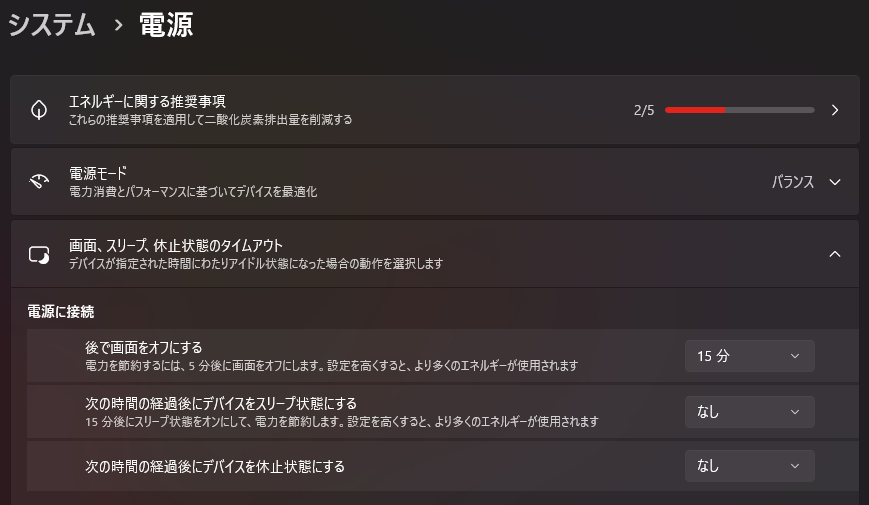
会社PCなどでは、管理者権限や組織のポリシーによって設定を変更できない場合があります。その場合は無理に変更せず、管理者や担当者へ確認してください。
スリープ設定案内をモーダルで表示する
スリープ設定の説明を見るために別ページへ移動すると、タイマー設定の途中で画面が切り替わってしまいます。
そこで、今回はページ内のモーダルとして案内を表示するようにしました。
openSleepGuideButton.addEventListener("click", () => sleepGuideDialog.showModal());
closeSleepGuideButton.addEventListener("click", () => sleepGuideDialog.close());
sleepGuideDialog.addEventListener("click", (event) => {
  if (event.target === sleepGuideDialog) sleepGuideDialog.close();
});
showModal() で案内を開き、close() で閉じます。
閉じるボタンだけでなく、モーダルの外側を押した場合も閉じるようにしています。
【画像を挿入:Windows 11スリープ設定案内モーダル】
ChromeとEdgeでスリープ防止を確認
今回のVer.1.0では、実際に使う可能性が高いGoogle ChromeとMicrosoft Edgeを中心に確認しました。
フルスクリーン表示、フルスクリーン解除、操作パネルの自動非表示と再表示、Wake Lockによるスリープ対策、通常のタイマー動作を確認しています。
また、前回までに追加した保存・復元、個別延長、終了演出、テーマ切り替えなども、今回の変更で壊れていないか確認しました。
新しい機能が動くだけではなく、前回までに完成した機能が壊れていないこともVer.1.0の大切な確認項目です。
Chromeでの最終確認
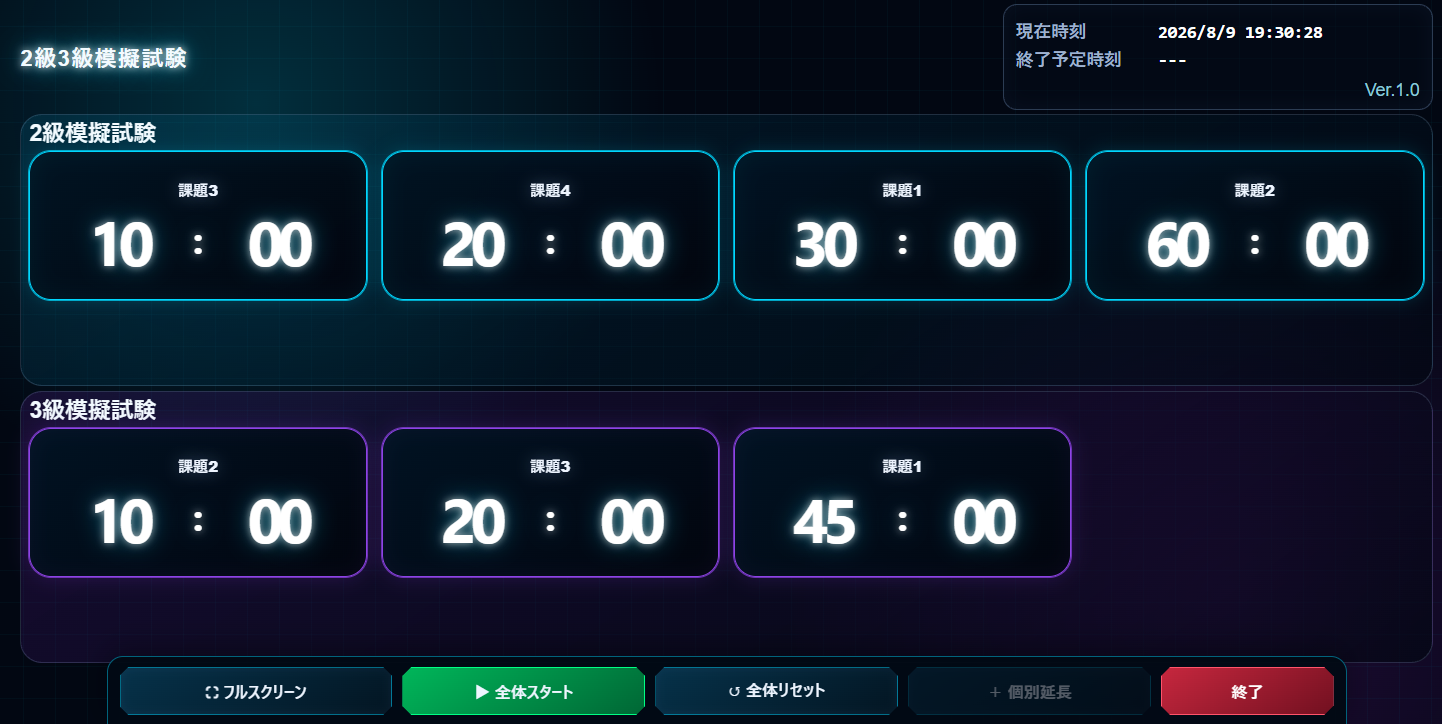
Microsoft Edgeでの最終確認
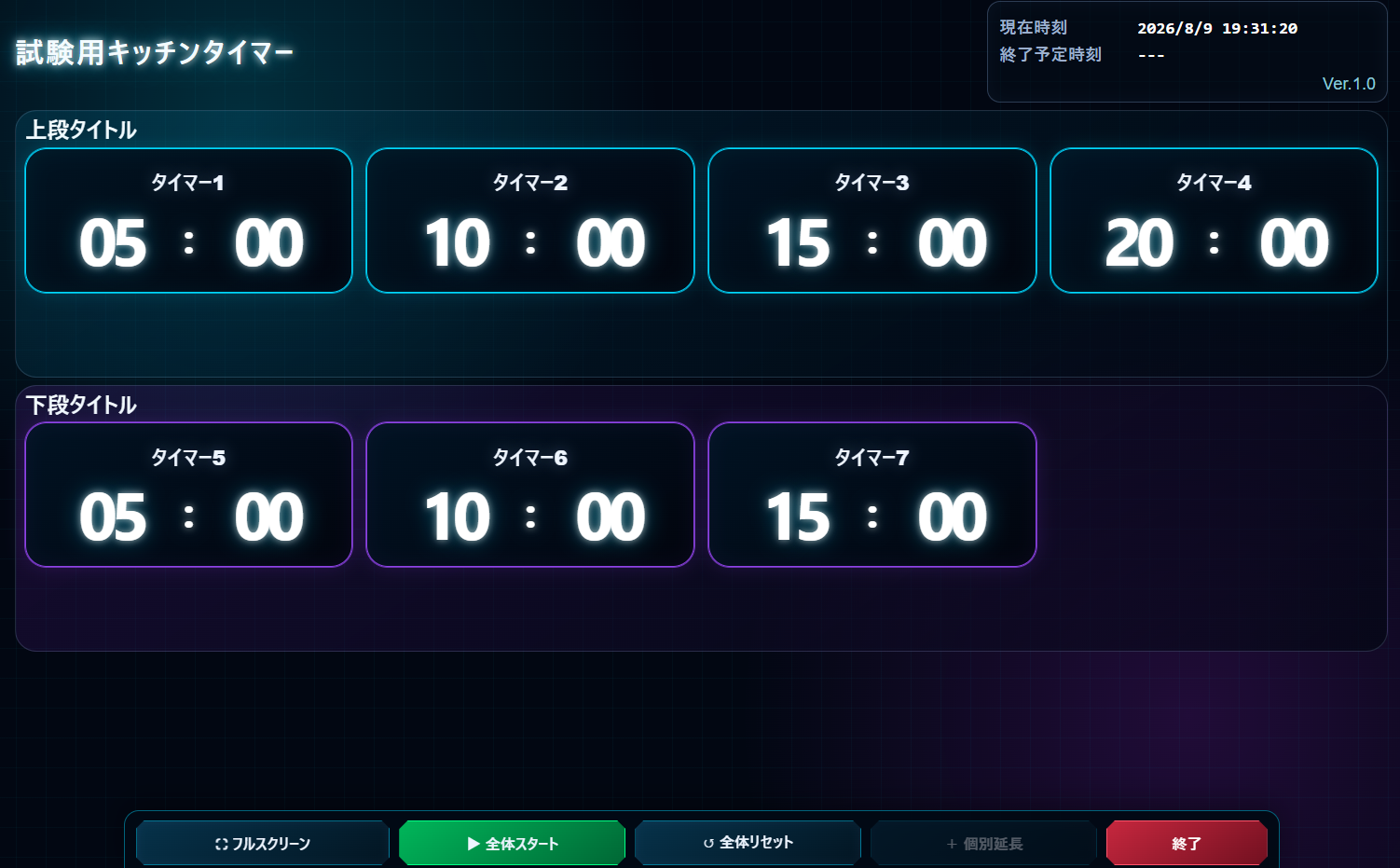
今回新しく使ったJavaScriptの仕組み
第10回で新しく登場した主なJavaScriptの仕組みを整理しておきます。
| 仕組み | 今回の用途 |
|---|---|
requestFullscreen() | ブラウザをフルスクリーン表示へ切り替える |
exitFullscreen() | フルスクリーン表示を解除する |
document.fullscreenElement | 現在フルスクリーン中かどうかを確認する |
fullscreenchange | 全画面表示・解除の変化を検知する |
navigator.wakeLock.request("screen") | 画面スリープを防ぐようブラウザへ要求する |
visibilitychange | 別タブから戻ったときなどにWake Lockの再取得を試す |
showModal() | Windows 11の設定案内をモーダル表示する |
close() | モーダルを閉じる |
全部を暗記する必要はありません。「ブラウザには全画面表示やスリープ防止を扱うための仕組みも用意されている」くらいから覚えておけば大丈夫です。
Ver.1.0でできるようになったこと
第1回から第10回まで作ってきた結果、Ver.1.0では次のようなことができるようになりました。
- 上段1~4個、下段0~4個のタイマーを設定
- 段ごとに累積時間/個別時間を選択
- 全タイマーを一斉スタート
- 通常タイマー、段全体、試験全体の終了表示
- マシントラブル時の個別延長タイマーを最大4個追加
- 個別延長時間の追加・減算と履歴表示
- 7種類の外観テーマを切り替え
- 設定内容をブラウザへ自動保存
- ブラウザ終了やPC再起動後に実行状態を復元
- 現在日時と最終終了予定日時を表示
- 保存期限を過ぎた実行データだけを自動破棄
- フルスクリーン表示
- Screen Wake Lock APIによるスリープ防止の補助
- Windows 11のスリープ設定方法をアプリ内で確認
最初は「試験用にキッチンタイマーが1個欲しい」というところから始まりましたが、かなり本格的な試験用タイマーボードになりました。
完成版を確認する
今回の完成版は、これまでと同じように別ページで実際に操作できます。
記事内でも確認できるように、完成版を埋め込んでおきます。
フルスクリーン表示やWake Lockなど、ブラウザの表示状態に関係する機能は、記事内の埋め込み表示よりも「別画面で開く」から確認した方が分かりやすい場合があります。
試験用キッチンタイマー Ver.1.0完成
これで、試験用キッチンタイマー Ver.1.0の完成です。
第1回では、分と秒を入力してスタート・一時停止・再開・リセットができるだけの小さなタイマーでした。
そこから実際の試験で必要になりそうな機能を一つずつ足していき、第10回で全画面表示とスリープ対策まで追加しました。
最初に完成形を全部決めて一気に作るのではなく、実際に使いながら「次はこれが欲しい」と追加していく作り方だったので、途中で何度も仕様が変わりました。
のんびり研究所では、完成した結果だけでなく、途中で困ったこと、試したこと、失敗したこと、仕様を変えた理由も開発記録として残しています。
Ver.1.0になったので、まずはこの状態で実際の運用に使ってみます。使ってみて初めて分かることが出てきたら、そのときにまた直していけば大丈夫です。
この先のキッチンタイマーについて
第10回で、本編の制作シリーズはいったん一区切りです。現時点では、第11回として追加する大きな機能は予定していません。
今後、大きな機能を追加して制作過程そのものを記事にしたくなった場合は、第11回、第12回とシリーズを続けます。
記事を1本作るほどではない小さな改善なら、Ver.1.1、Ver.1.2のようにバージョンを上げ、更新履歴として残していく予定です。
また、今回使ったJavaScriptの仕組みだけを詳しく取り上げたい場合は、キッチンタイマー本編とは別の技術メモとしてまとめてもよさそうです。
試験用キッチンタイマー制作シリーズは、これでVer.1.0完成。今後は実際に使いながら、必要になったときだけ少しずつ育てていきます。
ここまで読んでいただき、ありがとうございました。