このシリーズについて
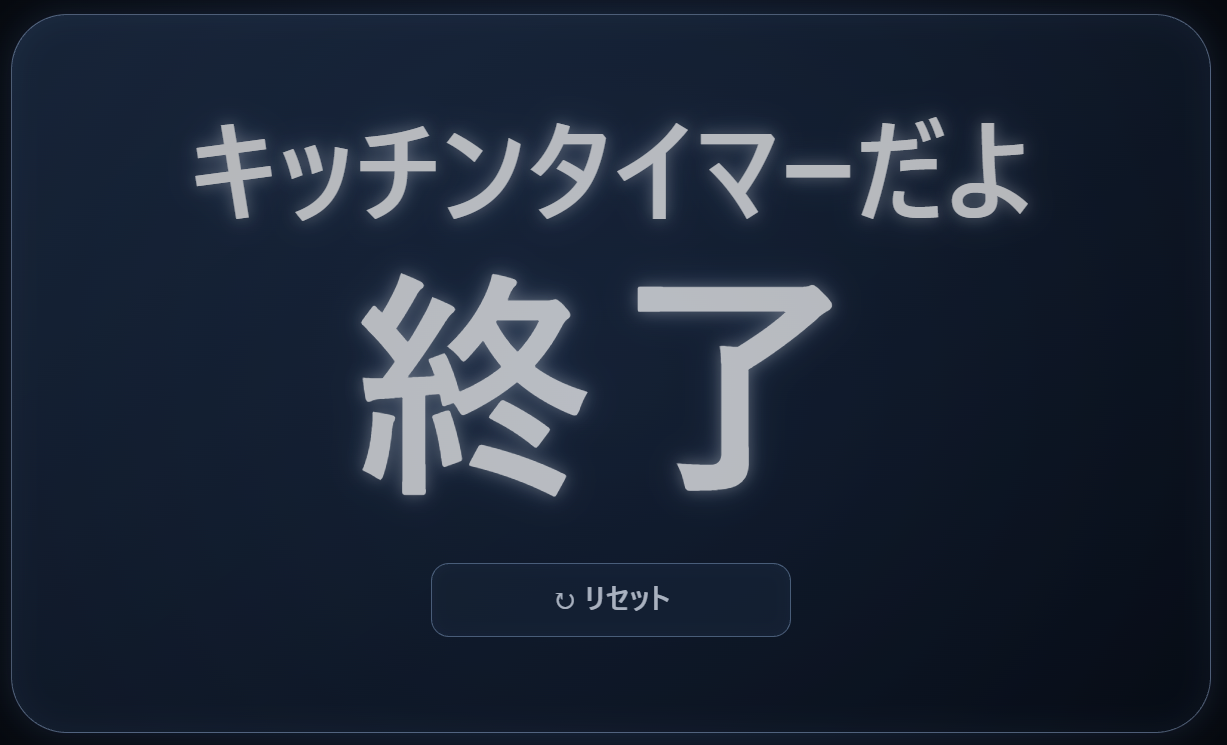
前回は、タイマーが0秒になったときにパネルが回転し、タイマー名と「終了」を表示する仕組みを追加しました。
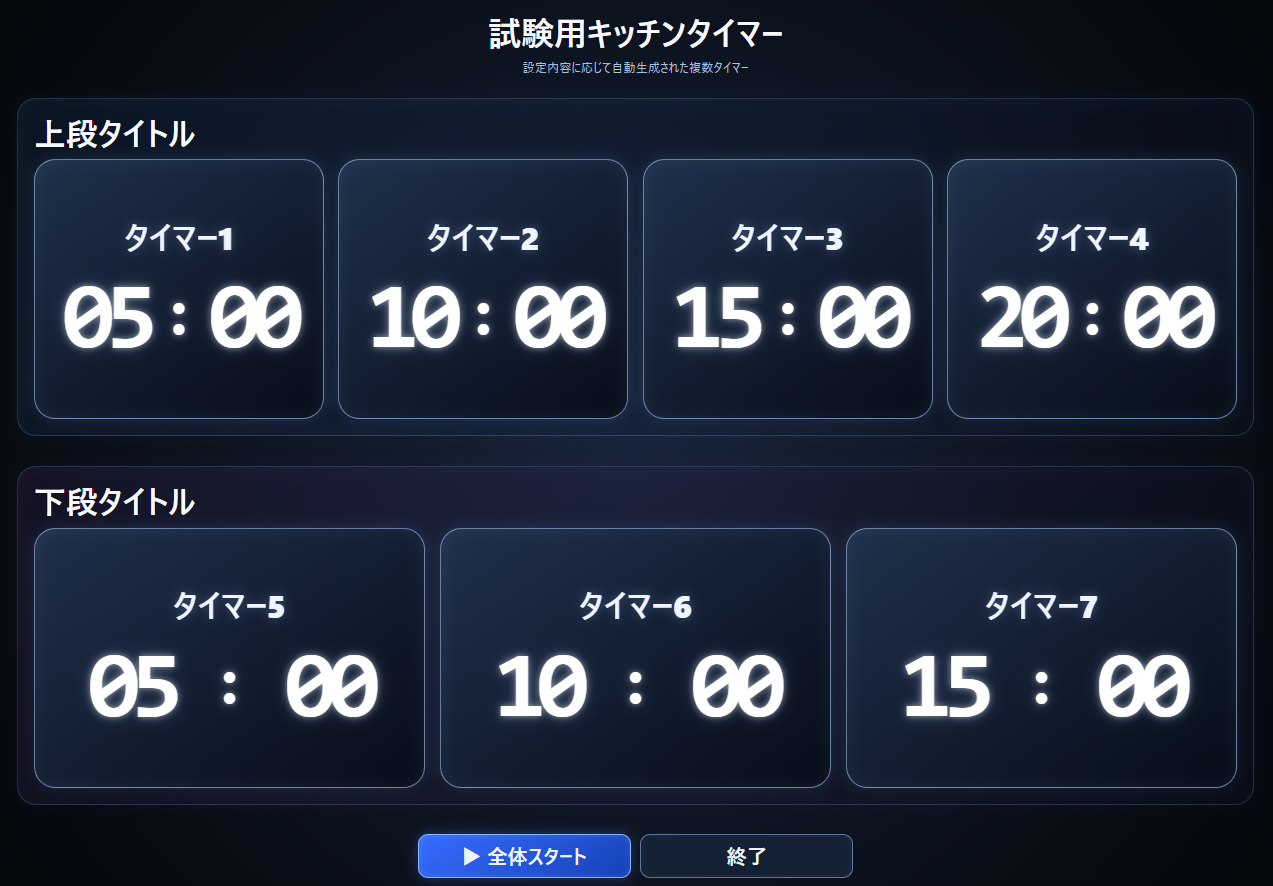
今回は、いよいよタイマーを複数に増やします。上段に4個、下段に3個を並べ、上段だけ、下段だけ、または全体をまとめて開始できるようにします。
今回も、必要な機能と画面構成はきょろぽんが考え、HTML・CSS・JavaScriptのソースコード作成はAIのノンが担当します。完成したコードを実際に動かし、表示や操作感を確認しながら調整していきます。
今回作るもの
第3回までは、1画面にタイマーが1個だけ表示されていました。しかし、模擬試験では複数の課題が同時に進み、それぞれ終了時刻が異なることがあります。毎回ブラウザを何個も開くのではなく、1画面にまとめて表示できるようにします。
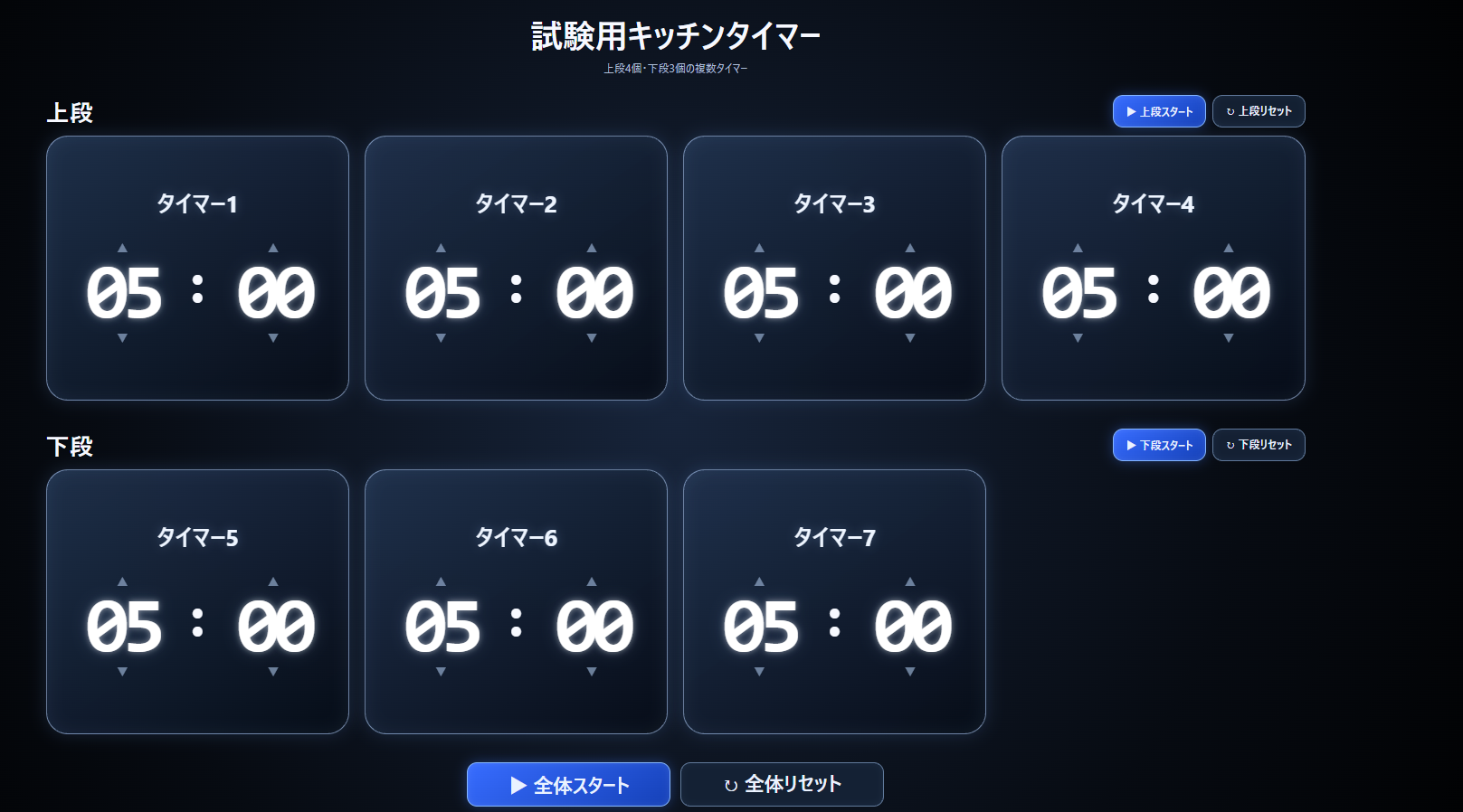
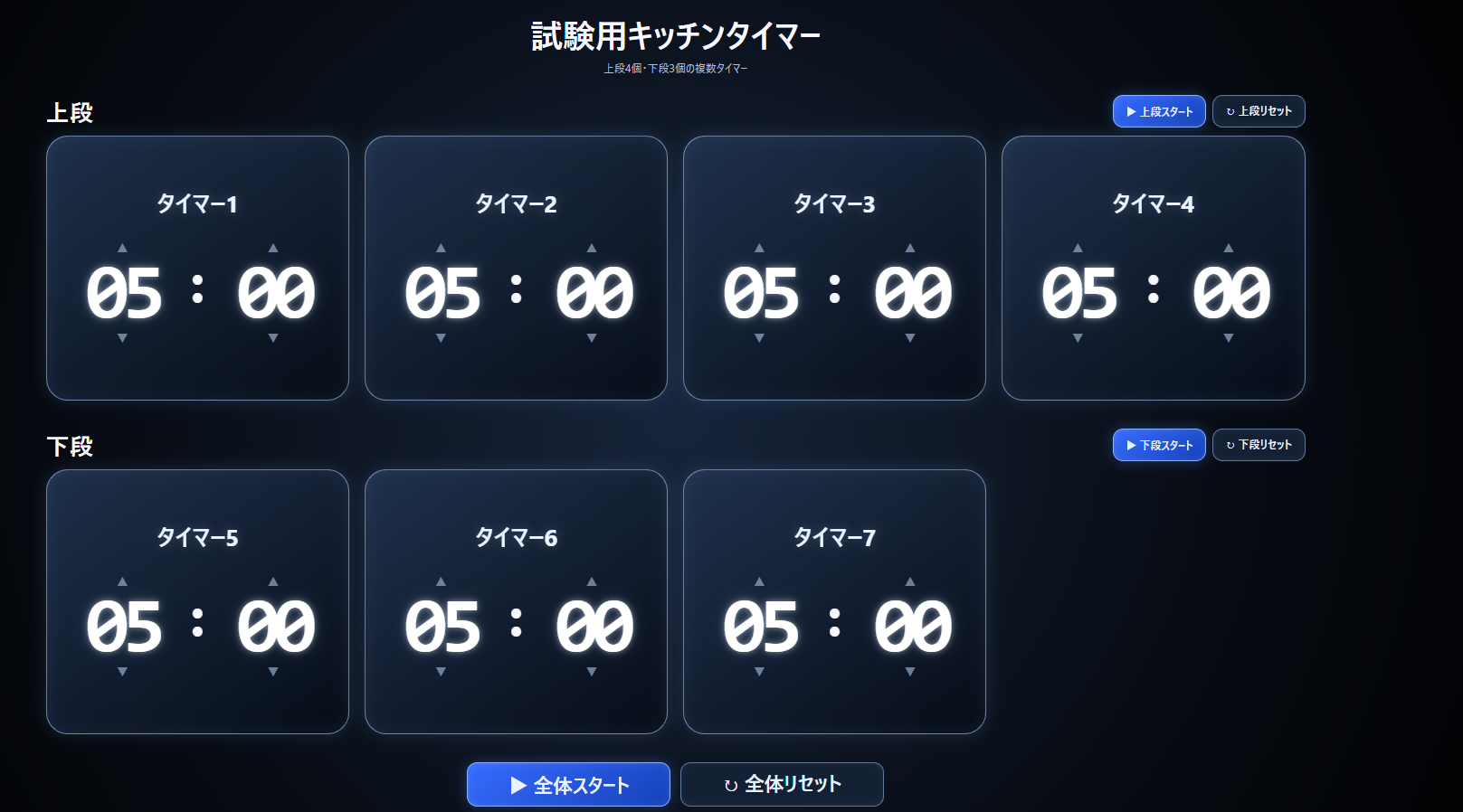
今回の完成形は、次の構成です。
- 上段にタイマー1~4を表示
- 下段にタイマー5~7を左寄せで表示
- 下段の右端は、今後追加する機能のために1個分空ける
- 上段スタートと上段リセット
- 下段スタートと下段リセット
- 全体スタートと全体リセット
- 各タイマーは別々の時間で終了する
- 終了したパネルだけが回転し、不透明度70%になる
今回は複数タイマーの基本部分に集中するため、タイマーの個数は固定です。上段・下段の個数を自由に選べる機能は、次回以降に追加します。
第3回のフォルダをコピーする
前回と同じように、完成済みのフォルダを直接編集せず、VSCodeで03フォルダをコピーして04フォルダを作ります。
KITCHEN-TIMER/
├─ 01/
├─ 02/
├─ 03/
└─ 04/
   ├─ index.html
   ├─ style.css
   └─ script.js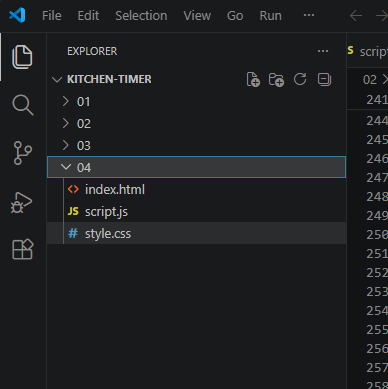
各回の完成状態を番号フォルダへ残しておくと、前回との比較がしやすくなります。修正中に表示が崩れても、前回の完成版へすぐ戻れます。
完成したソースコード
ここからは、第4回完成時点の3ファイルを全文掲載します。
index.html
index.html のソースコードを表示
<!DOCTYPE html>
<html lang="ja">
<head>
  <meta charset="UTF-8">
  <meta name="viewport" content="width=device-width, initial-scale=1.0">
  <title>試験用キッチンタイマー</title>
  <link rel="stylesheet" href="style.css">
</head>
<body>
  <main class="timer-page">
    <header class="page-header">
      <h1>試験用キッチンタイマー</h1>
      <p>上段4個・下段3個の複数タイマー</p>
    </header>

    <section class="timer-section" aria-labelledby="upper-heading">
      <div class="section-heading">
        <h2 id="upper-heading">上段</h2>
        <div class="section-controls">
          <button class="section-start-button" type="button" data-start-group="upper">
            ▶ 上段スタート
          </button>
          <button class="section-reset-button" type="button" data-reset-group="upper">
            ↻ 上段リセット
          </button>
        </div>
      </div>

      <div class="timer-grid timer-grid-upper">
        <article class="timer-panel" data-timer-id="1" data-group="upper"></article>
        <article class="timer-panel" data-timer-id="2" data-group="upper"></article>
        <article class="timer-panel" data-timer-id="3" data-group="upper"></article>
        <article class="timer-panel" data-timer-id="4" data-group="upper"></article>
      </div>
    </section>

    <section class="timer-section" aria-labelledby="lower-heading">
      <div class="section-heading">
        <h2 id="lower-heading">下段</h2>
        <div class="section-controls">
          <button class="section-start-button" type="button" data-start-group="lower">
            ▶ 下段スタート
          </button>
          <button class="section-reset-button" type="button" data-reset-group="lower">
            ↻ 下段リセット
          </button>
        </div>
      </div>

      <div class="timer-grid timer-grid-lower">
        <article class="timer-panel" data-timer-id="5" data-group="lower"></article>
        <article class="timer-panel" data-timer-id="6" data-group="lower"></article>
        <article class="timer-panel" data-timer-id="7" data-group="lower"></article>
      </div>
    </section>

    <div class="overall-controls">
      <button id="start-all-button" class="start-all-button" type="button">
        ▶ 全体スタート
      </button>
      <button id="reset-all-button" class="reset-all-button" type="button">
        ↻ 全体リセット
      </button>
    </div>
  </main>

  <template id="timer-template">
    <div class="timer-panel-inner">
      <div class="timer-face timer-face-front">
        <button class="timer-title" type="button" aria-label="タイマー名を変更"></button>

        <p class="error-message" aria-live="polite"></p>

        <div class="time-editor" aria-label="時間設定">
          <div class="time-unit">
            <button class="adjust-button" type="button" data-target="minutes" data-change="1" aria-label="分を1増やす">▲</button>
            <button class="time-number minutes-display" type="button" aria-label="分を直接入力">05</button>
            <button class="adjust-button" type="button" data-target="minutes" data-change="-1" aria-label="分を1減らす">▼</button>
          </div>

          <span class="time-colon" aria-hidden="true">:</span>

          <div class="time-unit">
            <button class="adjust-button" type="button" data-target="seconds" data-change="1" aria-label="秒を1増やす">▲</button>
            <button class="time-number seconds-display" type="button" aria-label="秒を直接入力">00</button>
            <button class="adjust-button" type="button" data-target="seconds" data-change="-1" aria-label="秒を1減らす">▼</button>
          </div>
        </div>
      </div>

      <div class="timer-face timer-face-back" aria-live="polite">
        <div class="finished-message">
          <p class="finished-title"></p>
          <p class="finished-text">終了</p>
        </div>

      </div>
    </div>
  </template>

  <script src="script.js"></script>
</body>
</html>
style.css
style.css のソースコードを表示
* {
  box-sizing: border-box;
}

:root {
  color-scheme: dark;
  font-family: "Segoe UI", "Yu Gothic UI", "Meiryo", sans-serif;
}

body {
  min-width: 320px;
  min-height: 100vh;
  margin: 0;
  background: radial-gradient(circle at center, #17243a 0%, #070b12 60%, #000 100%);
  color: #f7f9ff;
}

button {
  font: inherit;
  -webkit-tap-highlight-color: transparent;
}

.timer-page {
  width: min(1920px, 100%);
  min-height: 100vh;
  margin: 0 auto;
  padding: clamp(14px, 2vw, 32px);
}

.page-header {
  margin-bottom: clamp(18px, 2vw, 30px);
  text-align: center;
}

.page-header h1,
.page-header p,
.section-heading h2 {
  margin: 0;
}

.page-header h1 {
  font-size: clamp(1.7rem, 3vw, 3rem);
}

.page-header p {
  margin-top: 6px;
  color: #aebfd8;
}

.timer-section {
  margin-bottom: clamp(22px, 3vw, 42px);
}

.section-heading {
  display: flex;
  align-items: center;
  justify-content: space-between;
  gap: 16px;
  margin-bottom: 12px;
}

.section-heading h2 {
  font-size: clamp(1.4rem, 2.2vw, 2.2rem);
}

.timer-grid {
  display: grid;
  grid-template-columns: repeat(4, minmax(0, 1fr));
  gap: clamp(10px, 1.2vw, 22px);
}

.timer-grid-lower {
  justify-content: start;
}

.timer-panel {
  min-width: 0;
  perspective: 1200px;
  transition: opacity 0.35s ease;
}

.timer-panel-inner {
  display: grid;
  width: 100%;
  min-height: clamp(245px, 22vw, 390px);
  transform-style: preserve-3d;
  transition: transform 0.7s ease-in-out;
}

.timer-panel.is-finished {
  opacity: 0.7;
}

.timer-panel.is-finished .timer-panel-inner {
  transform: rotateY(180deg);
}

.timer-face {
  grid-area: 1 / 1;
  display: grid;
  width: 100%;
  padding: clamp(12px, 1.4vw, 24px);
  border: 1px solid rgba(182, 211, 255, 0.55);
  border-radius: clamp(18px, 2vw, 32px);
  background: linear-gradient(145deg, rgba(32, 50, 78, 0.92), rgba(6, 12, 23, 0.96));
  box-shadow: 0 0 24px rgba(116, 168, 255, 0.16), inset 0 0 24px rgba(158, 200, 255, 0.08);
  text-align: center;
  backface-visibility: hidden;
  -webkit-backface-visibility: hidden;
}

.timer-face-front {
  align-content: center;
}

.timer-face-back {
  align-content: center;
  justify-items: center;
  gap: clamp(16px, 2vw, 30px);
  transform: rotateY(180deg);
}

.timer-title {
  max-width: 100%;
  margin: 0 auto 4px;
  padding: 3px 8px;
  border: 0;
  border-bottom: 2px solid transparent;
  background: transparent;
  color: #eef5ff;
  font-size: clamp(1.15rem, 2vw, 2.15rem);
  font-weight: 700;
  line-height: 1.15;
  cursor: text;
  text-shadow: 0 0 14px rgba(159, 198, 255, 0.32);
  overflow-wrap: anywhere;
}

.timer-title:hover,
.timer-title:focus-visible {
  border-bottom-color: rgba(164, 202, 255, 0.7);
  outline: none;
}

.error-message {
  min-height: 1.4em;
  margin: 0;
  color: #ff9a9a;
  font-size: clamp(0.7rem, 0.9vw, 0.95rem);
  font-weight: 700;
}

.time-editor {
  display: grid;
  grid-template-columns: minmax(0, 1fr) auto minmax(0, 1fr);
  align-items: center;
  gap: 2px;
  width: 100%;
}

.time-unit {
  display: grid;
  min-width: 0;
  justify-items: center;
}

.time-number {
  width: 100%;
  min-width: 0;
  padding: 0;
  border: 0;
  background: transparent;
  color: #fff;
  font-family: Consolas, "Roboto Mono", "Courier New", monospace;
  font-size: clamp(3.2rem, 7vw, 7.2rem);
  font-weight: 700;
  line-height: 0.9;
  letter-spacing: -0.08em;
  cursor: text;
  text-shadow: 0 0 10px rgba(255, 255, 255, 0.48), 0 0 24px rgba(153, 194, 255, 0.2);
}

.time-number:hover,
.time-number:focus-visible {
  outline: none;
  text-shadow: 0 0 14px rgba(255, 255, 255, 0.72), 0 0 30px rgba(125, 177, 255, 0.34);
}

.time-colon {
  padding-bottom: clamp(12px, 2vw, 26px);
  font-family: Consolas, "Roboto Mono", "Courier New", monospace;
  font-size: clamp(2.7rem, 4vw, 5rem);
  font-weight: 700;
  line-height: 1;
}

.adjust-button {
  width: 42px;
  min-height: 30px;
  padding: 0;
  border: 0;
  background: transparent;
  color: #91a8c8;
  font-size: clamp(0.85rem, 1.2vw, 1.2rem);
  cursor: pointer;
  opacity: 0.72;
}

.adjust-button:hover,
.adjust-button:focus-visible {
  color: #d9e8ff;
  opacity: 1;
  outline: none;
  transform: scale(1.12);
}

.timer-panel.is-running .adjust-button {
  visibility: hidden;
}

.timer-title:disabled,
.time-number:disabled,
.adjust-button:disabled {
  cursor: not-allowed;
  opacity: 0.35;
}

.finished-message {
  display: grid;
  justify-items: center;
  gap: 8px;
  width: 100%;
}

.finished-title,
.finished-text {
  max-width: 100%;
  margin: 0;
  color: #fff;
  font-weight: 700;
  line-height: 1.05;
  overflow-wrap: anywhere;
  text-shadow: 0 0 14px rgba(255, 255, 255, 0.4), 0 0 28px rgba(153, 194, 255, 0.24);
}

.finished-title {
  font-size: clamp(1.45rem, 2.6vw, 2.8rem);
}

.finished-text {
  font-size: clamp(3.3rem, 6vw, 6.5rem);
  letter-spacing: 0.08em;
}

.section-start-button,
.section-reset-button,
.start-all-button,
.reset-all-button {
  min-height: 48px;
  padding: 10px 18px;
  border: 1px solid #84b6ff;
  border-radius: 15px;
  background: linear-gradient(145deg, #376cff, #1541b8);
  color: #eaf2ff;
  font-weight: 700;
  cursor: pointer;
  box-shadow: 0 0 18px rgba(71, 126, 255, 0.35), inset 0 0 10px rgba(255, 255, 255, 0.1);
}

.section-start-button:hover:not(:disabled),
.section-start-button:focus-visible:not(:disabled),
.section-reset-button:hover,
.section-reset-button:focus-visible,
.start-all-button:hover:not(:disabled),
.start-all-button:focus-visible:not(:disabled),
.reset-all-button:hover,
.reset-all-button:focus-visible {
  filter: brightness(1.14);
  outline: 3px solid rgba(155, 198, 255, 0.32);
  outline-offset: 3px;
}

.section-start-button:disabled,
.start-all-button:disabled {
  cursor: not-allowed;
  opacity: 0.35;
}

.section-controls {
  display: flex;
  gap: 10px;
}

.section-reset-button,
.reset-all-button {
  border-color: rgba(151, 184, 227, 0.58);
  background: rgba(21, 34, 54, 0.9);
  box-shadow: inset 0 0 10px rgba(122, 169, 236, 0.08);
}

.overall-controls {
  display: flex;
  justify-content: center;
  gap: 14px;
  padding-bottom: 18px;
}

.start-all-button,
.reset-all-button {
  min-width: min(300px, 46%);
  min-height: 64px;
  font-size: clamp(1.2rem, 2vw, 1.8rem);
}

@media (max-width: 980px) {
  .timer-grid {
    grid-template-columns: repeat(2, minmax(0, 1fr));
  }

  .timer-grid-lower .timer-panel:nth-child(3) {
    grid-column: 1;
  }

  .time-number {
    font-size: clamp(3.8rem, 13vw, 7rem);
  }
}

@media (max-width: 560px) {
  .timer-page {
    padding: 10px;
  }

  .section-heading {
    align-items: stretch;
    flex-direction: column;
  }

  .section-controls {
    display: grid;
    grid-template-columns: 1fr 1fr;
  }

  .section-start-button,
  .section-reset-button {
    width: 100%;
  }

  .overall-controls {
    display: grid;
    grid-template-columns: 1fr;
  }

  .start-all-button,
  .reset-all-button {
    width: 100%;
    min-width: 0;
  }

  .timer-grid {
    grid-template-columns: 1fr;
  }

  .timer-panel-inner {
    min-height: 300px;
  }

  .time-number {
    font-size: clamp(5rem, 28vw, 8.5rem);
  }

  .time-colon {
    font-size: clamp(3.4rem, 14vw, 5rem);
  }
}

@media (prefers-reduced-motion: reduce) {
  * {
    scroll-behavior: auto !important;
    transition: none !important;
  }
}
script.js
script.js のソースコードを表示
const DEFAULT_MINUTES = 5;
const DEFAULT_SECONDS = 0;
const UPDATE_INTERVAL = 200;

const timerTemplate = document.getElementById("timer-template");
const panelElements = [...document.querySelectorAll(".timer-panel")];
const groupStartButtons = [...document.querySelectorAll("[data-start-group]")];
const groupResetButtons = [...document.querySelectorAll("[data-reset-group]")];
const startAllButton = document.getElementById("start-all-button");
const resetAllButton = document.getElementById("reset-all-button");

function padNumber(value) {
  return String(value).padStart(2, "0");
}

function formatTime(milliseconds) {
  const totalSeconds = Math.max(0, Math.ceil(milliseconds / 1000));

  return {
    minutes: padNumber(Math.floor(totalSeconds / 60)),
    seconds: padNumber(totalSeconds % 60)
  };
}

class TimerPanel {
  constructor(panelElement) {
    this.panel = panelElement;
    this.timerId = panelElement.dataset.timerId;
    this.group = panelElement.dataset.group;

    this.selectedMinutes = DEFAULT_MINUTES;
    this.selectedSeconds = DEFAULT_SECONDS;
    this.intervalId = null;
    this.endTime = 0;
    this.remainingMilliseconds = 0;
    this.isRunning = false;
    this.isFinished = false;

    this.buildPanel();
    this.bindEvents();
    this.updateSelectedDisplay();
  }

  buildPanel() {
    const content = timerTemplate.content.cloneNode(true);
    this.panel.appendChild(content);

    this.titleButton = this.panel.querySelector(".timer-title");
    this.minutesDisplay = this.panel.querySelector(".minutes-display");
    this.secondsDisplay = this.panel.querySelector(".seconds-display");
    this.adjustButtons = [...this.panel.querySelectorAll(".adjust-button")];
    this.errorMessage = this.panel.querySelector(".error-message");
    this.finishedTitle = this.panel.querySelector(".finished-title");

    this.titleButton.textContent = `タイマー${this.timerId}`;
    this.finishedTitle.textContent = `タイマー${this.timerId}`;
  }

  bindEvents() {
    this.adjustButtons.forEach((button) => {
      button.addEventListener("click", () => {
        this.changeTime(button.dataset.target, Number(button.dataset.change));
      });
    });

    this.titleButton.addEventListener("click", () => this.editTitle());
    this.minutesDisplay.addEventListener("click", () => this.editMinutes());
    this.secondsDisplay.addEventListener("click", () => this.editSeconds());
  }

  setError(message = "") {
    this.errorMessage.textContent = message;
  }

  updateSelectedDisplay() {
    this.minutesDisplay.textContent = padNumber(this.selectedMinutes);
    this.secondsDisplay.textContent = padNumber(this.selectedSeconds);
  }

  updateRunningDisplay(milliseconds) {
    const formatted = formatTime(milliseconds);
    this.minutesDisplay.textContent = formatted.minutes;
    this.secondsDisplay.textContent = formatted.seconds;
  }

  setEditingEnabled(enabled) {
    this.titleButton.disabled = !enabled;
    this.minutesDisplay.disabled = !enabled;
    this.secondsDisplay.disabled = !enabled;

    this.adjustButtons.forEach((button) => {
      button.disabled = !enabled;
    });
  }

  getSelectedMilliseconds() {
    if (this.selectedMinutes === 0 && this.selectedSeconds === 0) {
      this.setError("0分0秒では開始できません。");
      return null;
    }

    this.setError();
    return (this.selectedMinutes * 60 + this.selectedSeconds) * 1000;
  }

  changeTime(target, change) {
    if (this.isRunning || this.isFinished) {
      return;
    }

    if (target === "minutes") {
      this.selectedMinutes = Math.max(0, this.selectedMinutes + change);
    } else if (target === "seconds") {
      this.selectedSeconds = Math.min(59, Math.max(0, this.selectedSeconds + change));
    }

    this.updateSelectedDisplay();
    this.setError();
  }

  askForNumber(label, currentValue, minimum, maximum = null) {
    const value = window.prompt(`${label}を入力してください。`, String(currentValue));

    if (value === null) {
      return null;
    }

    const number = Number(value);
    const isOutsideRange = maximum !== null && number > maximum;

    if (!Number.isInteger(number) || number < minimum || isOutsideRange) {
      const range = maximum === null
        ? `${minimum}以上の整数`
        : `${minimum}~${maximum}の整数`;

      this.setError(`${label}は${range}で入力してください。`);
      return null;
    }

    this.setError();
    return number;
  }

  editMinutes() {
    if (this.isRunning || this.isFinished) {
      return;
    }

    const value = this.askForNumber("分", this.selectedMinutes, 0);

    if (value !== null) {
      this.selectedMinutes = value;
      this.updateSelectedDisplay();
    }
  }

  editSeconds() {
    if (this.isRunning || this.isFinished) {
      return;
    }

    const value = this.askForNumber("秒", this.selectedSeconds, 0, 59);

    if (value !== null) {
      this.selectedSeconds = value;
      this.updateSelectedDisplay();
    }
  }

  editTitle() {
    if (this.isRunning || this.isFinished) {
      return;
    }

    const value = window.prompt(
      "タイマー名を入力してください。",
      this.titleButton.textContent.trim()
    );

    if (value === null) {
      return;
    }

    this.titleButton.textContent = value.trim() || `タイマー${this.timerId}`;
  }

  canStart() {
    return !this.isRunning && !this.isFinished;
  }

  validateStart() {
    return this.canStart() && this.getSelectedMilliseconds() !== null;
  }

  start() {
    if (!this.canStart()) {
      return false;
    }

    const selectedMilliseconds = this.getSelectedMilliseconds();

    if (selectedMilliseconds === null) {
      return false;
    }

    this.remainingMilliseconds = selectedMilliseconds;
    this.endTime = Date.now() + this.remainingMilliseconds;
    this.isRunning = true;

    this.panel.classList.add("is-running");
    this.setEditingEnabled(false);
    this.updateDisplay();

    this.intervalId = window.setInterval(() => this.updateDisplay(), UPDATE_INTERVAL);
    return true;
  }

  updateDisplay() {
    if (!this.isRunning) {
      return;
    }

    this.remainingMilliseconds = Math.max(0, this.endTime - Date.now());
    this.updateRunningDisplay(this.remainingMilliseconds);

    if (this.remainingMilliseconds <= 0) {
      this.finish();
    }
  }

  finish() {
    window.clearInterval(this.intervalId);
    this.intervalId = null;
    this.isRunning = false;
    this.isFinished = true;
    this.remainingMilliseconds = 0;

    this.panel.classList.remove("is-running");
    this.updateRunningDisplay(0);
    this.finishedTitle.textContent = this.titleButton.textContent.trim() || `タイマー${this.timerId}`;
    this.setEditingEnabled(false);
    this.panel.classList.add("is-finished");

    updateStartButtonStates();
  }

  reset() {
    window.clearInterval(this.intervalId);
    this.intervalId = null;
    this.endTime = 0;
    this.remainingMilliseconds = 0;
    this.isRunning = false;
    this.isFinished = false;

    this.selectedMinutes = DEFAULT_MINUTES;
    this.selectedSeconds = DEFAULT_SECONDS;

    this.panel.classList.remove("is-running", "is-finished");
    this.setEditingEnabled(true);
    this.updateSelectedDisplay();
    this.setError();

    updateStartButtonStates();
  }
}

const timers = panelElements.map((panel) => new TimerPanel(panel));

function getTimersByGroup(group) {
  return timers.filter((timer) => timer.group === group);
}

function startTimers(targetTimers) {
  const startableTimers = targetTimers.filter((timer) => timer.canStart());

  if (startableTimers.length === 0) {
    return;
  }

  const allValid = startableTimers.every((timer) => timer.validateStart());

  if (!allValid) {
    return;
  }

  startableTimers.forEach((timer) => timer.start());
  updateStartButtonStates();
}

function updateStartButtonStates() {
  groupStartButtons.forEach((button) => {
    const groupTimers = getTimersByGroup(button.dataset.startGroup);
    button.disabled = !groupTimers.some((timer) => timer.canStart());
  });

  startAllButton.disabled = !timers.some((timer) => timer.canStart());
}

groupStartButtons.forEach((button) => {
  button.addEventListener("click", () => {
    startTimers(getTimersByGroup(button.dataset.startGroup));
  });
});

groupResetButtons.forEach((button) => {
  button.addEventListener("click", () => {
    getTimersByGroup(button.dataset.resetGroup).forEach((timer) => timer.reset());
  });
});

startAllButton.addEventListener("click", () => startTimers(timers));
resetAllButton.addEventListener("click", () => {
  timers.forEach((timer) => timer.reset());
});

updateStartButtonStates();
ソース内解説
上段と下段を作る
まず、タイマーを置く場所を上段と下段の2つに分けます。それぞれをsection要素で囲み、上段には4個、下段には3個の空のarticle要素を用意しました。
<section class="timer-section" aria-labelledby="upper-heading">
  <div class="section-heading">
    <h2 id="upper-heading">上段</h2>
    <div class="section-controls">
      <button class="section-start-button" type="button" data-start-group="upper">
        ▶ 上段スタート
      </button>
      <button class="section-reset-button" type="button" data-reset-group="upper">
        ↻ 上段リセット
      </button>
    </div>
  </div>

  <div class="timer-grid timer-grid-upper">
    <article class="timer-panel" data-timer-id="1" data-group="upper"></article>
    <article class="timer-panel" data-timer-id="2" data-group="upper"></article>
    <article class="timer-panel" data-timer-id="3" data-group="upper"></article>
    <article class="timer-panel" data-timer-id="4" data-group="upper"></article>
  </div>
</section>各パネルには、data-timer-idとdata-groupという情報を付けています。
data-timer-id:タイマー番号data-group:上段か下段かを表すグループ名
data-から始まる属性は、HTML要素へ独自の情報を持たせるために使えます。JavaScriptからはdatasetを使って読み取れます。
同じパネルを何度も書かずにtemplateを使う
7個のタイマーへ同じHTMLを何度も書くと、修正箇所も7倍になります。そこで今回は、共通のタイマーパネルをtemplate要素へ1つだけ書き、JavaScriptで複製する形にしました。
<template id="timer-template">
  <div class="timer-panel-inner">
    <div class="timer-face timer-face-front">
      <button class="timer-title" type="button"></button>
      <p class="error-message" aria-live="polite"></p>

      <div class="time-editor" aria-label="時間設定">
        <!-- 分と秒の設定部分 -->
      </div>
    </div>

    <div class="timer-face timer-face-back" aria-live="polite">
      <div class="finished-message">
        <p class="finished-title"></p>
        <p class="finished-text">終了</p>
      </div>
    </div>
  </div>
</template>templateの中身は、HTMLを読み込んだだけでは画面へ表示されません。JavaScriptで必要な数だけコピーして、各articleへ追加します。
CSSで4列のレイアウトを作る
上段と下段を同じ4列にする
タイマーパネルは、CSS Gridを使って4列に並べます。下段には3個しかありませんが、グリッド自体は上段と同じ4列です。そのため、3個は左から並び、右端に1個分の空きが残ります。
.timer-grid {
  display: grid;
  grid-template-columns: repeat(4, minmax(0, 1fr));
  gap: clamp(10px, 1.2vw, 22px);
}

.timer-grid-lower {
  justify-content: start;
}
【画像を挿入:下段が左寄せになり右端が1個分空いている画面】
画面幅に応じて2列・1列へ切り替える
パソコンでは4列で表示し、画面幅が狭くなったら2列、スマートフォンでは1列へ切り替えます。
@media (max-width: 980px) {
  .timer-grid {
    grid-template-columns: repeat(2, minmax(0, 1fr));
  }
}

@media (max-width: 560px) {
  .timer-grid {
    grid-template-columns: 1fr;
  }
}
実際に使用する中心は教室の大型ディスプレイですが、スマートフォンでも表示が崩れず操作できるようにしています。
JavaScriptで各タイマーを独立させる
TimerPanelクラスを作る
第3回までは、1個のタイマーに対して変数や処理を直接書いていました。今回は7個あるため、同じ変数名を7組作るのではなく、タイマー1個分の仕組みをTimerPanelクラスとしてまとめました。
class TimerPanel {
  constructor(panelElement) {
    this.panel = panelElement;
    this.timerId = panelElement.dataset.timerId;
    this.group = panelElement.dataset.group;

    this.selectedMinutes = DEFAULT_MINUTES;
    this.selectedSeconds = DEFAULT_SECONDS;
    this.intervalId = null;
    this.endTime = 0;
    this.remainingMilliseconds = 0;
    this.isRunning = false;
    this.isFinished = false;

    this.buildPanel();
    this.bindEvents();
    this.updateSelectedDisplay();
  }
}ここにあるthisは、「今扱っているタイマー自身」を表します。タイマー1ならタイマー1の時間や状態、タイマー5ならタイマー5の時間や状態が、それぞれ別に保存されます。
クラスは、同じ仕組みを持つものを複数作るときの設計図のようなものです。今回は、同じ機能を持つ7個のタイマーを作るために使っています。
templateをコピーしてパネルを作る
buildPanel() {
  const content = timerTemplate.content.cloneNode(true);
  this.panel.appendChild(content);

  this.titleButton = this.panel.querySelector(".timer-title");
  this.minutesDisplay = this.panel.querySelector(".minutes-display");
  this.secondsDisplay = this.panel.querySelector(".seconds-display");

  this.titleButton.textContent = `タイマー${this.timerId}`;
  this.finishedTitle.textContent = `タイマー${this.timerId}`;
}cloneNode(true)でtemplateの中身を丸ごとコピーし、appendChild()で各パネルへ追加します。タイマー番号はHTMLのdata-timer-idから読み取り、「タイマー1」「タイマー2」のように自動設定しています。
7個のタイマーをまとめて作る
const timers = panelElements.map((panel) => new TimerPanel(panel));map()は、複数の要素を順番に処理し、新しい配列を作る命令です。ここでは、画面上の7個のtimer-panelを順番にTimerPanelへ変換しています。
上段・下段・全体をまとめて操作する
グループ名で対象を絞り込む
function getTimersByGroup(group) {
  return timers.filter((timer) => timer.group === group);
}filter()は、条件に合うものだけを取り出す命令です。upperを指定すれば上段4個、lowerを指定すれば下段3個だけを取り出せます。
開始できるタイマーだけをまとめて開始する
function startTimers(targetTimers) {
  const startableTimers = targetTimers.filter((timer) => timer.canStart());

  if (startableTimers.length === 0) {
    return;
  }

  const allValid = startableTimers.every((timer) => timer.validateStart());

  if (!allValid) {
    return;
  }

  startableTimers.forEach((timer) => timer.start());
  updateStartButtonStates();
}ここでは、filter()、every()、forEach()を組み合わせています。
filter():開始できるタイマーだけを取り出すevery():すべての入力値が正しいか確認するforEach():対象タイマーを1個ずつ開始する
対象の中に0分0秒のタイマーがある場合は、その段や全体を開始しません。誤った入力のまま一部だけ開始されることを防いでいます。
段ごとのリセットと全体リセット
groupResetButtons.forEach((button) => {
  button.addEventListener("click", () => {
    getTimersByGroup(button.dataset.resetGroup).forEach((timer) => timer.reset());
  });
});

resetAllButton.addEventListener("click", () => {
  timers.forEach((timer) => timer.reset());
});
上段リセットは上段4個だけ、下段リセットは下段3個だけ、全体リセットは7個すべてを5分00秒へ戻します。動作中や終了済みでも、対象をまとめて初期化できます。
第3回では終了面に個別リセットボタンを置いていましたが、今回は段ごと・全体の操作へ整理したため、パネルごとのリセットは外しました。
動作を確認する
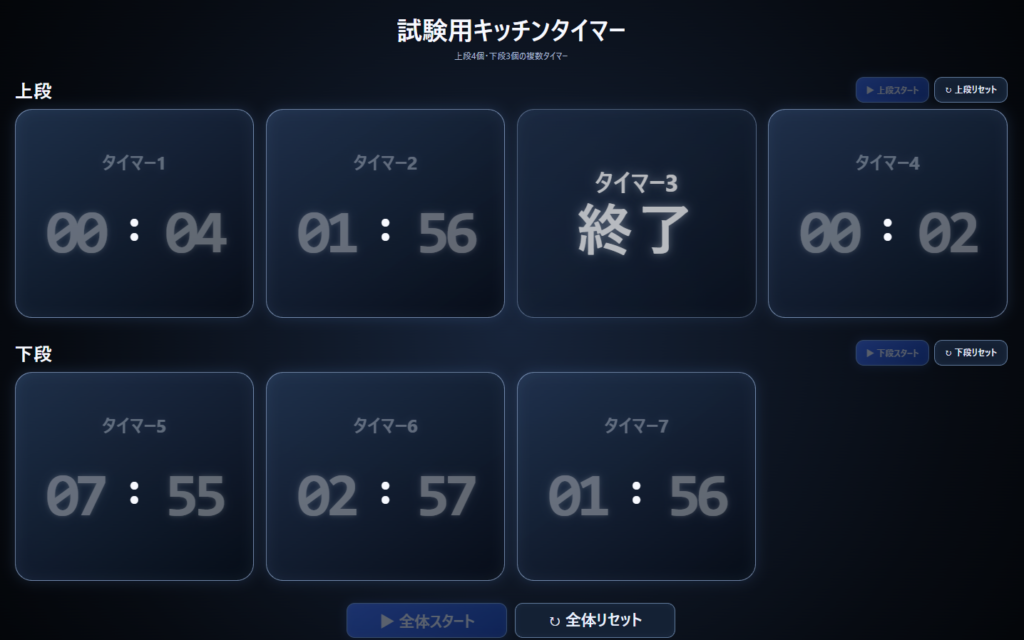
保存したら、index.htmlをブラウザで開いて確認します。今回は次の項目を試しました。
- 上段4個、下段3個が正しい位置に表示される
- 下段が中央ではなく左に寄り、右端が1個分空く
- 上段スタートで上段だけ開始する
- 下段スタートで下段だけ開始する
- 全体スタートで開始前のタイマーをすべて開始する
- 各タイマーが設定した時間で独立して終了する
- 終了したパネルだけが回転し、不透明度70%になる
- 上段・下段・全体リセットが対象だけを5分00秒へ戻す
- パソコンとスマートフォンで表示が崩れない
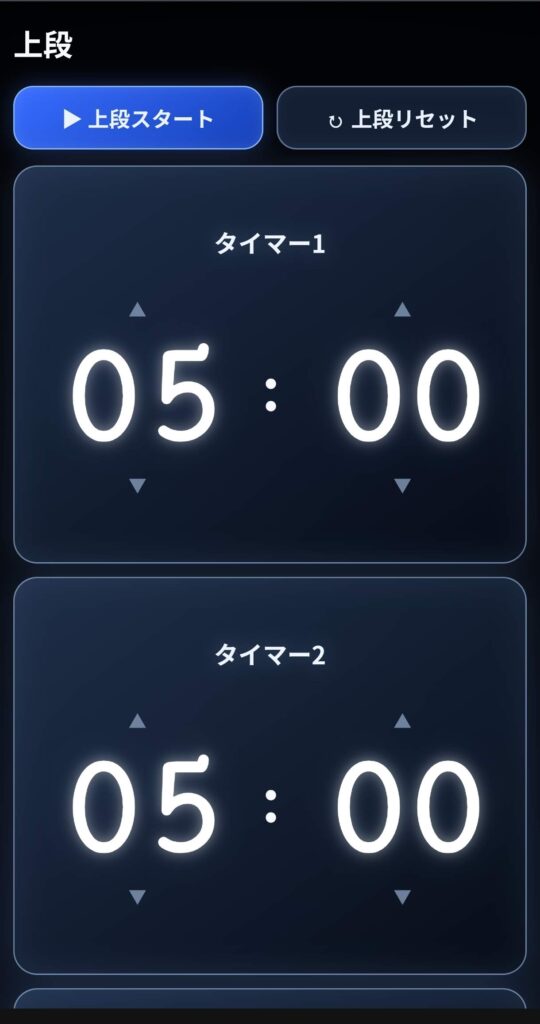
スマートフォンで表示した画面(表示上2個しか見えませんが、下に並んでいます)
複数タイマーになっても、各パネルはそれぞれ独立した終了予定時刻を持っています。画面更新が少し遅れても、PCの現在時刻との差から残り時間を計算する仕組みは第3回までと同じです。
Xserverへ公開する
動作確認が終わったら、Xserverの/public_html/tools/kitchen-timer/04/へ3ファイルをアップロードします。
/public_html/tools/kitchen-timer/04/
├─ index.html
├─ style.css
└─ script.js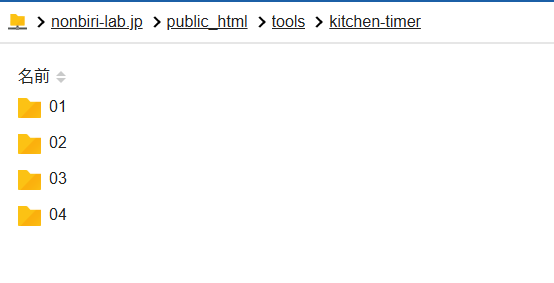
公開後は、次のURLへアクセスして表示と動作を確認します。
https://nonbiri-lab.jp/tools/kitchen-timer/04/第4回の完成版
第4回で完成した複数タイマーは、下の画面で実際に操作できます。
※画面に入りきれないので、別画面で開くのをお勧めします。
今回のまとめ
- CSS Gridで上段4個・下段3個を配置した
- 下段は4列の左側3列を使い、右端を1個分空けた
templateで共通パネルを1つにまとめたTimerPanelクラスで各タイマーの状態を独立管理したdata-属性で番号と段を管理したfilter()で上段・下段の対象を絞り込んだevery()で開始前の入力値をまとめて確認したforEach()で対象タイマーを一括開始・一括リセットした- 終了演出はタイマーごとに独立して動作した
単体タイマーから始めたものが、ようやく試験用タイマーボードらしい見た目になってきました。
次回は、上段と下段のタイマー数を1~4個から選べるようにし、入力した時間を段ごとの累積時間へ変換する仕組みを追加する予定です。